原生 <a title="..."> 提示樣式固定、無法排版。本文示範用 jQuery + CSS 實作自訂懸浮卡片,支援豐富 HTML 內容、定位自動調整、進場動畫,適用於職缺列表、商品卡片、使用者名片等場景。
<div class="wrap">
    <ul class="list clearfix">
        <li>
            <a href="#">UI 設計師</a>
            <div class="show">
                <p>所屬部門:技術部</p>
                <p>工作地點:鄭州</p>
                <p>招聘人數:21</p>
            </div>
        </li>
        <!-- 更多 li ... -->
    </ul>
</div>
.list 設 position: relative 作為定位基準。.show 為隱藏提示卡片,position: absolute 脫離文件流。* { margin:0; padding:0; }
body { font-size:12px; font-family: "Microsoft JhengHei", sans-serif; }
.wrap { width:600px; margin:100px auto; }
.clearfix:after { content:""; display:table; clear:both; }
.list { position:relative; }
.list li {
list-style:none; width:100px; height:24px; line-height:24px;
margin-right:10px; float:left;
}
.list li a { text-decoration:none; color:#333; display:block; }
.list li a:hover { color:#F00; text-decoration:underline; }
.show {
position:absolute; display:none; z-index:5;
width:100px; padding:6px;
background:#FFFEE1; border:1px solid #FFCC01;
margin-top:10px; /* 相對 li 底部下移 */
margin-left:60px; /* 相對 li 左側右移 */
}
.show p { height:18px; line-height:18px; }<script src="https://code.jquery.com/jquery-3.6.0.min.js"></script>
<script>
$(function(){
var $li = $(".wrap").find("li");
$li.on("mouseenter", function(){
$(this).find(".show").stop(true, true).fadeIn(150);
}).on("mouseleave", function(){
$(this).find(".show").stop(true, true).fadeOut(100);
});
});
</script>使用 fadeIn/fadeOut 替代 show/hide 增加平滑感;.stop(true,true) 防止快速進出造成動畫排隊。
margin-left/margin-top 或改用 top/left 計算,避免提示框被切掉。setTimeout 200ms 避免滑過即閃。a:focus + .show 或 tabindex 支援 Tab 鍵觸發。.show 內容可為模板。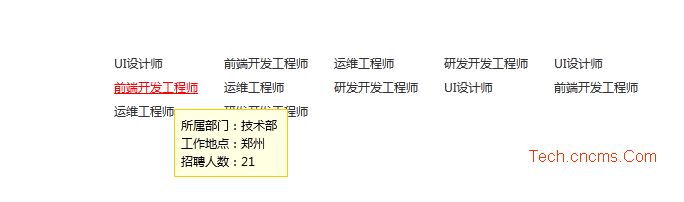
將上方 HTML、CSS、JS 合併存為 tooltip-demo.html,雙擊即可在瀏覽器預覽。無需伺服器,純前端即可運行。