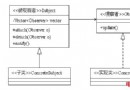
裝飾器模式屬於結構型設計模式,其核心思想是在不修改原有類結構的前提下,動態地為對象添加新職責。相比繼承,裝飾器提供了更靈活的功能擴展方式,避免了「類爆炸」問題。它通過組合而非繼承實現功能疊加,完美體現「開閉原則」——對擴展開放,對修改關閉。
Shape 接口Circle、RectangleShapeDecoratorRedShapeDecorator 添加紅色邊框public interface Shape {
void draw();
}
public class Circle implements Shape {
    @Override
    public void draw() {
        System.out.println("Shape: Circle");
    }
}

public class Rectangle implements Shape {
    @Override
    public void draw() {
        System.out.println("Shape: Rectangle");
    }
}
public abstract class ShapeDecorator implements Shape {
    protected Shape decoratedShape;

    public ShapeDecorator(Shape decoratedShape) {
        this.decoratedShape = decoratedShape;
    }

    @Override
    public void draw() {
        decoratedShape.draw(); // 委派給被裝飾對象
    }
}
public class RedShapeDecorator extends ShapeDecorator {
    public RedShapeDecorator(Shape decoratedShape) {
        super(decoratedShape);
    }

    @Override
    public void draw() {
        decoratedShape.draw(); // 先執行原有繪製
        setRedBorder(decoratedShape); // 再添加新功能
    }

    private void setRedBorder(Shape decoratedShape) {
        System.out.println("Border Color: Red");
    }
}
public class DecoratorPatternDemo {
    public static void main(String[] args) {
        Shape circle = new Circle();
        Shape redCircle = new RedShapeDecorator(new Circle());
        Shape redRectangle = new RedShapeDecorator(new Rectangle());

        System.out.println("Circle with normal border");
        circle.draw();

        System.out.println("\nCircle of red border");
        redCircle.draw();

        System.out.println("\nRectangle of red border");
        redRectangle.draw();
    }
}
Circle with normal border
Shape: Circle

Circle of red border
Shape: Circle
Border Color: Red

Rectangle of red border
Shape: Rectangle
Border Color: Red
BufferedReader 裝飾 FileReader裝飾器模式以優雅的組合方式解決了功能動態擴展難題,是 Java 開發中極具實用價值的設計模式。掌握其精髓——「委派 + 增強」,能幫助你編寫更彈性、可維護的代碼架構。下次當你面臨「為現有對象添加可選功能」的需求時,請優先考慮裝飾器模式而非繼承。