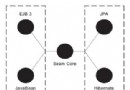
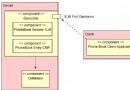
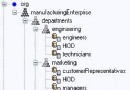
JNDI (Java Naming and Directory Interface) 提供統一 API 訪問各類命名/目錄服務:DNS、LDAP、RMI Registry、COS Naming、文件系統、Windows Registry 等。核心抽象:
| 包 | 功能 | 典型實現 |
|---|---|---|
| javax.naming | 核心命名操作 | Context、InitialContext、NamingException |
| javax.naming.directory | 目錄/屬性操作 | DirContext、Attributes、SearchControls |
| javax.naming.ldap | LDAP v3 擴展 | LdapContext、StartTlsResponse、Control |
| javax.naming.event | 事件通知 | NamingListener、EventContext |
| javax.naming.spi | 服務提供者接口 | InitialContextFactory、ObjectFactory、StateFactory |
Hashtable<String, String> env = new Hashtable<>();
// 必需:初始上下文工廠
env.put(Context.INITIAL_CONTEXT_FACTORY, "com.sun.jndi.ldap.LdapCtxFactory");
// 必需:提供者 URL
env.put(Context.PROVIDER_URL, "ldap://ldap.example.com:389/dc=example,dc=com");
// 認證 (可選)
env.put(Context.SECURITY_AUTHENTICATION, "simple"); // none/simple/strong
env.put(Context.SECURITY_PRINCIPAL, "cn=admin,dc=example,dc=com");
env.put(Context.SECURITY_CREDENTIALS, "secret");
// 其他
env.put(Context.SECURITY_PROTOCOL, "ssl"); // ssl/starttls
env.put("com.sun.jndi.ldap.connect.timeout", "5000");
env.put("com.sun.jndi.ldap.read.timeout", "10000");

DirContext ctx = new InitialDirContext(env);// 綁定 (名字不存在時)
ctx.bind("cn=users", new User("zhangsan", "zhangsan@example.com"));
// 重新綁定 (覆蓋已存在)
ctx.rebind("cn=users", new User("lisi", "lisi@example.com"));
// 解綁
ctx.unbind("cn=users");
// 重命名
ctx.rename("cn=old", "cn=new");// 精確查找
User user = (User) ctx.lookup("cn=zhangsan,ou=people");
// 列出綁定 (名字+類名)
NamingEnumeration<NameClassPair> list = ctx.list("ou=people");
while (list.hasMore()) {
NameClassPair ncp = list.next();
System.out.println(ncp.getName() + " -> " + ncp.getClassName());
}
// 列出綁定 (名字+類名+對象實例)
NamingEnumeration<Binding> bindings = ctx.listBindings("ou=people");
while (bindings.hasMore()) {
Binding bd = bindings.next();
System.out.println(bd.getName() + " -> " + bd.getObject());
}// 獲取所有屬性
Attributes attrs = ctx.getAttributes("cn=zhangsan,ou=people");
Attribute mail = attrs.get("mail");
System.out.println("Email: " + mail.get());
// 獲取指定屬性 (減少網絡開銷)
String[] attrIds = {"cn", "mail", "telephoneNumber"};
Attributes attrs2 = ctx.getAttributes("cn=zhangsan,ou=people", attrIds);
// 修改屬性
ModificationItem[] mods = new ModificationItem[2];
mods[0] = new ModificationItem(DirContext.REPLACE_ATTRIBUTE,
new BasicAttribute("telephoneNumber", "13800138000"));
mods[1] = new ModificationItem(DirContext.ADD_ATTRIBUTE,
new BasicAttribute("description", "Java Developer"));
ctx.modifyAttributes("cn=zhangsan,ou=people", mods);
// 創建子上下文 (帶屬性)
Attributes newAttrs = new BasicAttributes();
newAttrs.put("cn", "newuser");
newAttrs.put("sn", "wang");
newAttrs.put("mail", "wang@example.com");
ctx.createSubcontext("cn=newuser,ou=people", newAttrs);
// 刪除子上下文
ctx.destroySubcontext("cn=newuser,ou=people");// 簡單過濾器搜索
SearchControls controls = new SearchControls();
controls.setSearchScope(SearchControls.SUBTREE_SCOPE); // 整棵樹
controls.setCountLimit(50);
controls.setTimeLimit(5000);
controls.setReturningAttributes(new String[]{"cn", "mail"});
NamingEnumeration<SearchResult> results = ctx.search(
"ou=people",
"(&(objectClass=person)(|(cn=zhang*)(sn=li*)))", // LDAP 過濾器語法
controls
);
while (results.hasMore()) {
SearchResult sr = results.next();
System.out.println("DN: " + sr.getName());
Attributes attrs = sr.getAttributes();
System.out.println("CN: " + attrs.get("cn").get());
System.out.println("Mail: " + attrs.get("mail").get());
}
// 使用 SearchControls 精細控制
controls.setSearchScope(SearchControls.ONELEVEL_SCOPE); // 僅直接子節點
controls.setDerefLinkFlag(true); // 自動解引用鏈接
// web.xml / context.xml 配置
<Resource name="jdbc/MyDS" auth="Container" type="javax.sql.DataSource"
    driverClassName="com.mysql.jdbc.Driver"
    url="jdbc:mysql://localhost:3306/mydb"
    username="root" password="secret"
    maxTotal="20" maxIdle="10" maxWaitMillis="10000"/>

// Java 代碼查找
Context initCtx = new InitialContext();
Context envCtx = (Context) initCtx.lookup("java:comp/env");
DataSource ds = (DataSource) envCtx.lookup("jdbc/MyDS");
Connection conn = ds.getConnection();Context ctx = new InitialContext();
ConnectionFactory cf = (ConnectionFactory) ctx.lookup("jms/ConnectionFactory");
Queue queue = (Queue) ctx.lookup("jms/MyQueue");
Topic topic = (Topic) ctx.lookup("jms/MyTopic");// Remote EJB
Context ctx = new InitialContext();
MyRemoteBean bean = (MyRemoteBean) ctx.lookup("ejb/MyRemoteBean#com.example.MyRemoteBean");
// Local EJB (同一 JVM)
MyLocalBean local = (MyLocalBean) ctx.lookup("java:module/MyLocalBean");<Context>
<Resource name="bean/MyService" auth="Container"
type="com.example.MyService" factory="org.apache.naming.factory.BeanFactory"
property1="value1" property2="value2"/>
</Context><bean id="jndiTemplate" class="org.springframework.jndi.JndiTemplate">
<property name="environment">
<props>
<prop key="java.naming.factory.initial">org.jnp.interfaces.NamingContextFactory</prop>
<prop key="java.naming.provider.url">jnp://localhost:1099</prop>
<prop key="java.naming.factory.url.pkgs">org.jboss.naming:org.jnp.interfaces</prop>
</props>
</property>
</bean>
<bean id="jmsConnectionFactory" class="org.springframework.jndi.JndiObjectFactoryBean">
<property name="jndiTemplate" ref="jndiTemplate"/>
<property name="jndiName" value="ConnectionFactory"/>
<property name="proxyInterface" value="javax.jms.ConnectionFactory"/>
</bean>
<bean id="dataSource" class="org.springframework.jndi.JndiObjectFactoryBean">
<property name="jndiTemplate" ref="jndiTemplate"/>
<property name="jndiName" value="jdbc/MyDS"/>
<property name="expectedType" value="javax.sql.DataSource"/>
</bean><jee:jndi-lookup id="dataSource" jndi-name="jdbc/MyDS" expected-type="javax.sql.DataSource"/>
<jee:jndi-lookup id="jmsTemplate" jndi-name="jms/JmsTemplate"/>JNDI 支持聯邦命名:一個上下文可包含指向其他命名服務的引用 (Reference),實現跨域訪問。
// 服務器 A 綁定遠程引用
Reference ref = new Reference("javax.sql.DataSource",
    "org.apache.naming.factory.BeanFactory", null);
ref.add(new StringRefAddr("driverClassName", "com.mysql.jdbc.Driver"));
ref.add(new StringRefAddr("url", "jdbc:mysql://server-b:3306/db"));
ctx.bind("jdbc/RemoteDS", ref);

// 服務器 B 客戶端查找
Context ctx = new InitialContext();
DataSource remoteDs = (DataSource) ctx.lookup("jdbc/RemoteDS"); // 透明訪問遠程資源| 異常 | 原因 | 解決 |
|---|---|---|
| NameNotFoundException | JNDI 名字錯誤、資源未綁定、上下文路徑錯誤 | 用 list/listBindings 遞歸打印命名樹確認路徑 |
| NoInitialContextException | 未設置 INITIAL_CONTEXT_FACTORY、類路徑缺失提供者 JAR | 檢查環境屬性、添加對應 JAR (ldapbp.jar, fscontext.jar 等) |
| CommunicationException | LDAP 服務器不可達、端口防火牆、SSL 證書問題 | telnet 測試連通性、配置 SSL 信任庫、檢查安全組 |
| AuthenticationException | DN/密碼錯誤、認證機制不匹配 | 確認 SECURITY_PRINCIPAL/CREDENTIALS、嘗試 simple/strong |
| PartialResultException | 搜索引用超出範圍、追蹤引用失敗 | 設置 setDerefLinkFlag(false)、限制搜索範圍 |
java:comp/env/ 前綴,web.xml 声明 <resource-ref>JNDI 作為 Java 生態的「通用地址簿」,實現了資源配置與代碼邏輯的解耦,支撐了 Java EE 容器的資源管理、集群部署、服務發現等核心能力。雖然 Spring DI 在應用層大幅替代了 JNDI,但在容器資源整合、跨應用資源共享、異構系統集成等場景,JNDI 仍是不可替代的基礎設施。