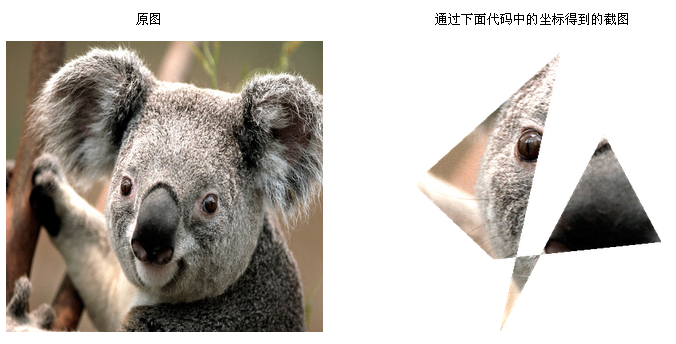
本文提供一個完整的 C# WinForms 示例,實現用戶通過鼠標繪製多邊形區域對圖片進行裁剪,裁剪區域外設置為透明。核心算法基於 System.Drawing.Drawing2D.GraphicsPath 的 IsVisible 方法進行像素級判斷。
using System;
using System.Drawing;
using System.Drawing.Drawing2D;

public static class ImageCropper
{
    ///
    /// 根據多邊形路徑裁剪圖片
    ///
    /// 源 Bitmap
    /// 裁剪路徑 (必須閉合)
    /// 輸出裁剪結果 (透明背景)
    /// 源圖副本 (裁剪區域已置透明,可選)
    public static Bitmap CropPolygon(Bitmap source, GraphicsPath path, out Bitmap output)
    {
        // 1. 計算路徑邊界作為輸出圖尺寸
        RectangleF bounds = path.GetBounds();
        int left = (int)Math.Floor(bounds.X);
        int top = (int)Math.Floor(bounds.Y);
        int width = (int)Math.Ceiling(bounds.Width);
        int height = (int)Math.Ceiling(bounds.Height);

        // 2. 複製源圖保護原數據
        Bitmap working = (Bitmap)source.Clone();

        // 3. 創建支援透明的輸出位圖
        output = new Bitmap(width, height, System.Drawing.Imaging.PixelFormat.Format32bppArgb);

        // 4. 雙重循環遍歷邊界矩形內每個像素
        for (int x = left; x < left + width; x++)
        {
            for (int y = top; y < top + height; y++)
            {
                // 邊界保護
                if (x >= 0 && x < source.Width && y >= 0 && y < source.Height)
                {
                    if (path.IsVisible(x, y))
                    {
                        // 內部像素: 複製到輸出圖 (相對坐標)
                        Color c = working.GetPixel(x, y);
                        output.SetPixel(x - left, y - top, c);

                        // 同時在工作副本中標記透明 (演示用)
                        working.SetPixel(x, y, Color.FromArgb(0, c));
                    }
                    else
                    {
                        // 外部像素: 寫入透明
                        output.SetPixel(x - left, y - top, Color.FromArgb(0, 255, 255, 255));
                    }
                }
                else
                {
                    // 超出源圖範圍填充透明
                    output.SetPixel(x - left, y - top, Color.FromArgb(0, 255, 255, 255));
                }
            }
        }

        working.Dispose();
        return working;
    }
}
using System;
using System.Drawing;
using System.Drawing.Drawing2D;
using System.Windows.Forms;

public class CropDemoForm : Form
{
    private Button btnCrop;
    private PictureBox picPreview;

    public CropDemoForm()
    {
        btnCrop = new Button { Text = "選擇圖片並裁剪", Dock = DockStyle.Top, Height = 40 };
        picPreview = new PictureBox { Dock = DockStyle.Fill, SizeMode = PictureBoxSizeMode.Zoom, BackColor = Color.Gray };

        Controls.Add(picPreview);
        Controls.Add(btnCrop);
        btnCrop.Click += BtnCrop_Click;
    }

    private void BtnCrop_Click(object sender, EventArgs e)
    {
        // 1. 定義裁剪多邊形 (實際項目中由用戶鼠標點擊動態生成)
        Point[] polygonPoints = {
            new Point(424, 244), new Point(240, 440), new Point(340, 552),
            new Point(550, 526), new Point(478, 366), new Point(348, 660),
            new Point(424, 244) // 首尾相接閉合
        };

        using (GraphicsPath path = new GraphicsPath())
        {
            path.AddLines(polygonPoints);

            // 2. 打開文件對話框
            using (OpenFileDialog ofd = new OpenFileDialog())
            {
                ofd.Filter = "圖片文件|*.bmp;*.jpg;*.jpeg;*.png;*.gif";
                ofd.Title = "選擇要裁剪的圖片";

                if (ofd.ShowDialog() == DialogResult.OK)
                {
                    try
                    {
                        using (Bitmap src = new Bitmap(ofd.FileName))
                        {
                            // 3. 執行裁剪
                            Bitmap result = ImageCropper.CropPolygon(src, path, out Bitmap cropped);

                            // 4. 顯示預覽
                            picPreview.Image?.Dispose();
                            picPreview.Image = (Bitmap)cropped.Clone();

                            // 5. 保存 (必須用 PNG 保留透明)
                            string savePath = System.IO.Path.Combine(
                                Environment.GetFolderPath(Environment.SpecialFolder.Desktop),
                                "Cropped_" + DateTime.Now.ToString("yyyyMMdd_HHmmss") + ".png");
                            cropped.Save(savePath, System.Drawing.Imaging.ImageFormat.Png);

                            MessageBox.Show($"裁剪成功!\n已保存至: {savePath}");

                            result.Dispose();
                            cropped.Dispose();
                        }
                    }
                    catch (Exception ex)
                    {
                        MessageBox.Show("處理失敗: " + ex.Message);
                    }
                }
            }
        }
    }

    [STAThread]
    public static void Main()
    {
        Application.EnableVisualStyles();
        Application.SetCompatibleTextRenderingDefault(false);
        Application.Run(new CropDemoForm());
    }
}
| 技術點 | 說明 |
|---|---|
| GraphicsPath | 表示幾何路徑,支援直線、貝塞爾曲線、矩形、橢圓等組合 |
| IsVisible(x,y) | 判斷點是否在路徑內部 (包含邊界),內部採用奇偶規則或非零環繞規則 |
| Format32bppArgb | 32位 ARGB 格式,每像素 4 字節,支援 Alpha 透明通道 |
| GetPixel/SetPixel | 簡單易用但極慢 (托管/非托管轉換開銷),大圖必須用 LockBits |
| Clone() | 創建位圖副本,避免修改原始圖片數據 |
對於超過 1000×1000 的圖片,雙重循環 GetPixel/SetPixel 可能耗時數秒。生產環境請使用 Bitmap.LockBits 直接操作記憶體:
// 核心邏輯替換 (需專案屬性勾選 "允許不安全代碼")
BitmapData srcData = src.LockBits(new Rectangle(0,0,src.Width,src.Height),
    ImageLockMode.ReadOnly, PixelFormat.Format32bppArgb);
BitmapData dstData = dst.LockBits(new Rectangle(0,0,width,height),
    ImageLockMode.WriteOnly, PixelFormat.Format32bppArgb);

unsafe {
    int srcStride = srcData.Stride;
    int dstStride = dstData.Stride;
    byte* srcPtr = (byte*)srcData.Scan0;
    byte* dstPtr = (byte*)dstData.Scan0;

    for (int y = 0; y < height; y++) {
        for (int x = 0; x < width; x++) {
            int sx = left + x, sy = top + y;
            bool inside = (sx >= 0 && sx < src.Width && sy >= 0 && sy < src.Height)
                          && path.IsVisible(sx, sy);

            int dstOffset = y * dstStride + x * 4;
            if (inside) {
                int srcOffset = sy * srcStride + sx * 4;
                *(int*)(dstPtr + dstOffset) = *(int*)(srcPtr + srcOffset); // 整數複製 4 字節
            } else {
                dstPtr[dstOffset + 3] = 0; // Alpha = 0
            }
        }
    }
}
src.UnlockBits(srcData);
dst.UnlockBits(dstData);
本文提供了從算法原理、完整 WinForms 示例到高性能優化的全鏈路實現。關鍵要點:路徑必須閉合、輸出格式用 PNG、大圖用 LockBits、及時 Dispose 釋放非托管資源。該方案可直接應用於截圖標註、照片剪貼簿、電子簽名圖片提取等業務場景。