public static void copyFile() throws IOException {
    // 1. 目標路徑(File 對象更靈活)
    File src = new File("C:\\Users\\bigerf\\Desktop\\截圖筆記\\22.PNG");
    File dest = new File("C:\\Users\\bigerf\\Desktop\\圖片備份\\22.PNG");

    // 2. 建立通道:先開輸入,後開輸出
    FileInputStream fis = new FileInputStream(src);
    FileOutputStream fos = new FileOutputStream(dest);

    // 3. 緩衝區
    byte[] buffer = new byte[1024];

    // 4. 邊讀邊寫
    while (fis.read(buffer) != -1) {
        fos.write(buffer);
    }

    // 5. 關閉順序:後開先關
    fos.close();
    fis.close();
}
public static void copyFileChar() throws IOException {
    File src = new File("C:\\Users\\bigerf\\Desktop\\截圖筆記\\33.PNG");
    File dest = new File("C:\\Users\\bigerf\\Desktop\\圖片備份\\33.PNG");

    FileReader frd = new FileReader(src);
    FileWriter fwt = new FileWriter(dest);

    char[] ch = new char[1024];
    int len;
    while ((len = frd.read(ch)) != -1) {
        fwt.write(ch, 0, len);
        fwt.flush(); // 每次刷新更慢
    }
    frd.close();
    fwt.close();
}
失敗根因深度解析:
字符流 = 字節流 + 解碼,默認編碼 GBK/UTF-8public static void test() {
File src = new File("C:\\Users\\bigerf\\Desktop\\截圖筆記\\55.PNG");
File dest = new File("C:\\Users\\bigerf\\Desktop\\圖片備份\\55.PNG");
FileInputStream fis = null;
FileOutputStream fos = null;
try {
// 1. 開啟流(可能拋出 FileNotFoundException)
fis = new FileInputStream(src);
fos = new FileOutputStream(dest);
byte[] buffer = new byte[1024];
try {
// 2. 讀寫循環(可能拋出 IOException)
while (fis.read(buffer) != -1) {
fos.write(buffer);
}
} catch (Exception e) {
System.out.println("存儲盤異常,請檢查");
throw new RuntimeException(e);
}
} catch (FileNotFoundException e) {
System.out.println("資源文件不存在");
throw new RuntimeException(e);
} finally {
// 3. 無論成敗,安全關閉資源(各自 try-catch 避免相互影響)
try {
if (fos != null) fos.close();
} catch (Exception e) {
System.out.println("目標文件關閉失敗!");
throw new RuntimeException(e);
}
try {
if (fis != null) fis.close();
} catch (IOException e) {
System.out.println("源文件關閉失敗!");
throw new RuntimeException(e);
}
}
}
null,在 try 中實例化try-catch:區分「文件不存在」與「讀寫異常」業務語義finally 中逐個關閉,各自 try-catch 確保一個關閉失敗不阻礙另一個null 再關閉,防止 NPERuntimeException 向上拋出,由全局異常處理器統一日誌/告警public static void copyFileModern() throws IOException {
File src = new File("src.png");
File dest = new File("dest.png");
try (FileInputStream fis = new FileInputStream(src);
FileOutputStream fos = new FileOutputStream(dest)) {
byte[] buffer = new byte[1024];
while (fis.read(buffer) != -1) {
fos.write(buffer);
}
} // 編譯器自動生成 finally 關閉代碼,異常抑制機制更安全
}
優勢:代碼簡潔、自動資源管理、支援異常抑制(Suppressed)、編譯期檢查更嚴格。
需要處理文本嗎?
├─ 是 → 字符流 + 指定編碼 + 緩衝流包裝
└─ 否 → 字節流 + 緩衝流包裝
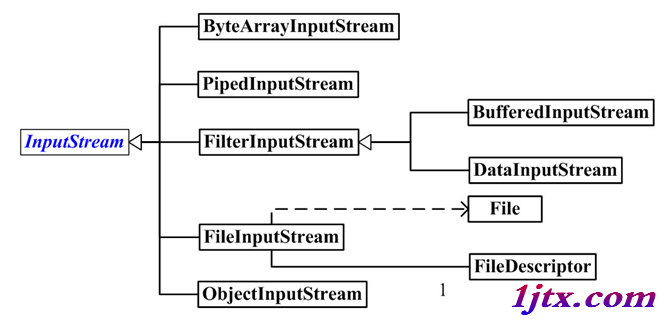
        ├─ 需要基本類型序列化? → DataInputStream/DataOutputStream
        ├─ 需要對象序列化? → ObjectInputStream/ObjectOutputStream
        ├─ 內存緩衝區互轉? → ByteArrayInputStream/ByteArrayOutputStream
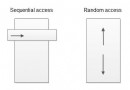
        └─ 隨機訪問? → RandomAccessFile