JDBC 代碼繁瑣、Hibernate 全自動 ORM 靈活性不足、SQL 不可控。MyBatis 定位為半自動 ORM:關注 SQL 本身,支持動態 SQL、存儲過程、高級映射,保留對 SQL 的完全控制權,成為現代 Java 企業級開發主流持久層框架。
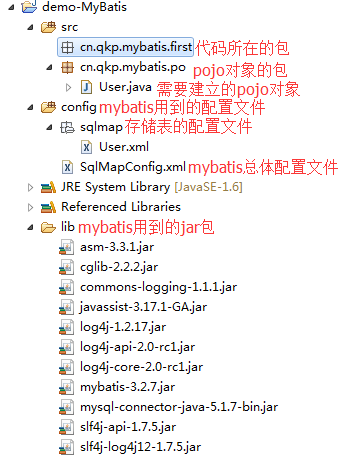
核心模塊:
SqlMapConfig.xml:全局配置文件(數據源、事務管理、映射器註冊)User.xml:SQL 映射文件User.java:POJO 實體類log4j.properties:日誌配置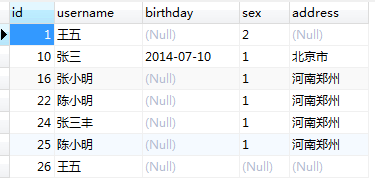
public class User {
    private int id;
    private String username;
    private String sex;
    private String address;
    private Date birthday;
    // getter/setter/toString 省略
}
<?xml version="1.0" encoding="UTF-8"?>
<!DOCTYPE configuration PUBLIC "-//mybatis.org//DTD Config 3.0//EN"
  "https://mybatis.org/dtd/mybatis-3-config.dtd">
<configuration>
  <!-- 數據源與事務 -->
  <environments default="development">
    <environment id="development">
      <transactionManager type="JDBC"/>
      <dataSource type="POOLED">
        <property name="driver" value="com.mysql.jdbc.Driver"/>
        <property name="url" value="jdbc:mysql://localhost:3306/mybatis?characterEncoding=utf-8"/>
        <property name="username" value="root"/>
        <property name="password" value="123456"/>
      </dataSource>
    </environment>
  </environments>

  <!-- 映射器註冊 -->
  <mappers>
    <mapper resource="sqlmap/User.xml"/>
  </mappers>
</configuration>
關鍵點: 生產環境建議使用 JNDI 數據源、外部化配置屬性文件、整合 Spring 後 environments 將廢除。
log4j.rootLogger=DEBUG, stdout
log4j.appender.stdout=org.apache.log4j.ConsoleAppender
log4j.appender.stdout.layout=org.apache.log4j.PatternLayout
log4j.appender.stdout.layout.ConversionPattern=%5p [%t] - %m%n
<?xml version="1.0" encoding="UTF-8"?>
<!DOCTYPE mapper PUBLIC "-//mybatis.org//DTD Mapper 3.0//EN"
  "https://mybatis.org/dtd/mybatis-3-mapper.dtd">
<mapper namespace="test">
  <!-- 根據 ID 查詢單條 -->
  <select id="findUserById" parameterType="int" resultType="cn.qkp.mybatis.po.User">
    SELECT * FROM USER WHERE id = #{id}
  </select>

  <!-- 模糊查詢列表 -->
  <select id="selectByName" parameterType="String" resultType="cn.qkp.mybatis.po.User">
    SELECT * FROM USER WHERE username LIKE '%${value}%'
  </select>
</mapper>
| 符號 | 含義 | 適用場景 |
|---|---|---|
#{property} | 參數佔位符,預編譯,自動類型轉換,防 SQL 注入 | WHERE 子句、INSERT VALUES、動態條件 |
${property} | 字符串直接替換,不防注入 | 表名、列名、排序字段、LIKE 模糊匹配通配符拼接 |
警告: ${value} 在 LIKE 查詢中常用於拼接 %'${value}'%,但必須確保輸入經過嚴格驗證或轉義,否則存在注入風險。推薦在 Service 層拼接好 %keyword% 後傳入 #{keyword}。
@Test
public void testFindById() {
    String resource = "SqlMapConfig.xml";
    InputStream inputStream = Resources.getResourceAsStream(resource);
    SqlSessionFactory sqlSessionFactory = new SqlSessionFactoryBuilder().build(inputStream);

    SqlSession sqlSession = sqlSessionFactory.openSession();
    try {
        // namespace.id 對應 mapper 中的 select id
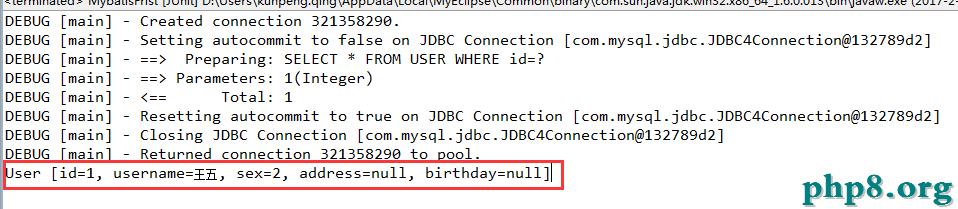
        User user = sqlSession.selectOne("test.findUserById", 1);
        System.out.println(user);
    } finally {
        sqlSession.close(); // 必須關閉,歸還連接
    }
}
@Test
public void testFindByName() {
    SqlSession sqlSession = sqlSessionFactory.openSession();
    try {
        List<User> users = sqlSession.selectList("test.selectByName", "小明");
        System.out.println(users.get(0));
    } finally {
        sqlSession.close();
    }
}

SqlMapConfig.xml 中配置 <typeAliases> 簡化 resultType 寫法MapperScannerConfigurer 自動掃描接口,無需手寫 XML 註冊<where>、<if>、<choose>、<foreach> 構建複雜查詢<resultMap>、<association>、<collection>MyBatis 通過 XML 或注解將 SQL 與代碼分離,保留 SQL 靈活性的同時大幅減少樣板代碼。掌握 SqlSessionFactory 構建、SqlSession 生命周期管理、#{} vs ${} 安全差異、動態 SQL 與結果映射,即可應對 90% 的持久層開發場景。
相關 JAR 包:百度網盤下載