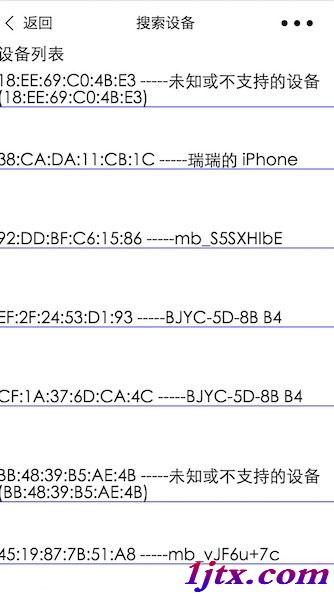
微信小程序基礎庫 1.1.0+ 引入藍牙 API,iOS 6.5.6+ 支持,Android 需較新版本。本文系統梳理 18 個藍牙接口,分為搜索、連接、通信三大類,並提供完整的搜索設備、連接獲取數據、發送指令的實戰代碼。
| 類別 | 核心接口 |
|---|---|
| 搜索類 | openBluetoothAdapter、startBluetoothDevicesDiscovery、getBluetoothDevices、onBluetoothDeviceFound |
| 連接類 | createBLEConnection、closeBLEConnection、getBLEDeviceServices、getBLEDeviceCharacteristics、onBLEConnectionStateChanged |
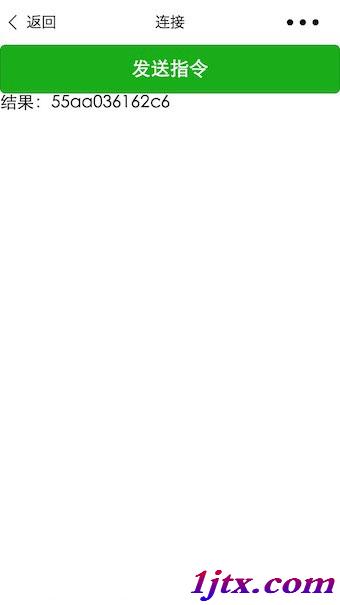
| 通信類 | writeBLECharacteristicValue、readBLECharacteristicValue、notifyBLECharacteristicValueChanged、onBLECharacteristicValueChange |
// index.js
Page({
  data: { logs: [], list: [] },
  onLoad() {
    const that = this;
    wx.openBluetoothAdapter({
      success(res) {
        console.log('適配器初始化成功', res);
        wx.startBluetoothDevicesDiscovery({
          services: [],
          success() { console.log('開始搜索設備'); }
        });
        wx.getBluetoothDevices({
          success(res) {
            that.setData({ list: res.devices });
          }
        });
      }
    });
  },
  bindViewTap(e) {
    const { title, name } = e.currentTarget.dataset;
    wx.redirectTo({ url: `../conn/conn?deviceId=${title}&name=${name}` });
  }
});
// conn.js 核心邏輯
Page({
  data: {
    deviceId: '', name: '', serviceId: '',
    cd20: '', cd01: '', cd02: '', cd03: '', cd04: '',
    characteristics20: null, characteristics01: null, /* ... */,
    result: ''
  },
  onLoad(opt) {
    const that = this;
    that.setData({ deviceId: opt.deviceId, name: opt.name });

    // 監聽連接狀態變化
    wx.onBLEConnectionStateChanged(res => {
      console.log(`設備 ${res.deviceId} 狀態變化: ${res.connected}`);
    });

    // 1. 建立連接
    wx.createBLEConnection({
      deviceId: that.data.deviceId,
      success() {
        // 2. 獲取服務列表
        wx.getBLEDeviceServices({
          deviceId: that.data.deviceId,
          success(res) {
            that.setData({ services: res.services });
            const targetService = res.services[1]; // 假設第二個服務為目標
            that.setData({ serviceId: targetService.uuid });

            // 3. 延遲獲取特徵值(等待服務就緒)
            setTimeout(() => {
              wx.getBLEDeviceCharacteristics({
                deviceId: that.data.deviceId,
                serviceId: that.data.serviceId,
                success(res) {
                  res.characteristics.forEach(c => {
                    if (c.uuid.includes('cd20')) that.setData({ cd20: c.uuid, characteristics20: c });
                    if (c.uuid.includes('cd01')) that.setData({ cd01: c.uuid, characteristics01: c });
                    if (c.uuid.includes('cd02')) that.setData({ cd02: c.uuid, characteristics02: c });
                    if (c.uuid.includes('cd03')) that.setData({ cd03: c.uuid, characteristics03: c });
                    if (c.uuid.includes('cd04')) that.setData({ cd04: c.uuid, characteristics04: c });
                  });

                  // 4. 監聽數據變化
                  wx.onBLECharacteristicValueChange(ch => {
                    const hex = that.buf2hex(ch.value);
                    if (ch.characteristicId.includes('cd01') || ch.characteristicId.includes('cd04')) {
                      console.log('收到數據:', hex);
                      if (ch.characteristicId.includes('cd04')) that.setData({ result: hex });
                    }
                  });

                  // 5. 啟用 notify
                  ['cd01','cd02','cd03','cd04'].forEach(uuidKey => {
                    wx.notifyBLECharacteristicValueChanged({
                      deviceId: that.data.deviceId,
                      serviceId: that.data.serviceId,
                      characteristicId: that.data[uuidKey],
                      state: true
                    });
                  });
                }
              });
            }, 1500);
          }
        });
      }
    });
  },

  // 發送校驗指令
  bindViewTap() {
    const that = this;
    const hex = 'AA5504B10000B5';
    const typedArray = new Uint8Array(hex.match(/[\da-f]{2}/gi).map(h => parseInt(h, 16)));
    wx.writeBLECharacteristicValue({
      deviceId: that.data.deviceId,
      serviceId: that.data.serviceId,
      characteristicId: that.data.cd20,
      value: typedArray.buffer,
      success() { console.log('指令發送成功'); }
    });
  },

  // ArrayBuffer 轉 Hex 字符串
  buf2hex(buffer) {
    return Array.from(new Uint8Array(buffer))
      .map(x => ('00' + x.toString(16)).slice(-2))
      .join('');
  }
});
Uint8Array,接收需轉 Hex 字符串便於業務解析本示例涵蓋了微信小程序 BLE 開發的核心流程,可作為物聯網設備接入的參考模板。