如保險保單:第 1 頁產品介紹、第 2 頁收益表、第 3 頁建議書、第 4 頁合同條款。需在單一報表模板中實現不同區域不同佈局、強制分頁。
在 iReport/Jaspersoft Studio 設計器中:
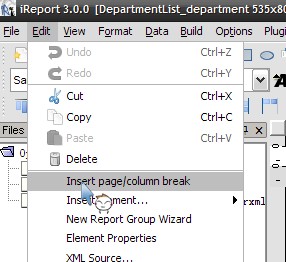
detail 區域 (或任意區域)top = 0 (佔用 1 像素高度)top = 1Print When Expression 控制條件分頁 (可選)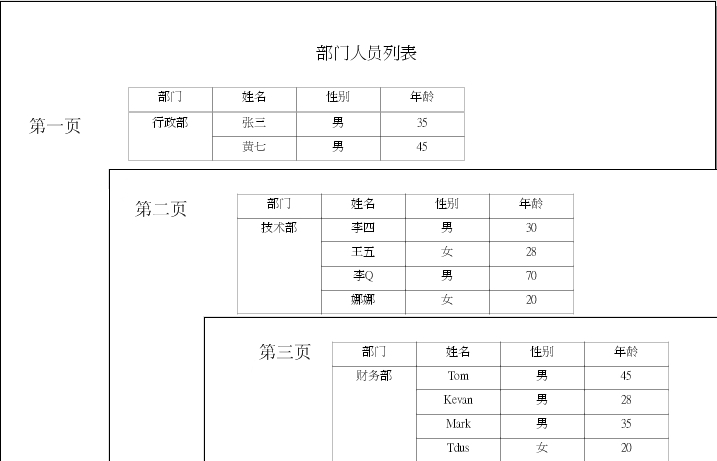

適用於數據分組換頁 (如每個部門單獨起頁):
Print When Expression + Start New Page = trueMin Height to Start New Page:當剩餘空間不足指定高度時強制換頁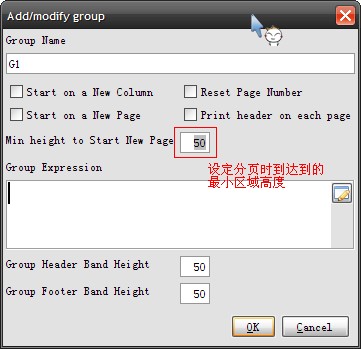
<detail>
    <band height="51" splitType="Stretch">
        <!-- 原有內容 top=1 -->
        <textField>
            <reportElement x="0" y="1" width="555" height="20" uuid="..."/>
            <textElement/>
            <textFieldExpression><![CDATA[$F{name}]]></textFieldExpression>
        </textField>

        <!-- Page Break 佔用 top=0, height=1 -->
        <break>
            <reportElement x="0" y="0" width="555" height="1" uuid="..."/>
        </break>
    </band>
</detail>
Chapter6.zip —— 包含完整 .jrxml、數據源 XML、編譯後 .jasper 文件