首頁
編程語言
C語言|JAVA編程
Python編程
網頁編程
ASP編程|PHP編程
JSP編程
數據庫
MYSQL數據庫|SqlServer數據庫
Oracle數據庫|DB2數據庫
您现在的位置: 程式碼之家 >> 編程語言 >  >> Java 程式設計 >> Java 相關知識

Struts2 標簽庫配置與 IDE 自動提示完全指南

     編輯:Java 相關知識

標簽庫定義文件

位於 struts2-core-xxx.jar/META-INF/struts-tags.tld,URI 為 /struts-tags。

Servlet 2.3 環境配置(需 web.xml)

<taglib>
  <taglib-uri>/struts-tags</taglib-uri>
  <taglib-location>/WEB-INF/lib/struts2-core-2.0.11.1.jar</taglib-location>
</taglib>

JSP 頁面引入:<%@ taglib prefix="s" uri="/struts-tags" %>

Servlet 2.4+ 環境(零配置)

僅需 JSP 頁面引入指令,容器自動掃描 JAR 中的 TLD 文件。

Eclipse 開啟標簽自動提示(解決紅叉)

  1. 將 struts-tags.tld 從 JAR 中提取到本地(如 E:/workspace/tld/struts-tags.tld)
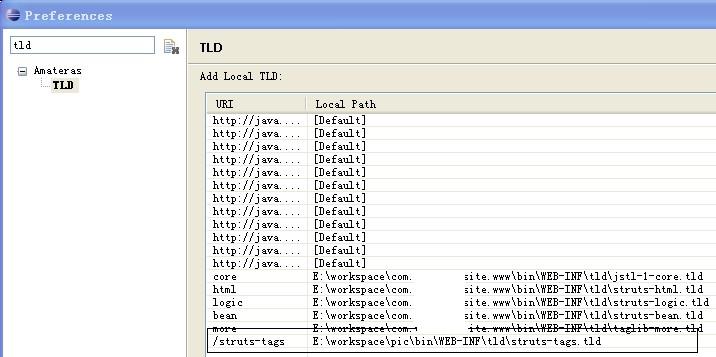
  2. Eclipse → Window → Preferences → 搜索 "TLD" → Amateras → TLD → Add
  3. URI: /struts-tags,Local Path: 本地 tld 文件路徑
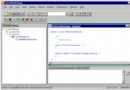
  4. 重啟 Eclipse,Struts2 標簽即可智能提示,紅叉消失

效果截圖

Eclipse Struts2 標簽自動提示效果

  1. 上一篇文章:
  2. 下一篇文章:
Copyright © 程式碼之家 All Rights Reserved