承接上文,本文詳細演示如何在 JBuilder 2005 中為「圖書管理」模塊創建獨立 Struts 配置文件、構建帶數據庫級校驗的 BookActionForm、使用標籤庫構建國際化 JSP 頁面、實現持久化 Action 並配置聲明式異常處理。
為避免多人協作時 struts-config.xml 衝突,Struts 1.1 支援多配置文件。步驟如下:
WEB-INF/struts-config.xml 為 book-struts-config.xml,清空內容僅保留骨架Deployment descriptors → <Struts 1.1> 右鍵 Properties,Add... 選擇新文件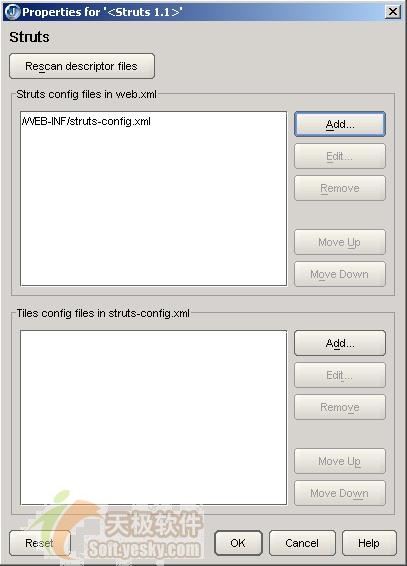
圖 16 Struts 配置文件維護對話框
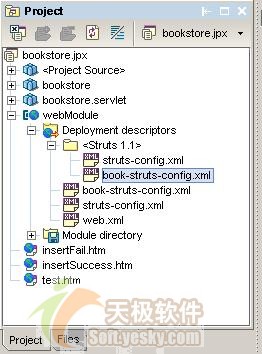
圖 17 兩個 Struts 配置文件並存
使用向導創建,指定配置文件為 book-struts-config.xml:
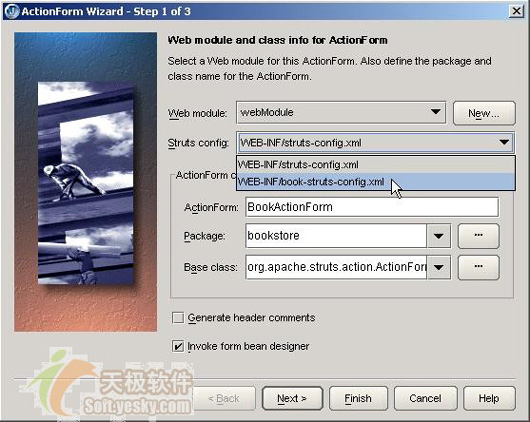
圖 18 選擇不同的配置文件
String bookId;    // 圖書 ID,主鍵
String isbn;      // ISBN
String createDate;// 創建日期
String bookName;  // 書名
String author; // 作者public ActionErrors validate(ActionMapping mapping, HttpServletRequest request) {
ActionErrors errors = new ActionErrors();
Connection conn = null;
try {
conn = DBConnection.getConnection();
PreparedStatement ps = conn.prepareStatement(
"select count(*) count from T_BOOK where BOOK_ID=?");
ps.setString(1, this.bookId);
ResultSet rs = ps.executeQuery();
if (rs.next() && rs.getInt(1) > 0) {
errors.add("bookId",
new ActionMessage("bookstore.duplicate.bookId",
"圖書ID和數據庫中已經有的ID重復"));
}
} catch (SQLException se) {
se.printStackTrace();
errors.add("bookId", new ActionMessage("bookstore.dbaccess.error", "訪問數據庫時出錯"));
} finally {
try { if (conn != null) conn.close(); }
catch (SQLException ex) {
ex.printStackTrace();
errors.add("bookId", new ActionMessage("bookstore.dbaccess.error", "訪問數據庫時出錯"));
}
}
return errors;
}reset() 中初始化 createDate 為當前日期(yyyyMMdd),因該字段非表單輸入。
struts-bean、struts-html 標籤庫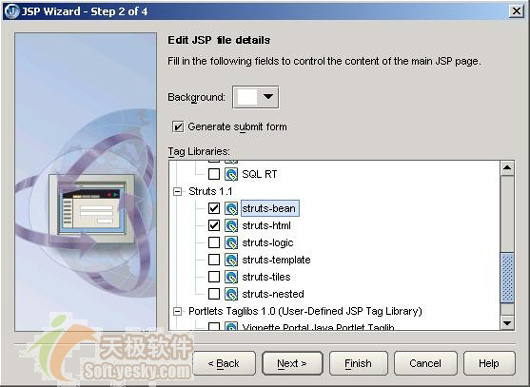
圖 19 指定選用 Struts 標籤
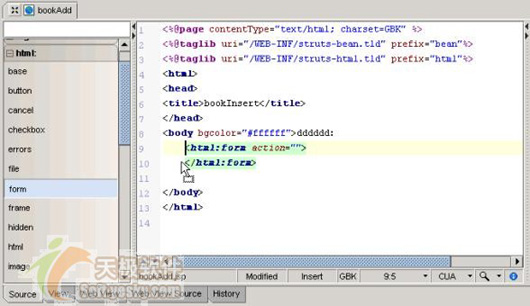
圖 20 拖拽方式添加 Struts 標籤
<html:form action="/bookInsertAction.do" focus="bookId" method="post"
    onsubmit="return mySubmit(this)">
<table width="100%" border="0">
<tr>
  <td><bean:message bundle="bookstore" key="bookstore.bookId"/></td>
  <td><html:text name="bookActionForm" property="bookId"/></td>
  <td><bean:message bundle="bookstore" key="bookstore.isbn"/></td>
  <td><html:text name="bookActionForm" property="isbn"/></td>
</tr>
<tr>
  <td><bean:message bundle="bookstore" key="bookstore.bookName"/></td>
  <td><html:text name="bookActionForm" property="bookName"/></td>
  <td><bean:message bundle="bookstore" key="bookstore.author"/></td>
  <td><html:text name="bookActionForm" property="author"/></td>
</tr>
<tr align="center">
  <td colspan="4"><html:submit value="保存"/> <html:reset value="取消"/></td>
</tr>
</table>
</html:form>
<html:form action="/bookInsertAction.do"> 無需加 Web 模塊前綴;onsubmit 進行客戶端非空校驗;<bean:message> 從資源文件讀取標籤文本,支援國際化。

圖 21 bookAdd.jsp 設計期界面(使用 Dreamweaver + Visual Tags for Struts 插件)
src/bookStoreResource_zh_CN.properties(中文需 native2ascii 轉 Unicode)Message Resources 標簽頁添加 bookstore 映射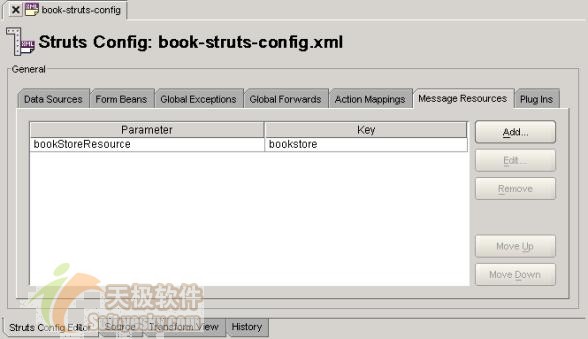
圖 22 定義資源文件
向導創建,指定 FormBean=bookActionForm、Scope=request、Input=/bookAdd.jsp:
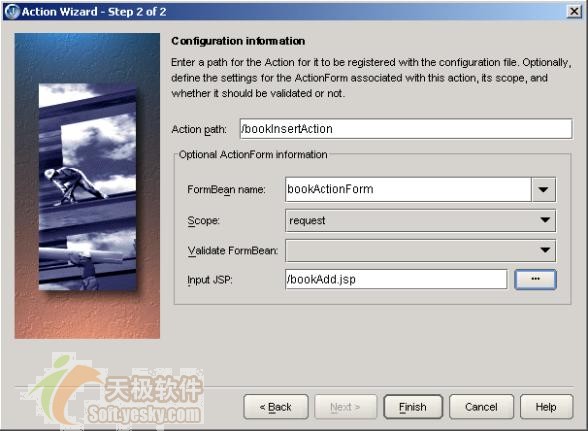
圖 23 指出 BookInsertAction 配置信息
在 Struts Config Editor 添加前向 success → /insertSuccess.htm:
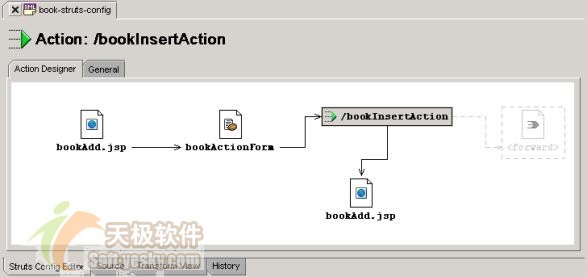
圖 24 bookInsertAction 流程
public ActionForward execute(ActionMapping mapping, ActionForm form,
        HttpServletRequest request, HttpServletResponse response) throws Exception {
    BookActionForm baf = (BookActionForm) form;
    Connection conn = DBConnection.getConnection();
    PreparedStatement ps = conn.prepareStatement(
        "insert into T_BOOK(BOOK_ID,ISBN,BOOK_NAME,AUTHOR,CREATE_DATE) values(?,?,?,?,?)");
    ps.setString(1, baf.getBookId());
    ps.setString(2, baf.getIsbn());
    ps.setString(3, baf.getBookName());
    ps.setString(4, baf.getAuthor());
    ps.setString(5, baf.getCreateDate());
    ps.executeUpdate();
    return mapping.findForward("success");
}注意:execute() 拋出 SQLException,不捕獲,交由全局異常處理。
在 book-struts-config.xml 的 Global Exceptions 標簽頁添加:
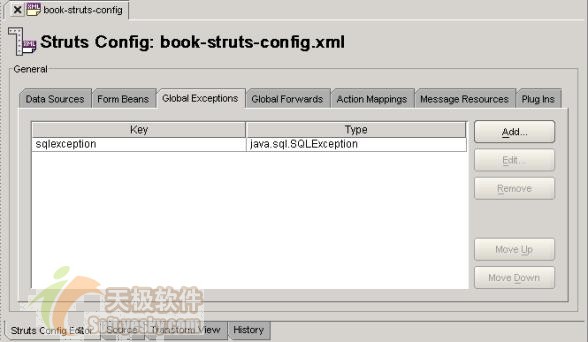
圖 25 異常處理配置
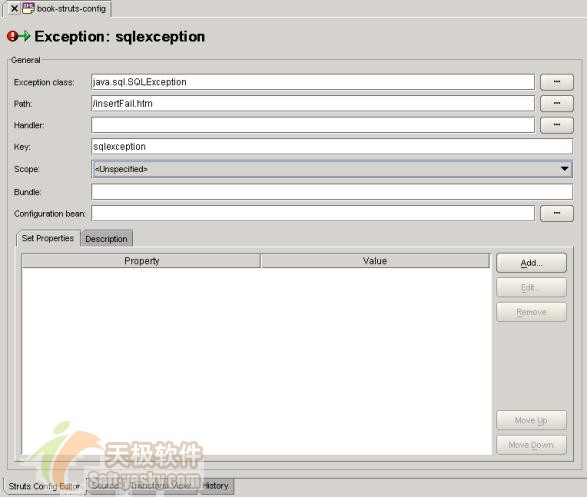
圖 26 異常處理詳細設置
<global-exceptions>
  <exception key="sqlexception" type="java.sql.SQLException" path="/sqlFail.htm"/>
</global-exceptions>
所有 Action 拋出的 SQLException 統一導向 sqlFail.htm,實現聲明式異常處理,Action 代碼更乾淨。
在 welcome.jsp 添加進入 bookAdd.jsp 鏈接:
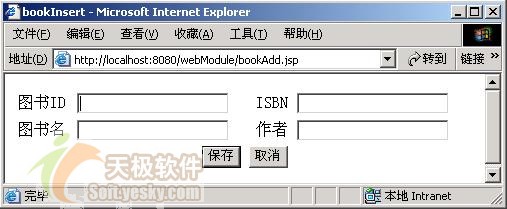
圖 27 添加圖書頁面
validate() 攔截,返回 bookAdd.jsp,<html:errors/> 顯示錯誤sqlFail.htminsertSuccess.htm若 Tomcat 出現中文亂碼,可配置編碼過濾器解決。