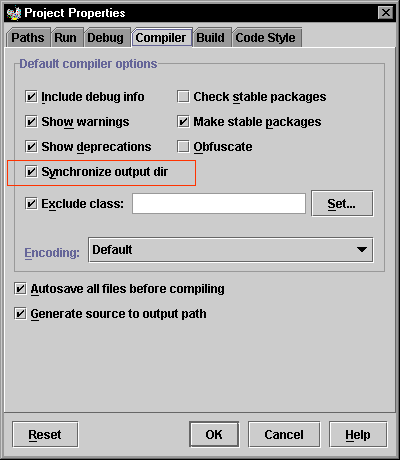
刪除 Java 原始檔後,對應 class 檔若殘留磁碟,可能導致依賴該類別的其他類別編譯錯誤,造成環境不穩。JBuilder 提供編譯選項同步原始檔與 class 檔:專案屬性 → Compiler 頁籤 → 勾選 Synchronize output dir。編譯時自動刪除無對應原始檔的 class 檔,保證同步。
開發期常用 System.out.println 輸出變數值,發佈前需逐一刪除。改用邏輯變數 debugMode 控制輸出已屬進步,但更佳方案是使用 Diagnostic 類別:
print/println/printlnc:輸出訊息,printlnc 附帶計數器與 TabsetLogStream(PrintStream):重導向輸出目標(檔案、URL 等)enable(false):正式編譯時一鍵關閉所有輸出,自動排除對 Diagnostic 方法的呼叫Diagnostic.printlnc("除錯資訊:變數值=" + value);
Diagnostic.setLogStream(new PrintStream(new FileOutputStream("log.txt")));
Diagnostic.enable(false); // 發佈前關閉將硬編碼字串外部化支援多語言。標準 Java 提供 Properties 檔與 ListResourceBundle 兩種方式,JBuilder 另提供 com.borland.jb.util.ArrayResourceBundle:以 String[] 陣列儲存值,索引存取效能佳,但維護時鍵值關聯不明顯。
printStackTrace() 預設輸出至 System.err。若需導向 Email、對話框或字串,可使用 PrintWriter 包裝 StringWriter 捕獲堆疊資訊:
private String getStackTraceAsString() {
    StringWriter sw = new StringWriter();
    PrintWriter pw = new PrintWriter(sw);
    e.printStackTrace(pw);
    return sw.getBuffer().toString();
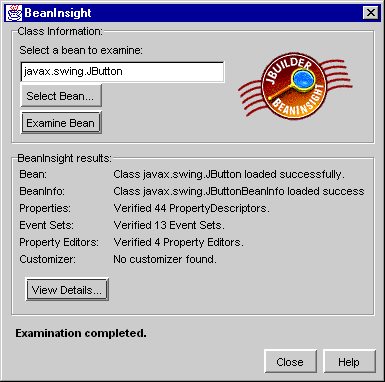
}除拖入設計視窗用 Object Inspector 外,可用 Tools | BeanInsight:點擊 Examine Bean 分析指定 JavaBean,結果區顯示屬性、事件等資訊,再點 View Details 看詳細資料。
Properties 檔鍵值對通常單行。值過長需跨行時,每行結尾加反斜線 \ 轉義:
multiline = This example shows how we \
can write a property \
value over multiple lines in a \
properties file
讀取時 getProperty("multiline") 即可完整取得多行合併後的值。
文中另涵蓋檔案操作、編碼處理等實用細節,助力 JBuilder 開發者提升生產力。