Java I/O 的核心抽象是 Stream(流)—— 代表資料源或資料目的地。所有流分為兩大體系:
InputStream/OutputStream。Reader/Writer,內部自動處理編碼轉換。| 類型 | 輸入流 | 輸出流 | 用途 |
|---|---|---|---|
| 記憶體緩衝 | ByteArrayInputStream | ByteArrayOutputStream | 記憶體間資料傳遞 |
| 字串/字串緩衝 | StringBufferInputStream (已棄用) | — | 舊版相容,勿用 |
| 檔案 | FileInputStream | FileOutputStream | 磁碟檔案讀寫 |
| 管道(執行緒間通訊) | PipedInputStream | PipedOutputStream | 生產者-消費者模式 |
| 序列合併 | SequenceInputStream | — | 將多輸入流串聯為一 |
字元流與位元組流一一對應,差異在於 編碼/解碼 由 InputStreamReader/OutputStreamWriter 自動完成(預設平台編碼或指定 Charset)。
| 位元組流 | 對應字元流 | 說明 |
|---|---|---|
| ByteArrayInputStream | CharArrayReader | char[] 為來源 |
| FileInputStream | FileReader | 檔案文字讀取 |
| PipedInputStream | PipedReader | 執行緒管道 |
| ByteArrayOutputStream | CharArrayWriter | 寫入 char[] |
| FileOutputStream | FileWriter | 寫入文字檔 |
| PipedOutputStream | PipedWriter | 執行緒管道 |
// 位元組流 → 字元流(指定 UTF-8 編碼)
Reader  in  = new InputStreamReader(new FileInputStream("data.txt"), StandardCharsets.UTF_8);
Writer  out = new OutputStreamWriter(new FileOutputStream("out.txt"), StandardCharsets.UTF_8);
這是處理中文等非 ASCII 文字檔的標準做法,避免平台預設編碼不一致導致亂碼。
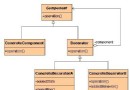
Java I/O 大量使用 Decorator Pattern,透過 FilterInputStream/FilterOutputStream 及其子類,在不修改原始流的前提下疊加功能:
| 功能 | 位元組流裝飾類 | 字元流裝飾類 |
|---|---|---|
| 緩衝(提升效能) | BufferedInputStream | BufferedReader |
| 基本型別讀寫 | DataInputStream | — (用 DataInputStream 或 BufferedReader.readLine()) |
| 行號追蹤 | LineNumberInputStream | LineNumberReader |
| 回推一字元/位元組 | PushbackInputStream | PushbackReader |
| 格式化輸出 | PrintStream | PrintWriter |
try (PrintWriter pw = new PrintWriter(
        new BufferedWriter(new FileWriter("log.txt", StandardCharsets.UTF_8)))) {
    pw.printf("Line %d: %s%n", 1, "Hello Decorator");
}
DataInput、DataOutput 介面,支援基本型別讀寫。"r" 唯讀、"rw" 讀寫、"rws"/"rwd" 同步寫入。seek(long pos) 移動檔案指標,實現隨機讀寫(如資料庫索引、斷點續傳)。import java.io.*;
import java.nio.charset.StandardCharsets;
public class ModernIOdemo {
public static void main(String[] args) throws IOException {
// 1. 帶緩衝逐行讀取檔案
StringBuilder content = new StringBuilder();
try (BufferedReader br = new BufferedReader(
new InputStreamReader(new FileInputStream("src/TestIO.java"), StandardCharsets.UTF_8))) {
String line;
while ((line = br.readLine()) != null) content.append(line).append('\n');
}
// 2. 從鍵盤讀取一行(同樣用 BufferedReader 包裝 System.in)
try (BufferedReader console = new BufferedReader(new InputStreamReader(System.in))) {
System.out.print("Enter a line: ");
System.out.println(console.readLine());
}
// 3. 從字串讀取(StringReader)
try (StringReader sr = new StringReader(content.toString())) {
int c;
while ((c = sr.read()) != -1) System.out.print((char)c);
}
// 4. 格式化寫入檔案(行號 + 內容)
try (BufferedReader br = new BufferedReader(new StringReader(content.toString()));
PrintWriter pw = new PrintWriter(new BufferedWriter(
new OutputStreamWriter(new FileOutputStream("TestIO.out"), StandardCharsets.UTF_8)))) {
String line; int n = 1;
while ((line = br.readLine()) != null) pw.println(n++ + ": " + line);
}
// 5. 基本型別序列化/反序列化(DataOutputStream/DataInputStream)
try (DataOutputStream dos = new DataOutputStream(
new BufferedOutputStream(new FileOutputStream("data.bin")))) {
dos.writeDouble(Math.PI);
dos.writeUTF("\nThis was pi: writeUTF\n");
dos.writeBytes("This was pi: writeBytes\n");
}
try (DataInputStream dis = new DataInputStream(
new BufferedInputStream(new FileInputStream("data.bin")))) {
System.out.println(dis.readDouble());
System.out.println(dis.readUTF());
System.out.println(dis.readLine()); // 對應 writeBytes
}
// 6. RandomAccessFile 隨機寫入/讀取 double 陣列
try (RandomAccessFile raf = new RandomAccessFile("rtest.dat", "rw")) {
for (int i = 0; i < 10; i++) raf.writeDouble(i * 1.414);
raf.seek(5 * 8); // 第 6 個 double (索引 5)
raf.writeDouble(47.0001);
raf.seek(0);
for (int i = 0; i < 10; i++) System.out.println("Value " + i + ": " + raf.readDouble());
}
}
}
new Outer(new Middle(new Inner(source))),外層功能優先生效(如 BufferedReader 先緩衝,再由 FileReader 讀檔)。StandardCharsets.UTF_8,切勿依賴預設值。