Java 作為 Internet 時代的原生語言,提供了強大的網絡編程 API。本文從基礎環境搭建入手,循序漸進講解:URL 機制獲取圖片/聲音/HTML/文本、動態定時抓取數據、Applet 安全限制與 Application 區別、URL 創建四種方式、Socket 客戶端/服務端通信實現。所有示例代碼精簡易懂,可直接運行驗證。
| 類型 | 編譯 | 運行 | 備註 |
|---|---|---|---|
| Application | javac File.java | java ClassName | main 入口 |
| Applet | javac File.java | appletviewer test.html / 瀏覽器打開 HTML | 需 HTML 引用,受沙箱限制 |
代碼托管:https://www.shu.edu.cn/~xyx/test/jvnet 可直接在線體驗。
URL 對象(四種構造方式)Image/AudioClip/InputStream 等)// 方式一:URL 字符串直傳
String url = "https://host/path/img.jpg";
Image img = getImage(new URL(url));
// 方式二:先創建 URL 對象
URL imgUrl = new URL("https://host/path/img.jpg");
Image img = getImage(imgUrl);
// paint() 中 g.drawImage(img, 0, 0, this);
關鍵點:getImage() 非阻塞異步加載,需在 paint() 中繪製。
兩類 API:
play(url) / play(url, filename) — 適合一次性短音效getAudioClip(url) → clip.loop()/clip.play()/clip.stop() — 適合背景音樂、循環播放AudioClip clip;
URL auUrl = new URL("https://host/audio/");
clip = getAudioClip(auUrl, "bark.au");
clip.loop(); // 在 paint() 或線程中調用
URL docUrl = new URL("https://host/doc.html");
getAppletContext().showDocument(docUrl, "_blank"); // 新窗口打開
// 或直接:getAppletContext().showDocument(new URL("..."));
此功能不受 Applet 同源策略限制,可打開任意站點頁面。
URL fileUrl = new URL("https://host/file.txt");
InputStream in = fileUrl.openStream();
DataInputStream dis = new DataInputStream(in);
String line;
while ((line = dis.readLine()) != null) {
    // 處理每行:解析、顯示、存儲...
    textArea.appendText(line + "\n");
}
此為動態數據抓取基礎:股票行情、新聞、日志分析等。
public class DynamicFetcher extends Applet implements Runnable {
    Thread fetcher;
    URL dataUrl;
    TextArea area;

    public void start() {
        if (fetcher == null) { fetcher = new Thread(this); fetcher.start(); }
    }
    public void stop() { if (fetcher != null) { fetcher.stop(); fetcher = null; } }

    public void run() {
        while (true) {
            // 讀取數據並更新 UI(同讀取文件邏輯)
            try { fetcher.sleep(5000); } catch (InterruptedException e) {}
            repaint();
        }
    }
}
每 5 秒自動刷新,配合圖表繪製可實現動態曲線展示。
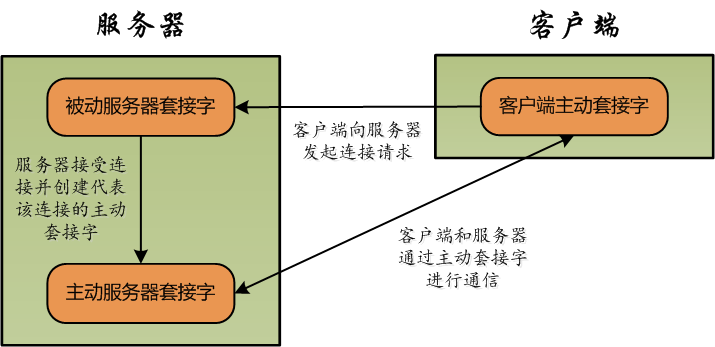
File → Open File 打開 HTML 可訪問任意網絡資源main() 入口類,直接 java ClassName 運行new URL("https://host/path") — 最常用new URL("http", "host", "/path") — 協議/主機/路徑分離new URL("http", "host", 80, "/path") — 顯式指定端口new URL(baseUrl, "relative/path") — 基址 + 相對路徑超越 HTTP,自定義協議:
// 客戶端
Socket socket = new Socket("host", port);
PrintWriter out = new PrintWriter(socket.getOutputStream(), true);
BufferedReader in = new BufferedReader(new InputStreamReader(socket.getInputStream()));
out.println("REQUEST_DATA");
String response = in.readLine();

// 服務端
ServerSocket server = new ServerSocket(port);
while (true) {
    Socket client = server.accept();
    new Thread(() -> handle(client)).start(); // 多線程併發
}
更高性能場景可升級至 NIO(SocketChannel/Selector)實現異步非阻塞。