MSN、QQ 等即時通訊軟體的「好友上線」右下角彈窗——從螢幕邊緣滑入、停留數秒後淡出——體驗極佳。本文示範如何使用 Java 與 Eclipse SWT 組件復刻此功能。
SWT 最初為 Eclipse IDE 開發的圖形 API,運行時優先調用作業系統原生組件,無原生對應才模擬繪製。此機制使其速度遠超 AWT/Swing。詳細資訊請見 eclipse.org/swt。
Display.getDefault().getClientArea()upPosition = 螢幕高度 - 彈窗高度downPosition = 螢幕高度 + 彈窗高度(螢幕外下方)leftPosition = 螢幕寬度 - 彈窗寬度moveStep 像素,直到達到 upPosition;停留 5 秒後關閉銷毀。import org.eclipse.swt.SWT;
import org.eclipse.swt.events.SelectionAdapter;
import org.eclipse.swt.events.SelectionEvent;
import org.eclipse.swt.widgets.Button;
import org.eclipse.swt.widgets.Display;
import org.eclipse.swt.widgets.Shell;
public class Test {
public static void main(String[] args) {
final Display display = new Display();
Shell shell = new Shell();
shell.setText("Main");
shell.setSize(250, 150);
final Button button = new Button(shell, SWT.NONE);
button.setBounds(50, 20, 100, 25);
button.setText("彈出通知");
button.addSelectionListener(new SelectionAdapter() {
public void widgetSelected(SelectionEvent e) {
new Popup("您的好友 xxx 上線了。").start();
}
});
shell.open();
while (!shell.isDisposed()) {
if (!display.readAndDispatch()) display.sleep();
}
display.dispose();
}
}
import org.eclipse.swt.SWT;
import org.eclipse.swt.graphics.Rectangle;
import org.eclipse.swt.widgets.Display;
import org.eclipse.swt.widgets.Shell;
import org.eclipse.swt.widgets.Text;

public class Popup extends Thread {
 Shell shell;
 private final int moveStep = 2;
 private int upPosition, downPosition, leftPosition;

 public Popup(String message) {
 shell = new Shell(SWT.ON_TOP);
 Text text = new Text(shell, SWT.MULTI | SWT.WRAP);
 text.setBounds(10, 20, 180, 80);
 text.setBackground(shell.getBackground());
 text.setText(message);

 Rectangle area = Display.getDefault().getClientArea();
 upPosition = area.height - 100;
 downPosition = area.height + 100;
 leftPosition = area.width - 180;
 shell.setSize(180, 100);
 shell.setLocation(leftPosition, downPosition);
 shell.open();
 }

 @Override
 public void run() {
 Display display = shell.getDisplay();
 while (true) {
 try {
 Thread.sleep(10);
 if ((downPosition - moveStep) > upPosition) {
 display.asyncExec(() -> {
 shell.setLocation(leftPosition, downPosition - moveStep);
 downPosition -= moveStep;
 });
 } else {
 Thread.sleep(5000);
 display.asyncExec(() -> shell.dispose());
 break;
 }
 } catch (InterruptedException e) {
 e.printStackTrace();
 }
 }
 }
}
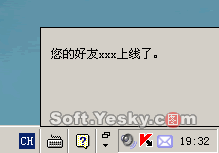
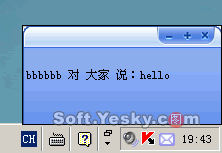
上述代碼已實現核心滑入/停留/退出流程,讀者可據此構建生產級通知組件。