Hibernate 3 內建的 hbm2ddl 工具,讓開發者能從領域模型直接生成資料庫結構,實現「Code First」開發模式。透過 SchemaExport 類別,可將映射檔轉換為 DDL 腳本並直接執行建表,大幅簡化專案初期的資料庫建置流程。
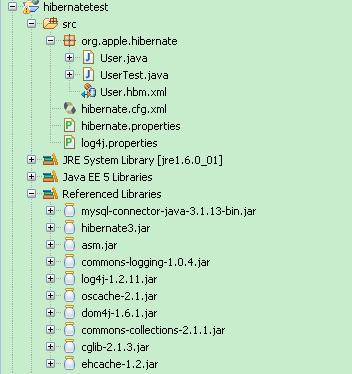
package org.apple.hibernate;

public class User {
    private String id;
    private String name;
    private String password;

    // 標準 getter/setter
    public String getId() { return id; }
    public void setId(String id) { this.id = id; }
    public String getName() { return name; }
    public void setName(String name) { this.name = name; }
    public String getPassword() { return password; }
    public void setPassword(String password) { this.password = password; }
}<?xml version="1.0" encoding="GB2312"?>
<!DOCTYPE hibernate-mapping SYSTEM
"https://hibernate.sourceforge.net/hibernate-mapping-2.0.dtd">
<hibernate-mapping>
<class name="org.apple.hibernate.User">
<!-- Hibernate 自動生成主鍵 -->
<id name="id" unsaved-value="null">
<generator class="uuid.hex"/>
</id>
<!-- 預設屬性名對應同名欄位 -->
<property name="name"/>
<property name="password"/>
</class>
</hibernate-mapping><!DOCTYPE hibernate-configuration PUBLIC
"-//Hibernate/Hibernate Configuration DTD 3.0//EN"
"https://hibernate.sourceforge.net/hibernate-configuration-3.0.dtd">
<hibernate-configuration>
<session-factory>
<property name="hibernate.dialect">org.hibernate.dialect.MySQLDialect</property>
<property name="hibernate.show_sql">true</property>
<mapping resource="org/apple/hibernate/User.hbm.xml"/>
</session-factory>
</hibernate-configuration>hibernate.dialect org.hibernate.dialect.MySQLDialect
hibernate.connection.driver_class com.mysql.jdbc.Driver
hibernate.connection.url jdbc:mysql://localhost/usertest?useUnicode=true&characterEncoding=GBK
hibernate.connection.username root
hibernate.connection.password passwordpackage org.apple.hibernate;
import org.hibernate.cfg.Configuration;
import org.hibernate.tool.hbm2ddl.SchemaExport;
public class UserTest {
public static void main(String[] args) throws Exception {
// 1. 載入配置,解析映射檔
Configuration conf = new Configuration().addClass(User.class);
// 2. 建立 SchemaExport,匯出 SQL 至檔案與資料庫
SchemaExport dbExport = new SchemaExport(conf);
dbExport.create(true, true); // (輸出到檔案, 執行到資料庫)
}
}### direct log messages to stdout ###
log4j.appender.stdout=org.apache.log4j.ConsoleAppender
log4j.appender.stdout.Target=System.out
log4j.appender.stdout.layout=org.apache.log4j.PatternLayout
log4j.appender.stdout.layout.ConversionPattern=%d{ABSOLUTE} %5p %c{1}:%L - %m%n
### set log levels - for more verbose logging change 'info' to 'debug' ###
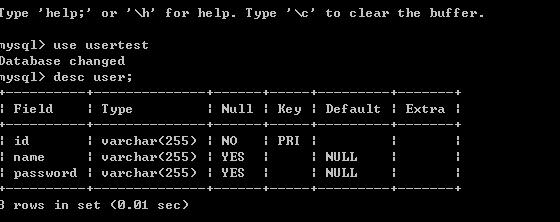
log4j.rootLogger=warn, stdout啟動 MySQL 資料庫,預先建立 usertest schema,執行 UserTest.main():
| 方法 | 說明 |
|---|---|
create(true, true) | 輸出 SQL 到檔案並執行建表 |
create(true, false) | 僅輸出 SQL 到檔案,不執行 |
drop(true, true) | 輸出 DROP SQL 並執行刪表 |
setOutputFile("schema.sql") | 指定 SQL 輸出檔案路徑 |
⚠ 生產環境警示:
create/drop,會導致資料遺失hbm2ddl.auto=update 僅適合開發測試環境正確設定 hibernate.dialect 至關重要,它決定:
善用 SchemaExport 加速原型開發,配合遷移工具管理正式環境,是現代 Hibernate 專案的標準作法。