junit.framework.TestCase。public void testXxx()。java junit.swingui.TestRunner TestClassNamejava junit.textui.TestRunner TestClassNameimport junit.framework.TestCase;
public class TestSample extends TestCase {
public void testMethod1() {
assertTrue(true);
}
}
import junit.framework.TestCase;
public class TestSample extends TestCase {
    protected void setUp() {
        // 初始化測試環境
    }
    public void testMethod1() {
        assertTrue(true);
    }
    protected void tearDown() {
        // 清理測試環境
    }
}
執行順序:setUp → testXxx → tearDown。
assertFalse(true))或主動呼叫 fail()。NullPointerException),屬於 Runtime 異常。public void testMethod1() {
try {
boolean b = ...;
assertTrue(b);
throw new Exception("This is a test.");
fail("Unable point."); // 不會執行到
} catch (Exception e) {
fail("Yes, I catch u"); // 預期捕獲點
}
}
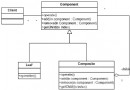
JUnit 採 Composite 模式:Test、TestCase、TestSuite 形成樹狀結構。自訂 suite() 靜態方法組裝測試套件:
import junit.framework.Test;
import junit.framework.TestSuite;
public class TestAll {
    public static Test suite() {
        TestSuite suite = new TestSuite("Running all tests.");
        suite.addTestSuite(TestCase1.class);
        suite.addTestSuite(TestCase2.class);
        return suite;
    }
}
執行方式同單一 TestCase。優點:靈活管理擴展、可從任意節點開始執行。
使用 JUnit 提供的 Ant Task:
<junit>:定義任務<batchtest>:批次執行多個 TestCase<test>:執行單一 TestCase<formatter>:定義輸出格式(brief、xml)<junitreport> + <report>:生成 HTML 報告<junit printsummary="yes" haltonfailure="no">
<classpath>
<path refid="classpath"/>
<pathelement location="${dist.junit}"/>
</classpath>
<formatter type="brief" usefile="false"/>
<formatter type="xml"/>
<batchtest todir="${doc.junitReport}">
<fileset dir="${dist.junit}" includes="**/*Test.class" />
</batchtest>
</junit>
<junitreport todir="${doc.junitReport}">
<fileset dir="${doc.junitReport}">
<include name="TEST*-*.xml"/>
</fileset>
<report format="frames" styledir="${junit.styleDir}" todir="${doc.junitReport}"/>
</junitreport>
setUp/tearDown 僅含共用邏輯。