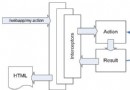
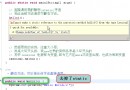
當 Eclipse RCP 應用需要復用現有 Windows 原生應用 (如 MSN Messenger、Office 組件、專業繪圖工具) 的功能時,最直接的策略是將原生視窗嵌入 SWT 容器。本文完整實作基於 Windows Reparent 機制 + JNI 橋接 + SWT 控件封裝 的整合方案,附完整 C++/Java 代碼與關鍵技術點解析。
┌─────────────────────────────────────┐
│       Eclipse RCP / SWT 應用         │
│  ┌───────────────────────────────┐  │
│  │      NativeControl (Canvas)    │  │  ← SWT 容器控件
│  │  handle (HWND) ──────────────►│  │
│  └───────────────┬────────────────┘  │
└──────────────────│────────────────────┘
                   │ JNI 呼叫
                   ▼
┌─────────────────────────────────────┐
│       reparent.dll (C++)             │
│  1. CreateProcess 啟動原生程式       │
│  2. SetWindowsHookEx 攔截視窗建立    │
│  3. WaitForSingleObject 同步等待     │
│  4. SetParent 重定向父視窗           │
│  5. SetWindowPos 調整大小/樣式       │
└─────────────────────────────────────┘
                   │
                   ▼
┌─────────────────────────────────────┐
│     Windows 原生應用 (如 MSN)        │
│  主視窗 HWND 成為 SWT 控件子視窗     │
└─────────────────────────────────────┘
| 層級 | 技術 | 角色 |
|---|---|---|
| Java 層 | JNI (Java Native Interface) | 聲明 native 方法、載入 DLL、傳遞參數 |
| C++ 層 | Windows API (CreateProcess, SetWindowsHookEx, SetParent, SetWindowPos, SetWindowLong) | 進程啟動、視窗攔截、父子關係重建、樣式調整 |
| 同步機制 | Named Event (Global\WaitWindowCreatedEvent) | 跨進程同步等待主視窗建立完成 |
| SWT 封裝 | Canvas 繼承 + Paint/Dispose/Focus/Control Listener | 生命週期管理、焦點轉發、尺寸同步 |
public class ReparentUtil {
    static { System.loadLibrary("reparent"); }
    public static native int startAndReparent(int parentWnd, String command, String wndClass);
}
啟動進程與字串轉換:
JNIEXPORT jint JNICALL Java_com_reparent_ReparentUtil_startAndReparent
  (JNIEnv *env, jclass cls, jint parent, jstring command, jstring wndClass) {
    // Java String → C 字串 (WideCharToMultiByte)
    jboolean isCopy = FALSE;
    jsize len = (*env).GetStringLength(command);
    const jchar *cmdStr = (*env).GetStringChars(command, &isCopy);
    char cmdCStr[200];
    int size = WideCharToMultiByte(CP_ACP, 0, (LPCWSTR)cmdStr, len, cmdCStr, len*2+1, NULL, NULL);
    (*env).ReleaseStringChars(command, cmdStr);
    cmdCStr[size] = 0;
    // ... wndClass 同理轉換 ...
}
進程啟動與 Hook 設置:
// 設置 WH_SHELL Hook 攔截頂層視窗建立
hHook = SetWindowsHookEx(WH_SHELL, ShellProc, hDllHandle, NULL);

// 啟動目標程式
STARTUPINFO sInfo = {0}; sInfo.cb = sizeof(sInfo); sInfo.wShowWindow = SW_HIDE;
PROCESS_INFORMATION pInfo;
if (!CreateProcess(NULL, cmdCStr, NULL, NULL, TRUE, 0, NULL, NULL, &sInfo, &pInfo)) {
    return 0; // 啟動失敗
}
childInstanceId = pInfo.dwProcessId; // 記錄目標進程 ID

// 建立同步 Event
SECURITY_ATTRIBUTES sa = {sizeof(sa), NULL, TRUE};
hEvent = CreateEvent(&sa, FALSE, FALSE, TEXT("Global\\WaitWindowCreatedEvent"));

// 等待主視窗建立 (最長 60 秒)
WaitForSingleObject(hEvent, 60000);
Hook 回調處理視窗建立事件:
LRESULT CALLBACK ShellProc(int nCode, WPARAM wParam, LPARAM lParam) {
    if (nCode == HSHELL_WINDOWCREATED && childInstanceId != 0) {
        HWND hwnd = (HWND)wParam;
        DWORD pid; GetWindowThreadProcessId(hwnd, &pid);
        if (pid == childInstanceId) {
            // 可選:驗證視窗類別名
            if (wndClassName[0] != 0) {
                char className[100];
                GetClassName(hwnd, className, 100);
                if (strcmp(className, wndClassName) != 0)
                    return CallNextHookEx(hHook, nCode, wParam, lParam);
            }
            hChildWnd = hwnd;
            ShowWindow(hChildWnd, SW_HIDE); // 先隱藏防閃爍
            // 通知主線程繼續
            HANDLE evt = OpenEvent(EVENT_ALL_ACCESS, TRUE, TEXT("Global\\WaitWindowCreatedEvent"));
            if (evt) SetEvent(evt);
        }
    }
    return CallNextHookEx(hHook, nCode, wParam, lParam);
}
重定向父視窗與樣式調整:
if (hChildWnd != 0) {
    RECT rect; GetWindowRect((HWND)hParentWnd, &rect);
    ShowWindow(hChildWnd, SW_HIDE);
    SetParent(hChildWnd, (HWND)hParentWnd);          // 核心:重定向父視窗
    SetWindowPos(hChildWnd, 0, 0, 0,
        rect.right - rect.left, rect.bottom - rect.top,
        SWP_NOZORDER | SWP_NOACTIVATE | SWP_ASYNCWINDOWPOS |
        SWP_SHOWWINDOW | SWP_NOSENDCHANGING | SWP_DEFERERASE);
    SetWindowLong(hChildWnd, GWL_STYLE, WS_POPUP);   // 移除標題列/邊框
    ShowWindow(hChildWnd, SW_SHOW);
}
public class NativeControl extends Canvas {
    private int childWnd = 0;
    private String startCommand, wndClassName;
    private boolean isCreatingNative = false;

    public NativeControl(Composite parent, int style) {
        super(parent, style);
        // 1. Paint 事件 → 啟動原生視窗 (非 UI 線程)
        addPaintListener(e -> {
            if (childWnd == 0 && !isCreatingNative) {
                isCreatingNative = true;
                new Thread(() -> {
                    childWnd = ReparentUtil.startAndReparent(getHandle(), startCommand, wndClassName);
                }).start();
            }
        });
        // 2. Dispose 事件 → 關閉原生視窗
        addDisposeListener(e -> {
            if (childWnd != 0) OS.SendMessage(childWnd, OS.WM_CLOSE, 0, 0);
        });
        // 3. Focus 事件 → 轉發焦點
        addFocusListener(new FocusListener() {
            public void focusGained(FocusEvent e) {
                if (childWnd != 0) OS.SetForegroundWindow(childWnd);
            }
            public void focusLost(FocusEvent e) {}
        });
        // 4. 鍵盤事件 → 支援 Tab 鍵焦點跳轉
        addKeyListener(new KeyListener() { /* 空實現即可 */ });
        // 5. Resize 事件 → 同步調整原生視窗大小
        addControlListener(new ControlListener() {
            public void controlMoved(ControlEvent e) {}
            public void controlResized(ControlEvent e) {
                if (childWnd != 0) {
                    Rectangle r = ((Composite)e.widget).getClientArea();
                    OS.SetWindowPos(childWnd, 0, r.x, r.y, r.width, r.height,
                        OS.SWP_NOZORDER | OS.SWP_NOACTIVATE | OS.SWP_ASYNCWINDOWPOS);
                }
            }
        });
    }
    // 參數設定方法略...
}
public class ReparentTest {
    public static void main(String[] args) {
        Display display = new Display();
        Shell shell = new Shell(display);
        shell.setText("RCP + Native Demo");
        shell.setLayout(new GridLayout());

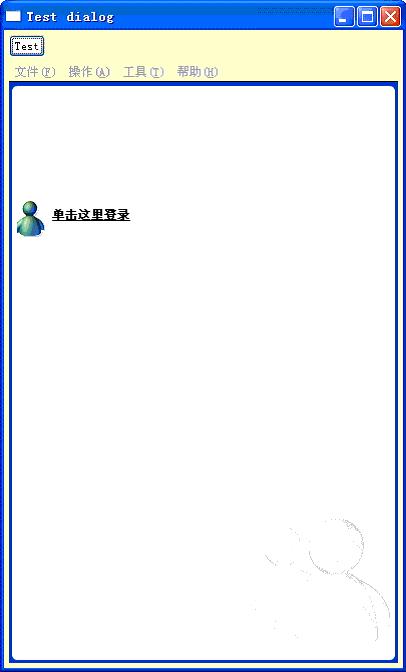
        new Button(shell, SWT.PUSH).setText("Test Button"); // 驗證 Tab 焦點跳轉

        NativeControl control = new NativeControl(shell, SWT.NONE);
        GridData gd = new GridData(SWT.FILL, SWT.FILL, true, true);
        gd.widthHint = 400; gd.heightHint = 400;
        control.setLayoutData(gd);
        // 關鍵:視窗顯示前設定啟動參數
        control.setStartParameters(
            "C:\\Program Files\\Messenger\\Msmsgs.exe",  // 可執行檔路徑
            "MSBLClass"                                   // 主視窗類別名 (用 Spy++ 獲取)
        );

        shell.open();
        while (!shell.isDisposed()) {
            if (!display.readAndDispatch()) display.sleep();
        }
    }
}
| 限制 | 原因 | 改進方向 |
|---|---|---|
| 原生選單列不整合在 RCP 主選單 | 第三方應用原生選單機制獨立 | 自研原生應用時暴露選單 API,RCP 動態合併 |
| 僅支援 Windows 平台 | 依賴 Windows Reparent API | Linux/macOS 需用 XEmbed / Cocoa 同層級方案 |
| Hook 全域性可能影響其他進程 | WH_SHELL 為全域 Hook | 盡快 Unhook,或改用 CBT Hook (HCBT_CREATEWND) |
| 64 位元 JVM 需 64 位元 DLL | JNI 指標寬度必須一致 | 提供 x86/x64 兩版 DLL,Java 端按架構載入 |
本方案通過 JNI 橋接 Windows Reparent API,實現了「零侵入式」嵌入第三方 Windows 應用。核心難點在於 跨進程視窗句柄獲取與同步,以 WH_SHELL Hook + Named Event 組合可靠解決。封裝為 SWT Canvas 子類後,即可像原生控件一樣佈局、縮放、焦點管理。對於自研原生組件,建議進一步定義 IPC 協議 (如共享記憶體、Named Pipe、COM) 實現深度雙向互動。
完整原始碼包含 C++ DLL 專案 (VS 方案) 與 Java/Eclipse 專案,建議配合 Spy++ 獲取目標應用主視窗類別名。