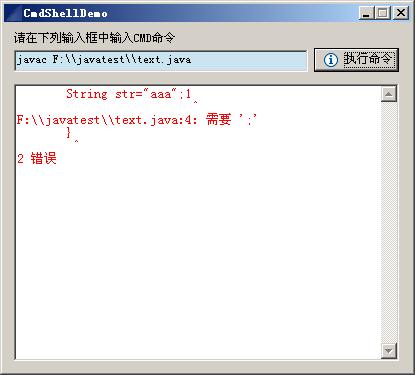
開發 Java 圖形介面應用(如編輯器、IDE、管理工具)時,常需呼叫外部命令列程式(javac、cmd.exe、shell script)並即時捕獲標準輸出與錯誤輸出顯示於 GUI。本文以 SWT 為介面框架,示範 Runtime.getRuntime().exec() 啟動子程序、雙流並發讀取、GUI 非阻塞顯示的完整實作模式。
Runtime.getRuntime().exec(command) 啟動原生程序,回傳 Process 物件process.getInputStream()(標準輸出)、process.getErrorStream()(錯誤輸出)Text 控制項)import java.io.IOException;
import java.io.InputStream;
import org.eclipse.swt.SWT;
import org.eclipse.swt.events.SelectionAdapter;
import org.eclipse.swt.events.SelectionEvent;
import org.eclipse.swt.widgets.*;
public class CmdShell {
private Text inputText;
private Text outputText;
protected Shell shell;
public static void main(String[] args) {
try {
new CmdShell().open();
} catch (Exception e) { e.printStackTrace(); }
}
public void open() {
Display display = Display.getDefault();
createContents();
shell.open();
shell.layout();
while (!shell.isDisposed()) {
if (!display.readAndDispatch()) display.sleep();
}
}
protected void createContents() {
shell = new Shell(SWT.MIN | SWT.CLOSE | SWT.TITLE | SWT.RESIZE);
shell.setSize(415, 375);
shell.setText("CmdShell Demo");
Button btn = new Button(shell, SWT.NONE);
btn.setText("執行命令");
btn.setBounds(310, 25, 85, 24);
btn.addSelectionListener(new SelectionAdapter() {
@Override
public void widgetSelected(SelectionEvent e) { cmdShell(); }
});
inputText = new Text(shell, SWT.BORDER);
inputText.setBounds(10, 27, 294, 22);
outputText = new Text(shell, SWT.V_SCROLL | SWT.BORDER | SWT.WRAP | SWT.H_SCROLL);
outputText.setForeground(Display.getDefault().getSystemColor(SWT.COLOR_RED));
outputText.setBounds(10, 61, 385, 277);
new Label(shell, SWT.NONE).setText("請輸入 CMD 命令");
}
private void cmdShell() {
try {
Process process = Runtime.getRuntime().exec(inputText.getText());
// 關鍵:必須同時消費 stdout 和 stderr,否則緩衝區滿會導致子程序掛起
StreamGobbler outputGobbler = new StreamGobbler(process.getInputStream(), outputText, false);
StreamGobbler errorGobbler = new StreamGobbler(process.getErrorStream(), outputText, true);
outputGobbler.start();
errorGobbler.start();
// 可選:等待程序結束
// process.waitFor();
} catch (IOException ex) { ex.printStackTrace(); }
}
// 內部類:流消費執行緒,支援 UI 安全更新
private static class StreamGobbler extends Thread {
private final InputStream is;
private final Text textWidget;
private final boolean isError;
StreamGobbler(InputStream is, Text textWidget, boolean isError) {
this.is = is;
this.textWidget = textWidget;
this.isError = isError;
}
@Override
public void run() {
try {
byte[] buffer = new byte[1024];
int len;
while ((len = is.read(buffer)) != -1) {
final String chunk = new String(buffer, 0, len);
// SWT UI 更新必須在 UI 執行緒
textWidget.getDisplay().asyncExec(() -> {
if (!textWidget.isDisposed()) {
textWidget.append(chunk);
}
});
}
} catch (IOException e) { e.printStackTrace(); }
}
}
}
子程序的標準輸出與錯誤輸出各有獨立緩衝區(通常 4KB-64KB)。若僅讀取其中一個流,另一個流緩衝區寫滿時,子程序會在 write() 系統呼叫處阻塞,導致程序掛起,主程式 waitFor() 永不返回。必須啟動兩條執行緒同時消費 stdout 和 stderr。
SWT 嚴格要求 UI 控制項只能在建立它的執行緒(UI 執行緒)中存取。流讀取執行緒必須透過 Display.asyncExec(Runnable) 或 syncExec(Runnable) 將 UI 更新任務排程到 UI 執行緒執行。範例使用 asyncExec 非阻塞方式,避免讀取執行緒等待 UI 執行緒。
new String(byte[], offset, length) 使用平台預設編碼。中文 Windows 通常為 GBK/CP936,Linux/Mac 為 UTF-8。跨平台穩健做法:new String(bytes, StandardCharsets.UTF_8) 或偵測 Charset.defaultCharset()。
ProcessBuilder pb = new ProcessBuilder("cmd.exe", "/c", command);
pb.redirectErrorStream(true);  // 合併 stderr 到 stdout,單流讀取即可
Process process = pb.start();
// 設定工作目錄、環境變數等
pb.directory(new File("C:/work"));
pb.environment().put("MY_VAR", "value");
ProcessBuilder (Java 5+) 提供更豐富的程序控制 API,redirectErrorStream(true) 可簡化雙流處理邏輯。
| 現象 | 原因 | 解決 |
|---|---|---|
| 程式執行後無輸出、介面卡死 | 單執行緒讀取 stdout,stderr 緩衝區滿阻塞子程序 | 雙執行緒消費或 redirectErrorStream(true) |
| 中文亂碼 | 位元組轉字串編碼不匹配 | 指定 Charset 或使用 InputStreamReader(Charset) |
| UI 不更新 / 例外 Invalid thread access | 非 UI 執行緒直接操作 SWT/Swing 控制項 | Display.asyncExec / SwingUtilities.invokeLater |
| 命令含管道/重導向失效 | Runtime.exec 不支援 Shell 內建語法 | 用 "cmd.exe /c command" 或 "bash -c command" |
| 大量輸出導致記憶體暴增 | 無限制累積字串於 Text 控制項 | 限制緩衝區大小、定期清理、使用虛擬滾動 |
Java 執行外部命令並捕獲輸出的核心在於:Process 雙流並發消費 + UI 執行緒安全更新 + 編碼正確處理。掌握 Runtime.exec 與現代 ProcessBuilder 的流處理模式,配合 SWT/Swing/JavaFX 的 UI 非同步更新機制,即可構建穩健的圖形化命令列前端工具。生產環境建議封裝為可重用的 CommandExecutor 元件,統一處理超時、編碼、日誌、進度回呼等橫切關注點。