本篇實作回覆發文頁面,包含表單驗證、巢狀回覆顯示、隱藏父貼 ID 傳遞,採用 JSTL + EL 保持視圖純淨。
parentId 進入 replyForm。request 轉發至 reply_jstl.jsp。replySubmit,Service 驗證後持久化,重導向列表頁或詳情頁。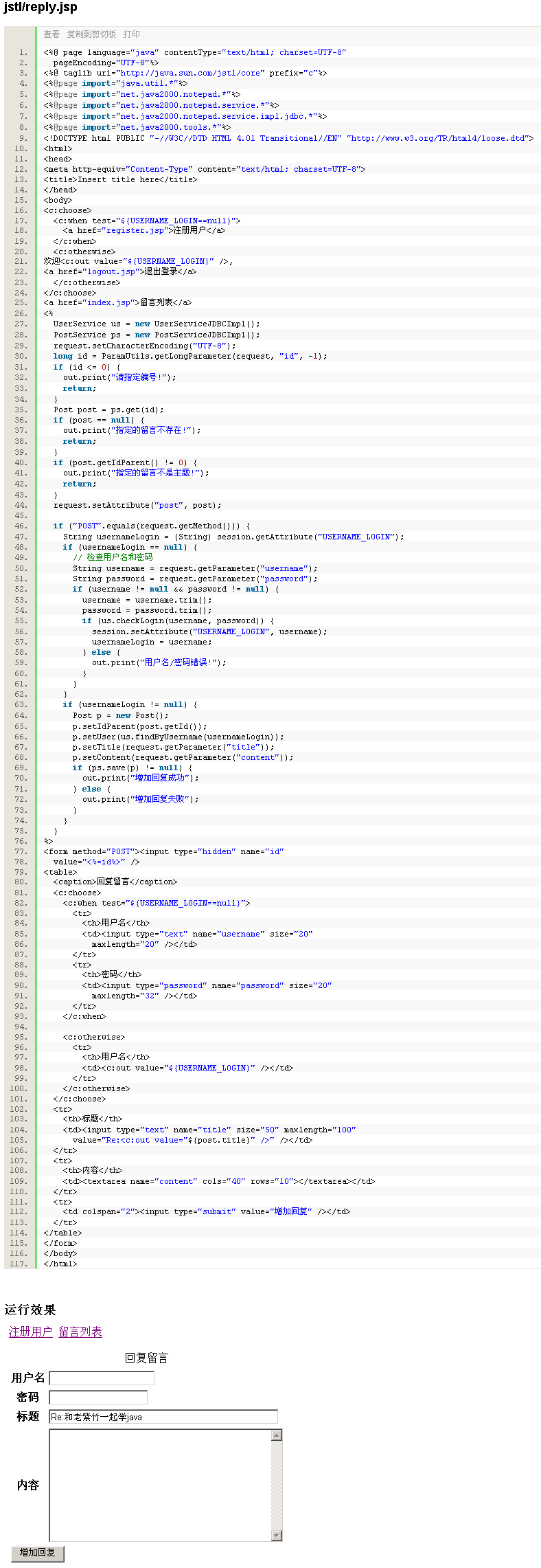
<%@ page contentType="text/html;charset=UTF-8" %>
<%@ taglib prefix="c" uri="https://java.sun.com/jsp/jstl/core" %>
<html><head><title>回覆留言</title>
<style>.error{color:red} textarea{width:100%;height:120px}</style></head><body>
<h2>回覆留言</h2>

<!-- 顯示父貼文摘要 -->
<fieldset><legend>原貼文</legend>
  <strong>標題:</strong><c:out value="${parent.title}" /><br/>
  <strong>作者:</strong><c:out value="${parent.user.username}" /><br/>
  <strong>內容:</strong><c:out value="${parent.content}" />
</fieldset>

<!-- 回覆表單 -->
<form action="replySubmit" method="post">
  <input type="hidden" name="parentId" value="<c:out value='${parent.id}'/>" />
  <input type="hidden" name="userId" value="<c:out value='${sessionScope.loginUser.id}'/>" />

  <div>
    <label>標題(選填):</label>
    <input type="text" name="title" size="60" value="<c:out value='${param.title}'/>" />
  </div>
  <div>
    <label>內容(必填):</label><br/>
    <textarea name="content"><c:out value="${param.content}"/></textarea>
    <span class="error"><c:out value="${errors.content}" /></span>
  </div>
  <div>
    <input type="submit" value="送出回覆" />
    <input type="button" value="取消" onclick="history.back()" />
  </div>
</form>
</body></html>
<input type="hidden" name="parentId"> 確保提交時關聯正確父貼文。value="${param.title}"、<c:out value="${param.content}">,驗證失敗時保留用戶已輸入內容。Map<String,String> errors 放入 request,頁面用 ${errors.content} 顯示。${sessionScope.loginUser.id} 直接取得當前用戶 ID,無需 Controller 額外傳遞。<c:out> 自動轉義。Map<String, String> errors = new HashMap<>();
if (content == null || content.trim().isEmpty()) {
errors.put("content", "回覆內容不能為空");
}
if (!errors.isEmpty()) {
request.setAttribute("errors", errors);
request.setAttribute("parent", parentMessage); // 重新查詢父貼文
return "reply_jstl"; // 轉發回表單頁
}
// 通過驗證 -> 建立 Message 物件 -> messageService.reply(parentId, userId, title, content)
// 重導向:return "redirect:list";
下一篇將展示同功能的 Scriptlet 版本對比。