控制台交互是 Java 入門必備技能。Scanner 類提供了強大的輸入解析能力,支持基本類型、字符串、正則表達式等多種輸入模式。本文詳細講解最佳實踐與異常處理。
Scanner 基礎用法
import java.util.Scanner;

public class Lession9 {
    public static void main(String[] args) {
        Scanner scan = new Scanner(System.in);

        // 字符串輸入(按空格分隔)
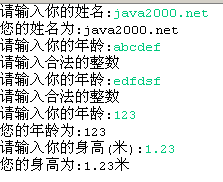
        System.out.print("請輸入你的姓名: ");
        String name = scan.next();
        System.out.println("您的姓名為: " + name);

        // 整數輸入
        System.out.print("請輸入你的年齡: ");
        int age = scan.nextInt();
        System.out.println("您的年齡為: " + age);

        // 浮點數輸入
        System.out.print("請輸入你的身高(米): ");
        float height = scan.nextFloat();
        System.out.println("您的身高為: " + height + "米");
    }
}
常用輸入方法對照表
| 方法 | 功能 | 分隔符 |
|---|
| next() | 讀取下一個 token(默認空格分隔) | 空白字符 |
| nextLine() | 讀取整行(含空格) | 換行符 |
| nextInt() | 解析 int | 空白字符 |
| nextLong() | 解析 long | 空白字符 |
| nextFloat() | 解析 float | 空白字符 |
| nextDouble() | 解析 double | 空白字符 |
| nextBigInteger() | 解析大整數 | 空白字符 |
| nextBigDecimal() | 解析高精度小數 | 空白字符 |
異常處理最佳實踐
int age = Integer.MIN_VALUE;
while (age == Integer.MIN_VALUE) {
    System.out.print("請輸入你的年齡: ");
    try {
        age = scan.nextInt();
    } catch (InputMismatchException ex) {
        System.out.println("請輸入合法的整數");
        scan.nextLine(); // 清理緩衝區無效輸入
    }
}
System.out.println("您的年齡為: " + age);
進階測試建議
- 測試超長整數輸入(超過 int 范圍),觀察異常
- 改用 nextLong() 處理長整數
- 輸入非數字字符觸發 InputMismatchException
- 使用 nextBigInteger/nextBigDecimal 處理超大數值
- 測試 next() 與 nextLine() 混用時的換行符問題
替代方案對比
| 方案 | 優點 | 缺點 |
|---|
| Scanner | 功能豐富、類型安全、正則支持 | 性能一般、需處理異常 |
| BufferedReader | 高性能、簡單穩定 | 需手動解析類型、無正則支持 |
| Console | 支持密碼隱藏輸入 | IDE 中可能為 null、功能有限 |
關鍵提示
- nextInt() 等不消耗換行符,後續 nextLine() 會讀到空行
- 異常捕獲後必須調用 nextLine() 清理緩衝區
- 生產環境建議封裝通用輸入工具類
- 關閉 Scanner 會關閉 System.in,避免重複使用