因工作需要,最近開始研究 GEF(Graphical Editor Framework),它可提供圖形化編輯模型功能,提升用戶體驗,典型應用如圖形化流程設計器、UML 類圖編輯器等。其實一年多來我們做的專案都與它相關,只是之前我具體負責的事與它無關。那時看過黃老大代碼,EMF 和 GEF 混在一起特別暈,沒堅持看下去。這次自己動手,正好趁機把它搞明白,感覺 GEF 做出來的東西給人很專業感覺,功能強大,應挺有前途。此外 GEF 用到很多經典模式,最突出如大量應用 Command 模式,方便實現 Undo/Redo 功能等,通過學習 GEF,等於演練這些模式,效果比只看書寫幾個類好得多。
現在網上關於 GEF 文章教程不多(比一年前增加幾篇),基本是 eclipse.org 上那些,少數有中文版,中文原創屬鳳毛麟角,市場似乎也無成書。GEF SDK 自帶文檔較抽象,不適合入門。我覺得最好入門方法是結合具體例子,一邊看代碼,一邊對照文檔,然後自己動手做。例子要簡單,像 GEF 那個 logic 例子太複雜,即使 flow(運行界面見下圖)覺得也有點大;例子要規范,否則學成錯誤路子後還要花時間改不值得。
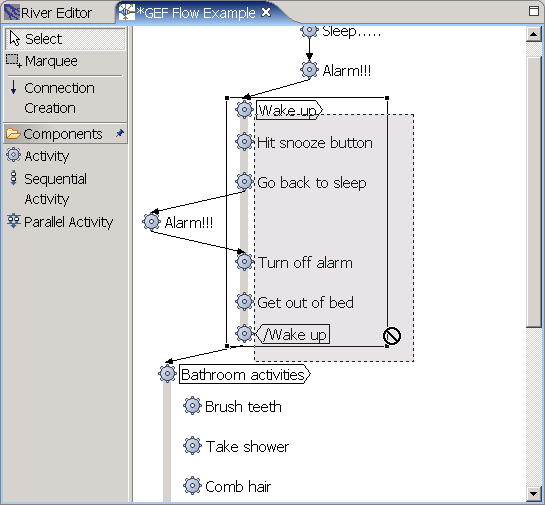
用 GEF 編寫的流程編輯器
GEF 結構決定應用複雜性,即使最簡單 GEF 程序也包含五六個包和十幾個類,剛開始接觸有點暈是正常。我找到一個不錯例子,當然很簡單,若想現在試試 GEF,可下載 zip 包(若無法下載用此鏈接),展開後六個專案(pt1,pt2,...,pt6),每個在前一個基礎上增加功能,pt1 最簡單,可看到典型功能(如 DirectEdit、Palette 等)在 GEF 中怎樣實現。關於此例更多信息請看作者 blog 說明:
"Back in March, I talked a little about my initial attempts writing an Eclipse Graphical Editor Framework (GEF) application. I wanted, then, to write a tutorial that essentially walked the reader through the various stages of the development of my first application. I even suggested some kind of versioned literate programming approach to writing the tutorial and the code at the same time.
I haven't had time since then to make any progress, but I did get the GEF application to the stage where I had put together a snapshot at each of six milestones. A few people have written to me over the last six months asking the status of my tutorial and I've sent them my six snapshots as a starting point.
It makes sense for me to just to offer them here.
You can download a ZIP file with the six snapshots at https://jtauber.com/2004/gef/gef.zip.
Hopefully they are still useful, even without a surrounding tutorial."
注意:此例應在 Eclipse 2.1 寫的,若想在 Eclipse 3 運行,需修改 plugin.xml dependencies:
<import plugin="org.eclipse.core.resources"/>
<import plugin="org.eclipse.gef"/>
<import plugin="org.eclipse.ui"/>
<import plugin="org.eclipse.core.runtime"/>
<import plugin="org.eclipse.core.runtime.compatibility"/>
<import plugin="org.eclipse.ui.views"/>
再修改 DiagramCreationWizard 類 finish() 方法裡 page.openEditor(newFile); 改為 page.openEditor(new FileEditorInput(newFile), "com.jtauber.river.editor");,有些 warning 不太影響,可不管。
或若不特別著急,留意我這半新手寫的 GEF 入門系列帖子,說不定能引起更多共鳴,也是個辦法。
GEF 學習週期較長,學前應有心理準備。特別是若未開發過 Eclipse 插件,最好先花時間熟悉 Eclipse 插件體系結構,這方面文章不少,也不難,基本會開發簡單 Editor 即可,因 GEF 應用一般都在 Editor 裡進行圖形編輯。另外,絕大多數 GEF 應用基於 Draw2D,可說 GEF 離不開 Draw2D,而後者有些概念難搞懂,加上文檔比 GEF 更少,故我從 Draw2D 開始說起,當然不能講很深入,因我自己也略知皮毛。
說實話,對寫這系列不太有信心,因自己也剛入門。但等幾個月再寫,很多心得怕講不出來。所以還是那句話,有寫錯請指正,歡迎交流。