繼承 GraphicalEditorWithFlyoutPalette 替代 GraphicalEditorWithPalette,獲得可摺疊工具條、與 Eclipse Palette 視圖聯動能力。
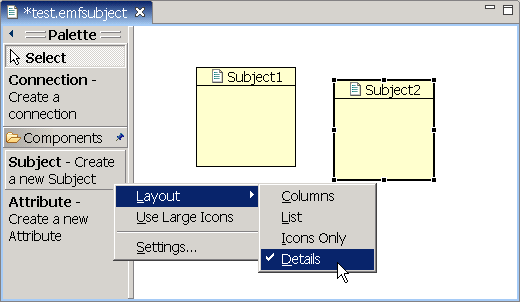
getPalettePreferences() 返回 FlyoutPreferences,持久化位置、大小、展開狀態 (使用 PreferenceStore)createPaletteViewerProvider() 為 PaletteViewer 添加 TemplateTransferDragSourceListener 支持拖放PaletteCustomizer 允許用戶隱藏/重命名工具 (參考 Logic 示例)Draw2D 原生支持縮放。使用 GEF 內置 Action:
ZoomInAction / ZoomOutAction (構造需 ZoomManager,從 ScalableFreeformRootEditPart 獲取)configureGraphicalViewer() 中創建 Action 並註冊到 ActionRegistry、KeyBindingServiceDiagramActionBarContributor 中添加 ZoomInRetargetAction/ZoomOutRetargetAction 到工具欄ZoomComboContributionItem 提供百分比下拉框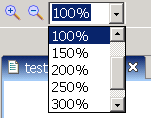
// 初始化時恢復
ZoomManager manager = (ZoomManager) getGraphicalViewer().getProperty(ZoomManager.class.toString());
if (manager != null) manager.setZoom(diagram.getZoom());

// 保存前記錄
if (manager != null) diagram.setZoom(manager.getZoom());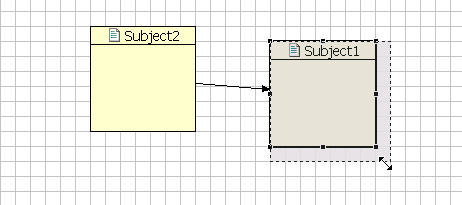
SnapToGrid.PROPERTY_GRID_VISIBLE、PROPERTY_GRID_ENABLED (Boolean)ToggleGridAction 同步切換顯示與吸附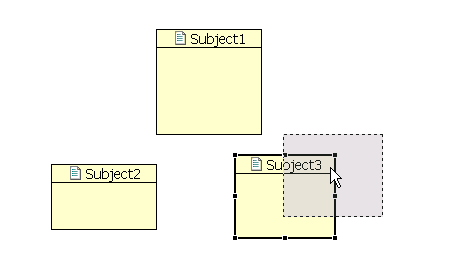
SnapToGeometry.PROPERTY_SNAP_ENABLEDToggleSnapToGeometryActionDiagramPart) 的 getAdapter() 中返回 CompoundSnapToHelper 組合多種吸附策略public Object getAdapter(Class adapter) {
if (adapter == SnapToHelper.class) {
List snapStrategies = new ArrayList();
// Ruler Guides
if (getViewer().getProperty(RulerProvider.PROPERTY_RULER_VISIBILITY) == Boolean.TRUE)
snapStrategies.add(new SnapToGuides(this));
// Geometry
if (getViewer().getProperty(SnapToGeometry.PROPERTY_SNAP_ENABLED) == Boolean.TRUE)
snapStrategies.add(new SnapToGeometry(this));
// Grid
if (getViewer().getProperty(SnapToGrid.PROPERTY_GRID_ENABLED) == Boolean.TRUE)
snapStrategies.add(new SnapToGrid(this));
if (snapStrategies.isEmpty()) return null;
if (snapStrategies.size() == 1) return snapStrategies.get(0);
return new CompoundSnapToHelper(snapStrategies.toArray(new SnapToHelper[0]));
}
return super.getAdapter(adapter);
}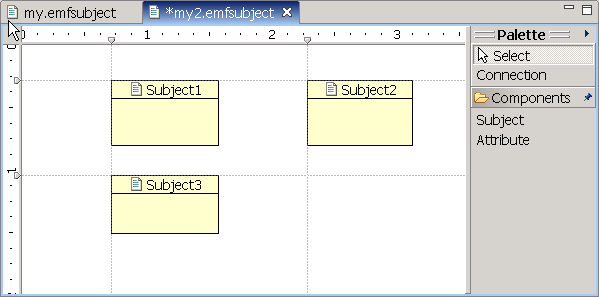
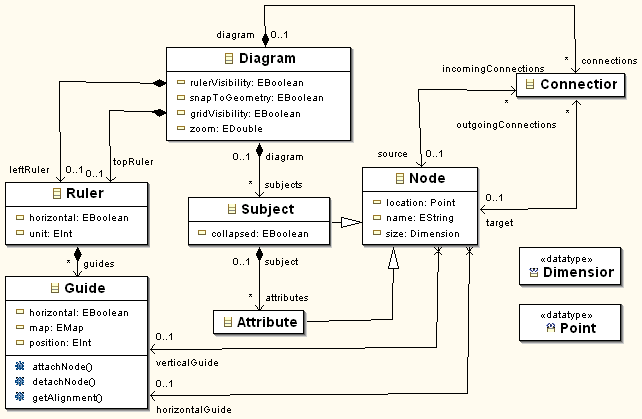
Diagram 新增 topRuler、leftRuler、rulerVisibilityRuler (包含 Guides 列表)、Guide (位置、方向、吸附映射 map)private RulerComposite rulerComp;
protected void createGraphicalViewer(Composite parent) {
rulerComp = new RulerComposite(parent, SWT.NONE);
super.createGraphicalViewer(rulerComp);
rulerComp.setGraphicalViewer((ScrollingGraphicalViewer) getGraphicalViewer());
}
protected Control getGraphicalControl() { return rulerComp; }getGraphicalViewer().setProperty(RulerProvider.PROPERTY_VERTICAL_RULER,
new SubjectRulerProvider(diagram.getLeftRuler()));
getGraphicalViewer().setProperty(RulerProvider.PROPERTY_HORIZONTAL_RULER,
new SubjectRulerProvider(diagram.getTopRuler()));
getGraphicalViewer().setProperty(RulerProvider.PROPERTY_RULER_VISIBILITY,
new Boolean(diagram.isRulerVisibility()));RulerProvider,維護 Ruler 模型getCreateGuideCommand()/getDeleteGuideCommand()/getMoveGuideCommand()RulerChangeListener 通知 EditPart 更新getGuidePositions()、getGuidePosition(Object) 等查詢方法使用 ToggleRulerVisibilityAction 加入主菜單控制標尺/輔助線可見性。

AlignmentAction:參數 PositionConstants.LEFT/CENTER/RIGHT/TOP/MIDDLE/BOTTOMMatchWidthAction/MatchHeightAction (繼承 MatchSizeAction)createActions() 創建並註冊,加入 getSelectionActions() 響應選中RetargetAction 到工具欄/菜單GEF 3.0+ 提供豐富的易用性組件,通過標準擴展點 (Action、Property、Adapter) 集成,幾十行代碼即可賦予編輯器專業級交互體驗。建議按需啟用,避免界面過載。