首頁
編程語言
C語言|JAVA編程
Python編程
網頁編程
ASP編程|PHP編程
JSP編程
數據庫
MYSQL數據庫|SqlServer數據庫
Oracle數據庫|DB2數據庫
您现在的位置: 程式碼之家 >> 編程語言 >  >> Java 程式設計 >> Java 相關知識

NetBeans IDE 6.0 內建 Profiler 效能分析實戰教學

     編輯:Java 相關知識

前言

NetBeans 6.0 整合強大的 Profiler,無需外掛即可對 Java SE、Java EE、Web 應用進行 CPU、記憶體、執行緒分析。本文以內建範例專案 Anagram Game 為例,完整演示三大分析任務與快照比較技巧。

準備工作

  1. File → New Project → Samples → Java → Anagram Game
  2. 設為 Main Project (粗體顯示)
  3. 首次使用需執行 Calibration:
    Profile → Advanced Commands → Run Profiler Calibration
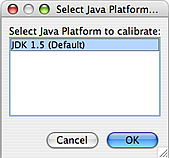
Calibration 設定

專案整合 Profiler

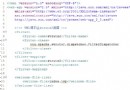
首次分析時,IDE 會修改 build.xml 匯入 nbproject/profiler-build-impl.xml,並備份原檔為 build-before-profiler.xml。可透過 Profile → Advanced Commands → Unintegrate 還原。
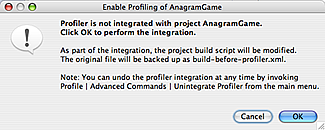
整合對話框

三大分析任務對比

任務用途開銷適用場景
MonitorJVM 高層遙測:Heap、GC、Thread 狀態極低長期監控、生產環境側寫
Analyze CPU Performance方法層級耗時、呼叫次數、熱點路徑中~高效能調優、找出 Bottleneck
Analyze Memory Usage物件配置數量、大小、存活期、GC 代數中~高記憶體洩漏、GC 壓力分析

任務一:Monitor 應用程式

  1. Profile → Profile Main Project → Monitor → Run
  2. 開啟 Window → Profiling → Telemetry Overview 觀察即時圖表
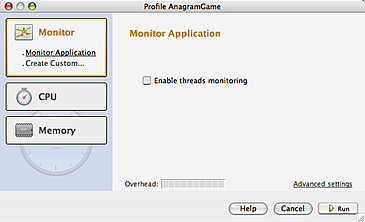

Monitor 設定 Telemetry Overview

任務二:分析 CPU 效能 (部分程式碼)

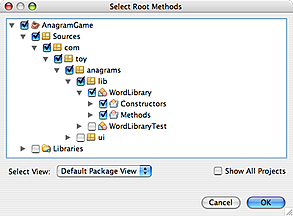
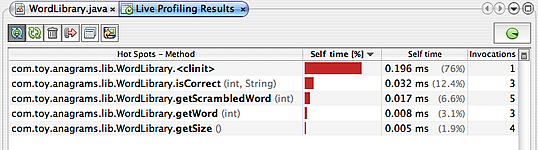
針對 WordLibrary.java 作為根方法,降低開銷:

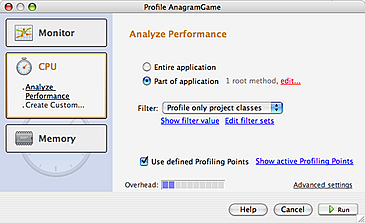
  1. Profile → Profile Main Project → CPU → Part of Application
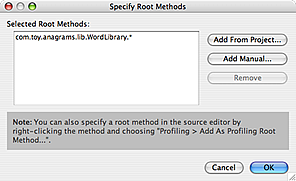
  2. 點擊 Define → Add from Project 選取 com.toy.anagrams.lib.WordLibrary
  3. Filter 選 Profile only project classes
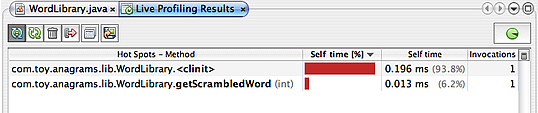
  4. Run → 操作遊戲 → Live Results 觀察方法耗時與呼叫次數
指定根方法 根方法確認 Filter 設定 Live Results 初始 Live Results 操作後

任務三:分析記憶體使用情況

  1. Profile → Profile Main Project → Memory → Record both object creation and garbage collection
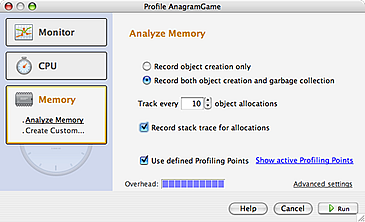
  2. 勾選 Record stack traces for allocation (記錄完整呼叫堆疊)
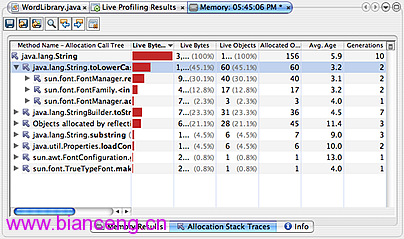
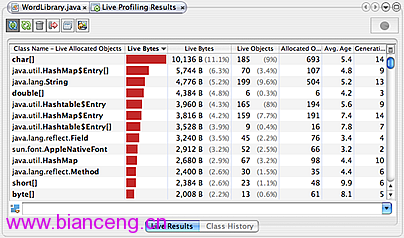
  3. Run → Live Results 觀察類別配置統計
Memory 設定 記憶體 Live Results

建立與比較快照

  1. 在 Live Results 右鍵類別 (如 java.lang.String) → Take Snapshot and Show Allocation Stack Traces
  2. 工具列 Save Snapshot to Project (存為 .nps)
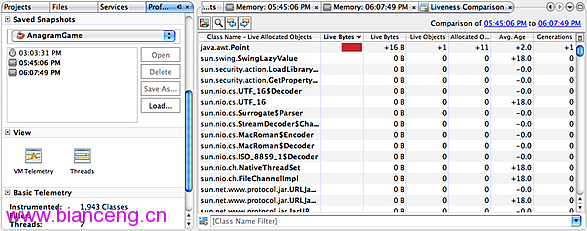
  3. 再次操作程式 → 取第二個快照
  4. 任一快照視窗點擊 Compute Difference (圖示:兩圓重疊) → 選擇另一快照 → 開啟 Liveness Comparison
Allocation Stack Traces Compute Difference 圖示 Liveness Comparison

進階技巧

  • 自訂分析任務:儲存常用根方法、Filter、取樣間隔為自訂任務
  • 遠端分析:Profile → Attach Profiler 連接遠端 JVM (需啟動 JMX/Profiler Agent)
  • Heuristics:調整 Track every N object allocations (預設 10) 平衡精度與開銷

  1. 上一篇文章:
  2. 下一篇文章:
Copyright © 程式碼之家 All Rights Reserved