在 J2ME 開發中,獲取裝置唯一識別碼(IMEI)與基站標識(Cell ID)是實現裝置綁定、LBS 服務的關鍵。但由於缺乏統一標準,各大手機廠商(Nokia、Sony Ericsson、Motorola、Samsung、Siemens 等)均採用專屬的 System Property 鍵值。本文彙整主流廠商的獲取方式,提供可直接部署的跨平台代碼,並附上測試建議。
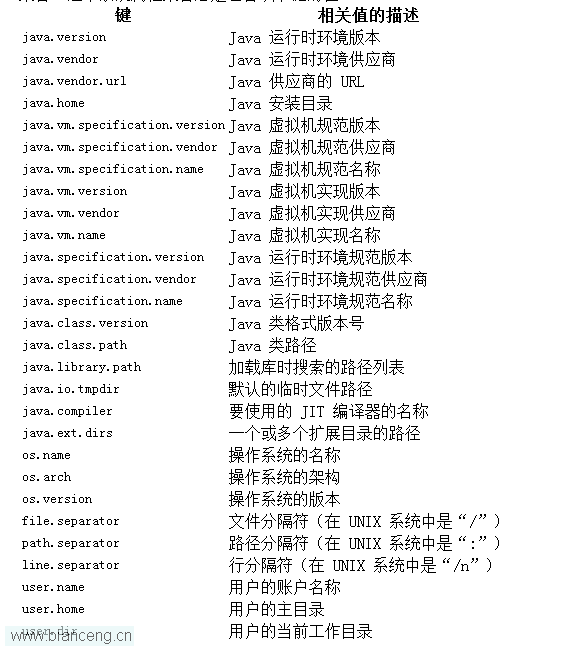
System.getProperty(key)J2ME 中無標準 API 獲取 IMEI/Cell ID,唯一途徑是讀取廠商預置的系統屬性。鍵值命名各異,需針對廠商/平台分支處理。
| 廠商/平台 | IMEI 鍵值 | Cell ID 鍵值 | LAC 鍵值 |
|---|---|---|---|
| Sony Ericsson | com.sonyericsson.imei | com.sonyericsson.net.cellid | com.sonyericsson.net.lac |
| Nokia (Series 60) | phone.imei / com.nokia.IMEI / com.nokia.mid.imei | com.nokia.mid.cellid | - |
| Nokia (Series 40) | 同上 | Cell-ID | - |
| Motorola | com.motorola.IMEI | CellID | - |
| Siemens | com.siemens.imei | - | - |
| Samsung | com.samsung.imei | - | - |
| 通用備選 | IMEI | - | - |
利用 J2ME Polish 的前置處理指令(#if)實現編譯期分支,生成針對不同廠商的 JAR 包:
public class GetIMEIAndCellId extends MIDlet implements CommandListener {
    // ... 介面初始化代碼省略 ...

    protected void startApp() {
        String imei = "", cellid = "", lac = "";
        String platform = System.getProperty("microedition.platform");

        //#if polish.vendor==Sony-Ericsson
        imei = System.getProperty("com.sonyericsson.imei");
        cellid = System.getProperty("com.sonyericsson.net.cellid");
        lac = System.getProperty("com.sonyericsson.net.lac");
        //#elif polish.vendor==Nokia
        imei = System.getProperty("phone.imei");
        if (empty(imei)) imei = System.getProperty("com.nokia.IMEI");
        if (empty(imei)) imei = System.getProperty("com.nokia.mid.imei");
        //#if polish.group==Series60
        cellid = System.getProperty("com.nokia.mid.cellid");
        //#elif polish.group==Series40
        cellid = System.getProperty("Cell-ID");
        //#endif
        //#elif polish.vendor==Motorola
        imei = System.getProperty("com.motorola.IMEI");
        cellid = System.getProperty("CellID");
        //#elif polish.vendor==Siemens
        imei = System.getProperty("com.siemens.imei");
        //#elif polish.vendor==Samsung
        imei = System.getProperty("com.samsung.imei");
        //#endif

        if (empty(imei)) imei = System.getProperty("IMEI"); // 通用備選

        // 顯示結果
        form.append("Platform: " + platform);
        form.append("IMEI: " + imei);
        form.append("CellID: " + cellid);
        // ...
    }

    private boolean empty(String s) { return s == null || s.trim().isEmpty(); }
    // ... CommandListener 實現省略 ...
}null **與空字串**;務必同時檢查,避免顯示 "null" 字串。隨著 Java ME 退出歷史舞台,本文主要作為維護舊專案或嵌入式系統的參考。新專案請優先採用 Android/iOS 原生平台 API。