本篇在商品列表基礎上,逐步建立功能完整的購物車:資料表設計、模型關聯、Session 管理、加入商品邏輯、數量合併與視圖美化。
建立 line_items 資料表(含外鍵關聯 products),並產生模型:
drop table if exists line_items;
create table line_items (
  id int not null auto_increment,
  product_id int not null,
  quantity int not null default 0,
  unit_price decimal(10,2) not null,
  constraint fk_items_product foreign key (product_id) references products(id),
  primary key (id)
);
ruby script/generate model LineItem
修改 line_item.rb 建立關聯:
class LineItem < ActiveRecord::Base
  belongs_to :product
end
在 store_controller.rb 定義私有方法 find_cart,從 Session 取得或建立 Cart 物件:
private
def find_cart
  session[:cart] ||= Cart.new
end
新增 add_to_cart 動作:尋找商品、取得購物車、加入商品、導向顯示購物車:
def add_to_cart
  product = Product.find(params[:id])
  @cart = find_cart
  @cart.add_product(product)
  redirect_to(:action => 'display_cart')
end
在 app/models/cart.rb 定義購物車類別,內含項目陣列、總價與加入商品邏輯:
class Cart
  attr_reader :items, :total_price
  def initialize
    @items = []
    @total_price = 0.0
  end
  def add_product(product)
    @items << LineItem.for_product(product)
    @total_price += product.price
  end
end
擴充 LineItem 加入類別方法 for_product 建立預設數量 1 的明細項:
def self.for_product(product)
  item = self.new
  item.quantity = 1
  item.product = product
  item.unit_price = product.price
  item
end
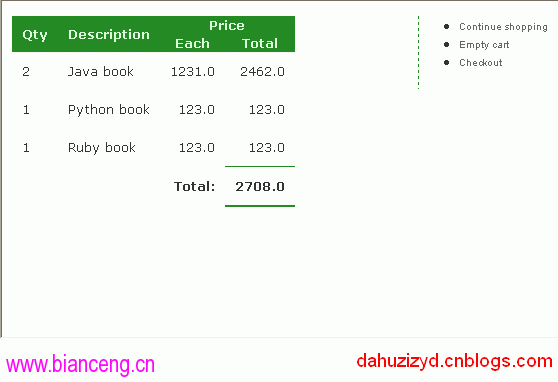
新增 display_cart 動作並建立對應視圖 display_cart.rhtml。初版僅顯示項目數量,後續美化為完整表格,包含數量、商品名稱、單價、小計、總計,並提供「繼續購物」、「清空購物車」、「結帳」導航。
修改 application.rb 載入模型:
class ApplicationController < ActionController::Base
  model :cart
  model :line_item
end
修改 add_product,若購物車已有該商品則增加數量,否則新增項目:
def add_product(product)
  item = @items.find {|i| i.product_id == product.id}
  if item
    item.quantity += 1
  else
    item = LineItem.for_product(product)
    @items << item
  end
  @total_price += product.price
end
最終購物車頁面效果如下圖所示。