承接上一篇完成購物車清空與金額格式化後,這次我們將著手建立訂單功能。訂單模組是電商系統的核心,涉及資料庫設計、模型關聯、控制器邏輯與視圖呈現。
首先在資料庫建立兩張關鍵資料表。orders 表存放訂單主資訊,line_items 表記錄每筆訂單包含的商品明細,並透過外鍵關聯商品與訂單。
create table orders (
  id int not null auto_increment,
  name varchar(100) not null,
  email varchar(255) not null,
  address text not null,
  pay_type char(10) not null,
  primary key (id)
);

create table line_items (
  id int not null auto_increment,
  product_id int not null,
  order_id int not null,
  quantity int not null default 0,
  unit_price decimal(10,2) not null,
  constraint fk_items_product foreign key (product_id) references products(id),
  constraint fk_items_order foreign key (order_id) references orders(id),
  primary key (id)
);
在 InstantRails 環境下,可使用 phpMyAdmin 執行上述 SQL。
透過指令產生 Order 模型:
ruby script/generate model Order
修改 app/models/order.rb 與 app/models/line_item.rb,建立一對多關聯:
class Order < ActiveRecord::Base
  has_many :line_items
  PAYMENT_TYPES = [
    [ "Check", "check" ],
    [ "Credit Card", "cc" ],
    [ "Purchase Order", "po" ]
  ].freeze
end

class LineItem < ActiveRecord::Base
  belongs_to :product
  belongs_to :order

  def self.for_product(product)
    item = self.new
    item.quantity = 1
    item.product = product
    item.unit_price = product.price
    item
  end
end
在 store_controller.rb 新增 checkout 方法,檢查購物車是否為空,若無商品則導回首頁並顯示提示;否則建立新訂單物件供視圖使用:
def checkout
  @cart = find_cart
  @items = @cart.items
  if @items.empty?
    redirect_to_index("There's nothing in your cart!")
  else
    @order = Order.new
  end
end
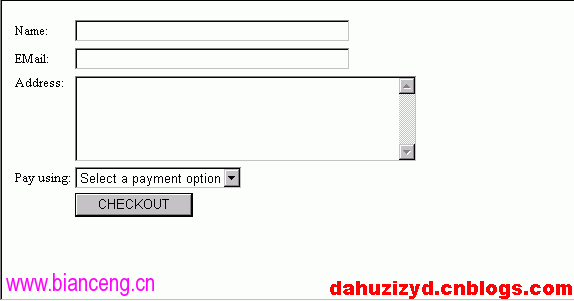
在 app/views/store/checkout.rhtml 建立結帳頁面,包含姓名、信箱、地址、付款方式下拉選單與送出按鈕:
<% @page_title = "Checkout" -%>
<%= start_form_tag(:action => "save_order") %>
<table>
  <tr><td>Name:</td><td><%= text_field("order", "name", "size" => 40 ) %></td></tr>
  <tr><td>EMail:</td><td><%= text_field("order", "email", "size" => 40 ) %></td></tr>
  <tr valign="top"><td>Address:</td><td><%= text_area("order", "address", "cols" => 40, "rows" => 5) %></td></tr>
  <tr>
    <td>Pay using:</td>
    <td>
      <%= options = [["Select a payment option", ""]] + Order::PAYMENT_TYPES %>
      <%= select("order", "pay_type", options) %>
    </td>
  </tr>
  <tr><td></td><td><%= submit_tag(" CHECKOUT ") %></td></tr>
</table>
<%= end_form_tag %>
若頁面顯示錯誤,請確認 order.rb 已正確定義 PAYMENT_TYPES 常數。完成後即可看到結帳頁面(如下圖)。點擊 CHECKOUT 按鈕目前會導向「Unknown action」錯誤,因為 save_order 動作尚未實作,將於下一篇完成。