join() 方法定義在 Thread.java 中,其核心作用是讓「主線程」等待「子線程」執行結束後才能繼續運行。簡單來說,它實現了線程之間的順序控制。
// 主線程
public class Father extends Thread {
    public void run() {
        Son s = new Son();
        s.start();  // 啟動子線程
        s.join();   // 主線程等待子線程結束
        // ... 子線程結束後繼續執行
    }
}

// 子線程
public class Son extends Thread {
    public void run() {
        // 子線程具體邏輯
    }
}
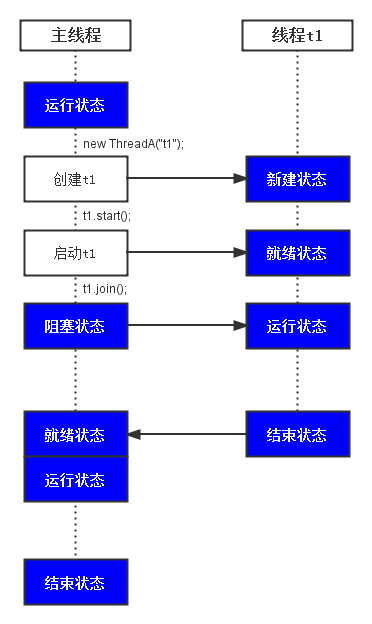
說明: 在 Father 主線程中,通過 new Son() 創建子線程 s,調用 s.start() 啟動它,隨即調用 s.join()。此時主線程會進入阻塞狀態,直到子線程 s 運行完畢,主線程才能恢復執行。
public final void join() throws InterruptedException {
    join(0);
}

public final synchronized void join(long millis) throws InterruptedException {
    long base = System.currentTimeMillis();
    long now = 0;
    if (millis < 0) {
        throw new IllegalArgumentException("timeout value is negative");
    }
    if (millis == 0) {
        while (isAlive()) {
            wait(0);
        }
    } else {
        while (isAlive()) {
            long delay = millis - now;
            if (delay <= 0) {
                break;
            }
            wait(delay);
            now = System.currentTimeMillis() - base;
        }
    }
}
millis == 0 時,進入 while(isAlive()) 循環,只要子線程存活,主線程就不斷調用 wait(0) 等待。isAlive() 判斷的是調用 join() 的線程對象(即子線程)是否存活。問題: 雖然 s.join() 在主線程中調用,但它是通過子線程對象 s 調用的。那麼 wait(0) 不是應該讓子線程等待嗎?為什麼卻是主線程等待?
答案: wait() 的作用是讓「當前線程」等待,而「當前線程」是指正在 CPU 上運行的線程。雖然是調用子線程對象的 wait() 方法,但這個方法是在主線程中執行的,因此休眠的是主線程,而非子線程。
// JoinTest.java
public class JoinTest {
    public static void main(String[] args) {
        try {
            ThreadA t1 = new ThreadA("t1");
            t1.start();
            t1.join();  // 主線程等待 t1 結束
            System.out.printf("%s finish\n", Thread.currentThread().getName());
        } catch (InterruptedException e) {
            e.printStackTrace();
        }
    }

    static class ThreadA extends Thread {
        public ThreadA(String name) { super(name); }
        public void run() {
            System.out.printf("%s start\n", this.getName());
            for (int i = 0; i < 1000000; i++); // 模擬耗時操作
            System.out.printf("%s finish\n", this.getName());
        }
    }
}
t1 start
t1 finish
main finish
main 創建並啟動線程 t1,隨即調用 t1.join()。t1 運行結束。t1 結束後喚醒主線程,主線程重新獲取 CPU 執行權,繼續執行後續代碼。