系列首篇,使用 dom4j 解析 Foxmail 導出的 OPML (XML 格式) 訂閱文件,處理單分組/多分組兩種格式差異,構建領域模型為後續展示奠基。
<opml version="1.1">
  <head><title>六期新博客地址</title></head>
  <body>
    <outline text="丁成雲" title="丁成雲" type="rss" version="RSS"
             xmlUrl="https://blog.csdn.net/sundenskyqq/rss/list"
             htmlUrl="https://blog.csdn.net/sundenskyqq" />
    <outline text="韓正陽" ... />
  </body>
</opml>
特點:分組名在 head/title,訂閱直接在 body/outline。
<opml version="1.0">
  <head><title>Subscription in Foxmail</title></head>
  <body>
    <outline title="八期" text="八期">
      <outline htmlUrl="..." xmlUrl="..." version="RSS" type="rss"
               title="賈琳" text="賈琳的專欄" />
    </outline>
    <outline title="提高班" text="提高班"> ... </outline>
  </body>
</opml>
特點:分組在 body/outline[@title],訂閱巢狀在 outline/outline。
// 訂閱配置:對應 rss_config.xml 中每個 OPML 文件
class RssConfigBean { String name; String path; }

// 分組信息:包含標題、顯示名、訂閱列表
class RssTeamBean {
    String title;
    String text;
    List rssBeanList;
}

// 具體訂閱:六大屬性完整保留
class RssBean {
    String text, title, xmlUrl, htmlUrl, version, type;
}
<rss>
  <rss-list>
    <rss-name>單分組foxmail6.5</rss-name>
    <rss-path>\rss\單分組foxmail6.5.opml</rss-path>
  </rss-list>
  <rss-list>
    <rss-name>多分組foxmail7</rss-name>
    <rss-path>\rss\多分組foxmail7.opml</rss-path>
  </rss-list>
</rss>
public List getRssConfig() {
    InputStream is = Thread.currentThread().getContextClassLoader()
                           .getResourceAsStream("rss_config.xml");
    SAXReader reader = new SAXReader();
    Document doc = reader.read(is);
    Element root = doc.getRootElement();

    return root.elements("rss-list").stream().map(e -> {
        RssConfigBean bean = new RssConfigBean();
        bean.setName(e.elementTextTrim("rss-name"));
        bean.setPath(e.elementTextTrim("rss-path"));
        return bean;
    }).collect(Collectors.toList());
}
public void ReadRssTeam(String directory) {
    for (RssConfigBean config : new RssConfigMgr().getRssConfig()) {
        File file = new File(directory + config.getPath());
        SAXReader reader = new SAXReader();
        Document doc = reader.read(new FileInputStream(file));

        Element root = doc.getRootElement();
        String title = root.selectSingleNode("head/title").getTextTrim();
        Element body = root.selectSingleNode("body");
        Element firstOutline = body.selectSingleNode("outline");

        // 判斷格式:屬性數 > 2 為單分組葉子節點
        if (firstOutline.attributes().size() > 2) {
            parseSingleGroup(body, title);
        } else {
            parseMultiGroup(body);
        }
    }
}

private void parseSingleGroup(Element body, String groupTitle) {
    RssTeamBean team = new RssTeamBean();
    team.setTitle(groupTitle);
    team.setText(groupTitle);

    List rssList = body.elements("outline").stream().map(e -> {
        RssBean bean = new RssBean();
        bean.setText(e.attributeValue("text"));
        bean.setTitle(e.attributeValue("title"));
        bean.setXmlUrl(e.attributeValue("xmlUrl"));
        bean.setHtmlUrl(e.attributeValue("htmlUrl"));
        bean.setVersion(e.attributeValue("version"));
        bean.setType(e.attributeValue("type"));
        return bean;
    }).collect(Collectors.toList());

    team.setRssBeanList(rssList);
    rssTeamBeanList.add(team);
}

private void parseMultiGroup(Element body) {
    for (Element groupOutline : body.elements("outline")) {
        RssTeamBean team = new RssTeamBean();
        team.setTitle(groupOutline.attributeValue("title"));
        team.setText(groupOutline.attributeValue("text"));

        List rssList = groupOutline.elements("outline").stream().map(e -> {
            // 同單分組解析邏輯
        }).collect(Collectors.toList());

        team.setRssBeanList(rssList);
        rssTeamBeanList.add(team);
    }
}
public static void main(String[] args) {
    ReadXML reader = new ReadXML();
    reader.ReadRssTeam("D:/workspace/RssReader/rss/");

    for (RssTeamBean team : reader.getRssTeamBeanList()) {
        System.out.println("分組: " + team.getTitle());
        for (RssBean rss : team.getRssBeanList()) {
            System.out.println("  - " + rss.getTitle() + " [" + rss.getXmlUrl() + "]");
        }
    }
}
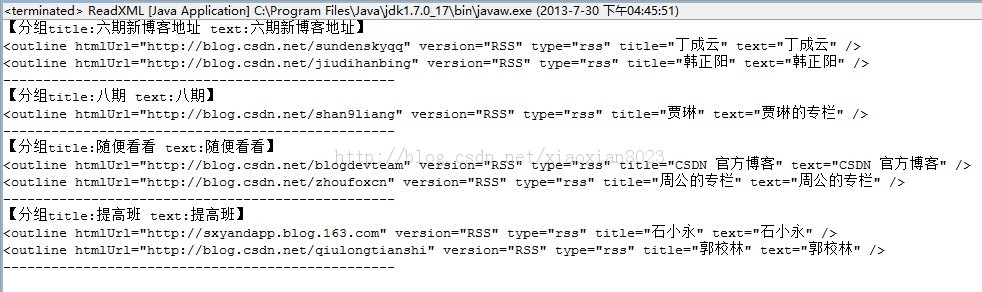
selectSingleNode("head/title") 精準定位,代碼簡潔