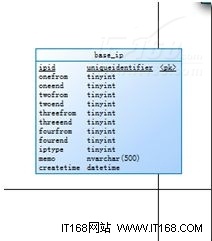
近期專案中某政務系統需可配置的 IP 訪問控制。基於先前使用 IHttpHandlerFactory 驗證用戶的經驗,本次採用 HttpModule 在管線更早階段 (BeginRequest) 攔截請求。判斷邏輯基於 IPv4 四段分別比對,支援批量網段配置。配置存儲於資料庫,表結構如下:
public class IPHttpModule : IHttpModule {
    public void Dispose() { }
    public void Init(HttpApplication context) {
        context.BeginRequest += context_BeginRequest;
    }
    const string ErrorHtml = @"您的訪問受到限制,請與系統管理員聯系。";
    void context_BeginRequest(object sender, EventArgs e) {
        HttpApplication app = (HttpApplication)sender;
        HttpContext context = app.Context;
        if (!CheckPermisssion(context.Request.UserHostAddress)) {
            context.Response.Write(ErrorHtml);
            context.Response.End();
        }
    }
}
public static bool CheckPermisssion(string ip) {
    bool isallow = true;
    string[] tempipsection = ip.Split('.');
    int[] ipsection = new int[] {
        int.Parse(tempipsection[0]),
        int.Parse(tempipsection[1]),
        int.Parse(tempipsection[2]),
        int.Parse(tempipsection[3])
    };
    List<Base_ip> ipList = GetList(null);
    // 允許列表
    List<Base_ip> ipallowList = ipList.FindAll(m => m.Iptype == 1);
    foreach (var ipModel in ipallowList) {
        if (CheckPermisssion(ipsection, ipModel)) { isallow = true; break; }
        else isallow = false;
    }
    if (!isallow) return isallow;
    // 禁止列表
    List<Base_ip> ipnotallowList = ipList.FindAll(m => m.Iptype == 2);
    foreach (var ipModel in ipnotallowList) {
        if (CheckPermisssion(ipsection, ipModel)) { isallow = false; break; }
    }
    return isallow;
}

private static bool CheckPermisssion(int[] ipsection, Base_ip ipModel) {
    if (ipsection[0] < ipModel.Onefrom || ipsection[0] > ipModel.Oneend) return false;
    if (ipsection[1] < ipModel.Twofrom || ipsection[1] > ipModel.Twoend) return false;
    if (ipsection[2] < ipModel.Threefrom || ipsection[2] > ipModel.Threeend) return false;
    if (ipsection[3] < ipModel.Fourfrom || ipsection[3] > ipModel.Fourend) return false;
    return true;
}
邏輯簡單:先檢查允許列表,命中即通過;再檢查禁止列表,命中即拒絕。四段 IP 分別比對範圍 (Onefrom~Oneend 等),靈活支援網段配置。
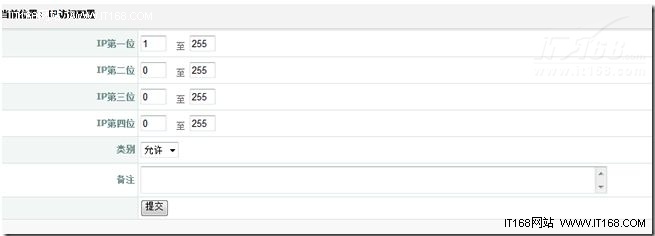


因每次請求皆需檢查,會頻繁查詢資料庫。系統資料訪問層使用 Hxj.Data,可透過其緩存配置減輕資料庫壓力。在 web.config 中註冊 httpModules 節點即可啟用。