XElement root = XElement.Load("PurchaseOrder.xml");
IEnumerable<XElement> billingAddresses =
    from el in root.Elements("Address")
    where (string)el.Attribute("Type") == "Billing"
    select el;

foreach (XElement el in billingAddresses) Console.WriteLine(el);
傳統方式:載入 → 修改節點/屬性 → 儲存。
XElement root = XElement.Load("Data.xml");
foreach (XAttribute att in root.Attributes()) {
    root.Add(new XElement(att.Name, (string)att));
}
root.Attributes().Remove();
// 結果:屬性轉為子元素
將修改視為轉換:從來源樹查詢、轉換、建構新樹。
XElement root = XElement.Load("Data.xml");
XElement newTree = new XElement("Root",
    root.Element("Child1"),
    from att in root.Attributes()
    select new XElement(att.Name, (string)att)
);
Console.WriteLine(newTree);
優勢:大量轉換時程式碼更易維護、可組合;代價:建立較多短命物件。開發效率與執行效能的權衡由團隊決定。
| 方法 | 說明 |
|---|---|
Add | 在 XContainer 子內容末尾新增 |
AddFirst | 在 XContainer 子內容開頭新增 |
AddAfterSelf | 在 XNode 之後新增同級內容 |
AddBeforeSelf | 在 XNode 之前新增同級內容 |
XElement xmlTree = new XElement("Root", new XElement("Child1", 1), ...);
xmlTree.Add(new XElement("NewChild", "new content"));
xmlTree.Add(from el in srcTree.Elements() where (int)el > 3 select el);
// 若來源不存在(如 Child9),不拋例外、不新增
| 方法 | 用途 |
|---|---|
SetElementValue(name, value) | 設定子元素值;不存在則建立;值為 null 則移除 |
SetAttributeValue(name, value) | 設定屬性值;不存在則建立;值為 null 則移除 |
ReplaceAll(content) | 替換所有子節點與屬性 |
Value / SetValue | 替換元素文字內容 |
XElement root = new XElement("Root");
root.SetElementValue("Ele1", 1);
root.SetElementValue("Ele2", 2);
root.SetElementValue("Ele3", 3);
// 1 2 3 1 22 XElement child3 = xmlTree.Element("Child3");
child3.ReplaceWith(new XElement("NewChild", "new content"));
// Child3 被 NewChild 取代
關鍵規則:移除集合時,必須先具體化為清單(ToList())或使用 Remove() 擴充方法,否則延遲執行導致迭代器失效。
XElement root = XElement.Parse(@"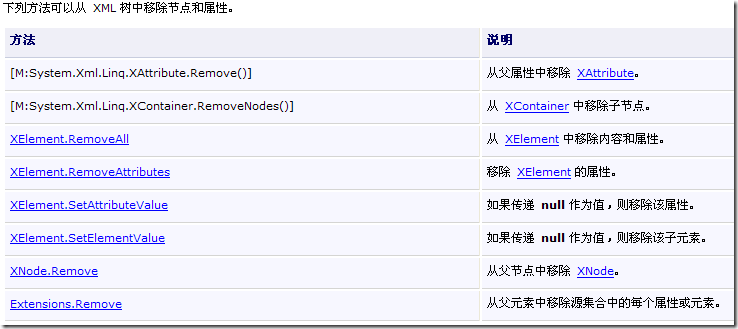
LINQ to XML 提供豐富的記憶體樹操作 API:
Add/AddFirst/AddAfterSelf/AddBeforeSelf 靈活控制位置;SetElementValue/SetAttributeValue 簡化名值對維護。ToList() 或用 Remove() 擴充方法。