動態實例化服務需監聽連接埠,如何找到可用 Port?系統無內建 GetAvailablePorts(),Win32 EnumPorts 亦不可用。自行實作。
public bool IsAvailable(int port)
{
    using (Socket socket = new Socket(AddressFamily.InterNetwork, SocketType.Stream, ProtocolType.Tcp))
    {
        try
        {
            socket.Bind(new IPEndPoint(IPAddress.Any, port));
            return true;  // 綁定成功 = 可用
        }
        catch (SocketException)
        {
            return false; // 綁定失敗 = 已被佔用
        }
    }
}
原理:嘗試綁定,成功即可用,失敗 (例外) 即被佔用。using 確保 Socket 釋放。
public int GetAvailablePort()
{
    Random rnd = new Random();
    int port = rnd.Next(1024, 65535);
    while (!IsAvailable(port))
    {
        port = rnd.Next(1024, 65535);
    }
    return port;
}
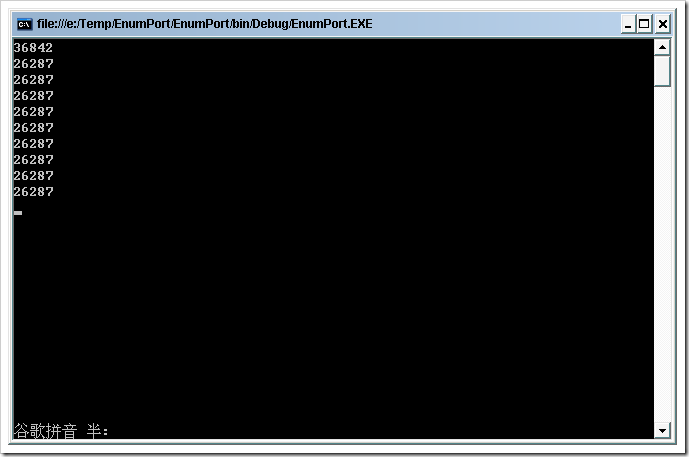
for (int i = 0; i < 10; i++)
    Console.WriteLine(GetAvailablePort());

// 輸出:連續 10 次相同數字!
Random() 預設種子 = Environment.TickCount。迴圈執行極快,種子相同 → 產生相同序列。
private static readonly Random _rnd = new Random();
public int GetAvailablePort()
{
    int port;
    do { port = _rnd.Next(1024, 65535); } while (!IsAvailable(port));
    return port;
}
for (int i = 0; i < 10; i++)
{
    Thread.Sleep(100);  // 強制間隔
    Console.WriteLine(GetAvailablePort());
}
new Random(Guid.NewGuid().GetHashCode())
using System;
using System.Net;
using System.Net.Sockets;
using System.Threading;

public class PortHelper
{
    private static readonly Random _rnd = new Random();

    public bool IsAvailable(int port)
    {
        using (Socket socket = new Socket(AddressFamily.InterNetwork, SocketType.Stream, ProtocolType.Tcp))
        {
            try
            {
                socket.Bind(new IPEndPoint(IPAddress.Any, port));
                return true;
            }
            catch (SocketException)
            {
                return false;
            }
        }
    }

    public int GetAvailablePort()
    {
        int port;
        do
        {
            port = _rnd.Next(1024, 65535);
        } while (!IsAvailable(port));
        return port;
    }
}

// 使用範例
PortHelper helper = new PortHelper();
Console.WriteLine($"Port 8080 可用?{helper.IsAvailable(8080)}");
Console.WriteLine("取得 10 個可用連接埠:");
for (int i = 0; i < 10; i++)
    Console.WriteLine(helper.GetAvailablePort());
Socket.BindAsyncSocket 綁定測試法簡單可靠。關鍵陷阱:Random 實例化在迴圈內導致重複。解決:靜態單一 Random 實例。生產環境優先「直接綁定+重試」模式避免競態。