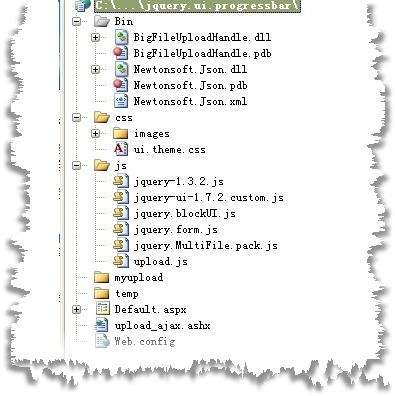
實作大檔案上傳且顯示即時進度,需結合伺服端元件與客戶端非同步輪詢。本文採用「高山來客」大檔上傳元件、Newtonsoft.Json 反序列化、jQuery BlockUI 遮罩層與 jQuery Form 表單提交。
表單設定 enctype="multipart/form-data",包含檔案輸入、上傳按鈕與隱藏的進度條區塊:
<form id="uploadForm" runat="server" enctype="multipart/form-data">
  <div id="uploadfield" style="width:600px; height:500px">
    <input id="File1" type="file" runat="server" />
    <asp:Button ID="Button1" runat="server" Text="上傳" onclick="Button1_Click" />
    ...
  </div>
  <div id="ui" style="display:none">
    <div id="output"></div>
    <div id="progressbar" class="ui-progressbar ui-widget ui-widget-content ui-corner-all" style="width:296px; height:20px;"></div>
    <input id="btn_cancel" type="button" value="取消上傳" />
  </div>
</form>
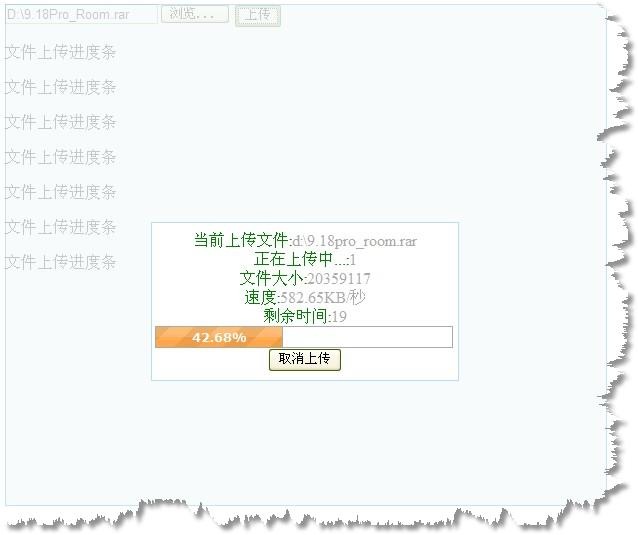
ajaxForm 進行非同步表單提交。beforeSubmit 階段啟動 BlockUI 遮罩,並每 500ms 呼叫 getprogress() 輪詢進度。getprogress() 透過 AJAX 向 upload_ajax.ashx 取得 JSON 進度資料,更新進度條與狀態文字。var inte;
$(function() {
$('#uploadForm').submit(function() { return false; });
$('#uploadForm').ajaxForm({
beforeSubmit: function(a, f, o) {
o.dataType = "json";
$('#uploadfield').block({ message: $('#ui'), css: { width: '300px', border: '#b9dcfe 1px solid', padding: '0.5em 0.2em' } });
inte = self.setInterval("getprogress()", 500);
}
});
$('#btn_cancel').click(function() {
var uploadid = $("#UploadID").val();
$.ajax({ type: "POST", dataType: "json", async: false, url: "upload_ajax.ashx", data: "UploadID=" + uploadid + "&cancel=true",
success: function(obj) { $("#output").html(obj.msg); inte = self.clearInterval(inte); $('#uploadfield').unblock(); }
});
});
});
function getprogress() {
var uploadid = $("#UploadID").val();
$.ajax({ type: "POST", dataType: "json", async: false, url: "upload_ajax.ashx", data: "UploadID=" + uploadid,
success: function(obj) {
var p = obj.msg.Readedlength / obj.msg.TotalLength * 100;
var info = "<FONT color=Green> 當前上傳檔案:</FONT>" + obj.msg.CurrentFile + "<br>...";
$("#output").html(info);
$("#progressbar").progressbar({ value: p });
}
});
}
透過 UploadContextFactory.GetUploadContext(guid) 取得上傳上下文,序列化為 JSON 回傳;支援 cancel=true 參數中止上傳。
public class progressbar : IHttpHandler {
  private string template = "{{statue:'{0}',msg:{1}}}";
  public void ProcessRequest(HttpContext context) {
    context.Response.ContentType = "text/plain";
    try {
      string guid = context.Request["UploadID"];
      string cancel = context.Request["cancel"];
      UploadContext c = UploadContextFactory.GetUploadContext(guid);
      if (!string.IsNullOrEmpty(cancel)) { c.Abort = true; throw new Exception("使用者取消"); }
      string json = Newtonsoft.Json.JsonConvert.SerializeObject(c);
      WriteResultJson(1, json, context, template);
    } catch (Exception err) { WriteResultJson(0, err.Message, context); }
  }
  // WriteResultJson, ClearBR, ReplaceString 輔助方法略...
}