需引用 Unity 相關程序集(可從 CodePlex 下載):
Microsoft.Practices.ObjectBuilder2.dll
Microsoft.Practices.Unity.dll
Microsoft.Practices.Unity.Configuration.dll
Microsoft.Practices.Unity.Interception.dll
Microsoft.Practices.Unity.Interception.Configuration.dll
Microsoft.Practices.Unity.StaticFactory.dll
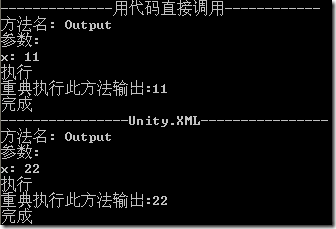
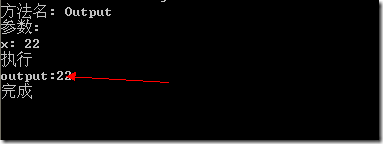
定義接口 IOutput 及實現類 OutputImplement2。直接調用時僅輸出參數;引入 AOP 後,可在方法執行前後注入日誌、參數檢查等橫切邏輯,最終效果如圖所示(除核心輸出外皆為注入代碼)。
public class MyHandler : ICallHandler {
 public int Order { get; set; }
 public IMethodReturn Invoke(IMethodInvocation input, GetNextHandlerDelegate getNext) {
 Console.WriteLine("方法名: {0}", input.MethodBase.Name);
 Console.WriteLine("參數:");
 for (var i = 0; i < input.Arguments.Count; i++)
 Console.WriteLine("{0}: {1}", input.Arguments.ParameterName(i), input.Arguments[i]);
 Console.WriteLine("執行");
 var retvalue = getNext()(input, getNext); // 執行目標方法
 Console.WriteLine("完成");
 return retvalue;
 }
 }
public class MyHandlerAttribute : HandlerAttribute {
 public override ICallHandler CreateHandler(IUnityContainer container) {
 return new MyHandler();
 }
 }
[MyHandler]
class OutputImplement1 : IOutput { ... }
var container1 = new UnityContainer()
 .AddNewExtension()
 .RegisterType();
container1.Configure()
 .SetInterceptorFor(new InterfaceInterceptor());
var op1 = container1.Resolve();
op1.Output(11);
無需特性,通過 Unity.xml 定義類型映射、攔截器策略:
<typeAlias alias="IOutput" type="ConsoleApplication1.IOutput, ConsoleApplication1" />
<typeAlias alias="MyHandler" type="ConsoleApplication1.MyHandler, ConsoleApplication1" />
<typeAlias alias="OutputImplement2" type="ConsoleApplication1.OutputImplement2, ConsoleApplication1" />
<container name="DefContainer">
 <type type="IOutput" mapTo="OutputImplement2">
 <lifetime type="singleton" />
 </type>
</container>
var container2 = new UnityContainer().AddNewExtension();
var map = new ExeConfigurationFileMap { ExeConfigFilename = "Unity.xml" };
var config = ConfigurationManager.OpenMappedExeConfiguration(map, ConfigurationUserLevel.None);
var section = (UnityConfigurationSection)config.GetSection("unity");
section.Containers["DefContainer"].Configure(container2);
container2.Configure()
 .SetDefaultInterceptorFor(new TransparentProxyInterceptor())
 .AddPolicy("LogMethod")
 .AddMatchingRule(new TypeMatchingRule("IOutput"))
 .AddCallHandler(typeof(MyHandler));
var op2 = container2.Resolve();
op2.Output(22);
特性方式簡潔「硬編碼」;配置文件方式靈活解耦,適合生產環境動態調整。Unity 攔截機制讓 AOP 落地輕而易舉。