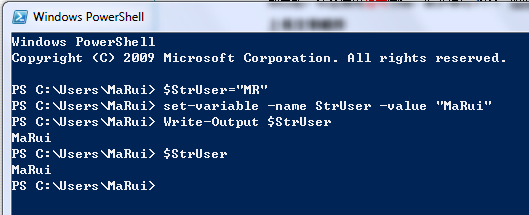
PowerShell 變數以 $ 開頭,使用 = 指派:
$StrUser = "MR"
Set-Variable -Name StrUser -Value "MaRui"  # 等效指令(名稱不需 $)
break, continue, do, else, elseif, filter, foreach, function, if, in, return, switch, until, where, while
Write-Output $StrUser
$StrUser  # 直接輸入變數名亦可輸出
| 類型 | .NET 對應 | 說明 |
|---|---|---|
| [int] | System.Int32 | 32 位元有號整數 |
| [long] | System.Int64 | 64 位元有號整數 |
| [double] | System.Double | 64 位元雙精度浮點 |
| [single] | System.Single | 32 位元單精度浮點 |
| [string] | System.String | Unicode 字串 |
| [char] | System.Char | 16 位元 Unicode 字元 |
| [byte] | System.Byte | 8 位元無號整數 |
| [decimal] | System.Decimal | 128 位元十進制精確數值 |
| [array] | System.Array | 陣列 |
| [xml] | System.Xml.XmlDocument | XML 文件 |
| [hashtable] | System.Collections.Hashtable | 雜湊表 |
| [bool] | System.Boolean | true/false |
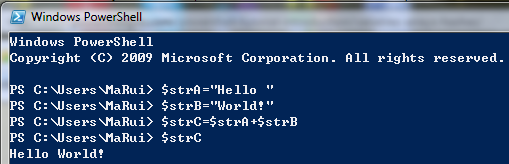
$strA = "Hello "
$strB = "World!"
$strC = $strA + $strB  # "Hello World!"
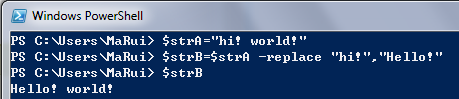
$strA = "hi! world!"
$strB = $strA -replace "hi!", "Hello"  # "Hello world!"
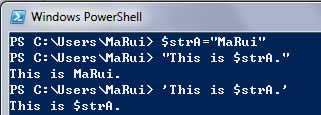
$strA = "MaRui"
"This is $strA."   # 雙引號:展開變數 → "This is MaRui."
'This is $strA.'   # 單引號:字面值 → "This is $strA."
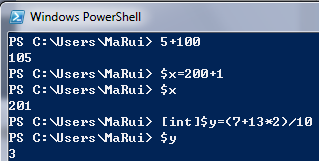
5 + 100           # 105
$x = 200 + 1      # 201
[int]$y = (7 + 13 * 2) / 10  # 3(整數除法截斷)
| 運算子 | 功能 |
|---|---|
| + | 加法 / 字串串接 |
| - | 減法 |
| * | 乘法 |
| / | 除法 |
| % | 取餘數 |
| ++ | 遞增 1 |
| -- | 遞減 1 |
括號 () 可控制優先順序。
PowerShell 雖具動態型別推斷,但腳本開發時建議明確宣告型別:
# 建議寫法
[int]$count = 0
[string[]]$names = @("A", "B")
[hashtable]$config = @{ Key = "Value" }
$_:管線目前物件 / ForEach-Object 迴圈變數$Args:函數/腳本未命名參數陣列$Error:錯誤記錄陣列$Home:使用者家目錄$PSHome:PowerShell 安裝目錄$True/$False/$Null:布林與空值常數變數與資料類型是 PowerShell 程式設計的基石。理解型別系統、字串展開規則、數值運算特性,並養成強型別宣告習慣,能顯著減少執行期錯誤,編寫出更專業的自動化腳本。