問題:實體類別對應資料表時,[Table(Name="User")] 寫死表名。實務上可能需依情境動態加前綴/後綴(如 tt_User、User1)。
分析:DataContext 透過 MappingSource 取得對應資訊。解決方法是繼承 MappingSource 自訂模型。
解決方案:實作 DynamicMappingSource 覆寫 CreateModel,內部 DynamicAttributedMetaModel 覆寫 GetTable,根據委派 GetMetaTableName 動態產生 TableAttribute 並建立 MetaTable。
class DynamicMappingSource : MappingSource {
    public Func<Type, string> GetMetaTableName;
    protected override MetaModel CreateModel(Type dataContextType) {
        return new DynamicAttributedMetaModel(this, dataContextType);
    }
    class DynamicAttributedMetaModel : MetaModel {
        // ... 透過反射建立 AttributedMetaTable,注入動態表名
        public override MetaTable GetTable(Type rowType) {
            if (mappingSource.GetMetaTableName != null) {
                var attr = new TableAttribute { Name = mappingSource.GetMetaTableName(rowType) };
                // 反射建立 MetaTable 實例
            }
            return source.GetTable(rowType);
        }
    }
}
使用範例:
var mappingSource = new DynamicMappingSource();
int i = 0;
mappingSource.GetMetaTableName = t => {
    var att = (TableAttribute)t.GetCustomAttributes(typeof(TableAttribute), true).Single();
    return att.Name + i;
};
var context = new DataContext(connStr, mappingSource) { Log = Console.Out };
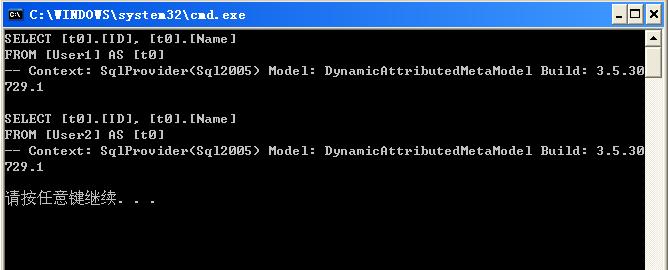
i = 1; context.GetTable<User>().ToList(); // 查詢 User1
i = 2; context.GetTable<User>().ToList(); // 查詢 User2
結果:SQL 語句顯示表名已動態變為 User1、User2。