承接上文,我們已了解 TypeConverterAttribute 的作用。本文將通過完整代碼示範,為自定義控件新增一個複雜屬性 Scope,並實現其類型轉換器,使該屬性在屬性瀏覽器中可視、可編輯、可持久化。
首先在控件中聲明 Scope 屬性:
[Browsable(true)]
public Scope Scope {
    get { return _scope; }
    set { _scope = value; }
}
Scope 類別包含 Min、Max 兩個整數屬性,並提供預設與帶參數的建構函式:
public class Scope {
    private Int32 _min;
    private Int32 _max;

    public Scope() { }
    public Scope(Int32 min, Int32 max) {
        _min = min; _max = max;
    }

    [Browsable(true)]
    public Int32 Min { get { return _min; } set { _min = value; } }

    [Browsable(true)]
    public Int32 Max { get { return _max; } set { _max = value; } }
}建置專案後,在測試專案中選取控件,發現 Scope 屬性呈灰色無法編輯。原因在於 .NET 僅為基本型別與常用型別提供預設轉換器,自訂類型需自行實作 TypeConverter。
public class ScopeConverter : TypeConverter {
    public override bool CanConvertFrom(ITypeDescriptorContext context, Type sourceType) {
        if (sourceType == typeof(String)) return true;
        return base.CanConvertFrom(context, sourceType);
    }

    public override bool CanConvertTo(ITypeDescriptorContext context, Type destinationType) {
        if (destinationType == typeof(String)) return true;
        if (destinationType == typeof(InstanceDescriptor)) return true;
        return base.CanConvertTo(context, destinationType);
    }

    public override object ConvertTo(ITypeDescriptorContext context,
        CultureInfo culture, object value, Type destinationType) {
        if (destinationType == typeof(String)) {
            Scope scope = (Scope)value;
            return scope.Min.ToString() + "," + scope.Max.ToString();
        }
        if (destinationType == typeof(InstanceDescriptor)) {
            ConstructorInfo ci = typeof(Scope).GetConstructor(
                new Type[] { typeof(Int32), typeof(Int32) });
            Scope scope = (Scope)value;
            return new InstanceDescriptor(ci, new object[] { scope.Min, scope.Max });
        }
        return base.ConvertTo(context, culture, value, destinationType);
    }

    public override object ConvertFrom(ITypeDescriptorContext context,
        CultureInfo culture, object value) {
        if (value is string) {
            String[] v = ((String)value).Split(',');
            if (v.Length != 2)
                throw new ArgumentException("Invalid parameter format");
            Scope csf = new Scope();
            csf.Min = Convert.ToInt32(v[0]);
            csf.Max = Convert.ToInt32(v[1]);
            return csf;
        }
        return base.ConvertFrom(context, culture, value);
    }
}在 Scope 類別前標註屬性,指定轉換器類型:
[TypeConverter(typeof(ScopeConverter))]
public class Scope { ... }重新建置並切換至測試專案,Scope 屬性現已可編輯:
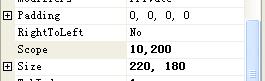
修改屬性值後,查看設計器生成的代碼(Form1.Designer.cs):
this.myListControl1.Scope = new CustomControlSample.Scope(10, 200);關鍵在於此行代碼的自動生成,證明類型轉換器正確支援了 InstanceDescriptor 轉換,實現了屬性值的持久化。
本文完整示範了:自訂複雜屬性類型 → 實作 TypeConverter → 套用 TypeConverterAttribute → 驗證設計時體驗的完整流程。掌握此模式,即可為任何自訂類型賦予一級公民般的設計時支援。