使用逗號分隔即可建立陣列,元素型別可混合:
520, 'abc', 2MB, 0xFFFE
# 輸出:
520
abc
2097152
65534$array = 1,2,3,4,5
$int = 1
$array.count # 5
"$array" # 顯示所有元素 (以空格分隔)
$int.count # 1 (標量視為單元素陣列)
"$int" # 1
$array.GetType().FullName # System.Object[]
$array.Length # 3
$array[0] # 1 (第一個元素)
$array[2] # 3 (第三個元素)
$array[4] # $null (越界不報錯,回傳 null)$a = "I", "am"
$a[0] = "We" # 修改現有元素 OK
$a[2] = "Lihua" # 錯誤:索引超出範圍,陣列大小固定
# 正確新增方式:建立新陣列
$a = $a + "Lihua" # $a 變為 "I", "am", "Lihua"PowerShell 內建 Get-Help -Examples 提供豐富範例。以下腳本將所有 Cmdlet 的範例匯出至獨立 .ps1 檔案,方便離線閱讀:
$d = Get-Command -CommandType Cmdlet
"Total: " + $d.Count
$i = 0
$d | ForEach-Object -Process {
    $i++
    "Printing " + $i
    $cmdlet = $_.Name
    $path = ".\EXAMPLE\" + $cmdlet + ".ps1"
    Get-Help -Examples $cmdlet > $path
}
"Successfully"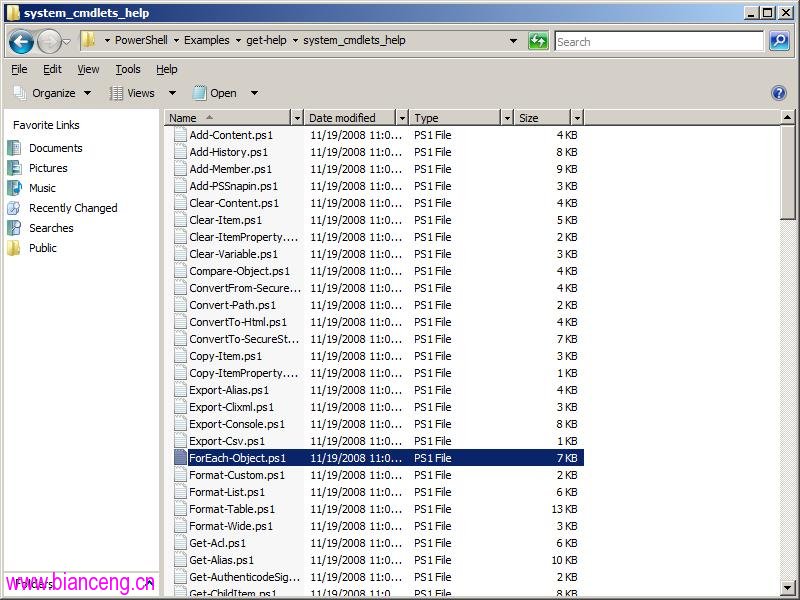
NAME
    ForEach-Object
SYNOPSIS
    Performs an operation against each of a set of input objects.
-------------------------- EXAMPLE 1 --------------------------
C:\PS>30000,56798,12432 | foreach-object -process {$_/1024}
    This command accepts an array of integers, divides each one of them by 1024, and displays the results.
-------------------------- EXAMPLE 2 --------------------------
C:\PS>get-childitem C:\ | foreach-object -process { $_.length / 1024 }
    This command retrieves the files and directories in the root of the C: drive and returns and displays the size of each of them.
-------------------------- EXAMPLE 3 --------------------------
C:\PS>$events = get-eventlog -logname system -newest 1000
$events | foreach-object -begin {get-date} -process {out-file -filepath events.txt -append -inputobject $_.message} -end {get-date}
    This command retrieves the 1000 most recent events from the system log ...
-------------------------- EXAMPLE 4 --------------------------
C:\PS>get-itemproperty -path hkcu:\Network\* | foreach-object {set-itemproperty -path $_.pspath -name RemotePath -value $_.RemotePath.ToUpper();}
This command updates a set of registry entries ... changes the characters in the UNC path to uppercase.# 需先註冊 PSSnapin
$d = Get-Command -PSSnapin Zivsoft.PowerShell.Cmdlets
"Total: " + $d.Count
$i = 0
$d | ForEach-Object -Process {
$i++
"Printing " + $i
$cmdlet = $_.Name
$path = ".\CmdletsUsage\" + $cmdlet + ".ps1"
Get-Help -Examples $cmdlet > $path
}
"Successfully".Count 與 .Length 屬性。Get-Help -Examples 批次匯出,能快速建立個人化 Cmdlet 範例庫,加速學習與查閱。