3D 旋轉算法並非原創,參考學術論文與開源專案整理而成。關鍵在於理解滑鼠在視口上的移動對應球面軌跡,而非平面直線。
滑鼠點擊視口邊緣拖曳,對應半球面上從 A 點到 B 點的圓弧軌跡。旋轉軸為平面 OAB 的法向量,旋轉角為向量 OA、OB 的夾角。
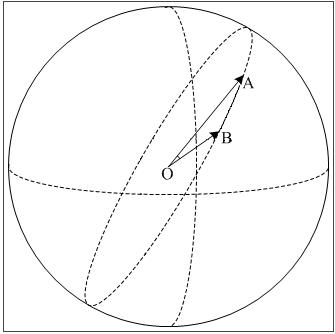
n = OA × OB(向量叉積)α = acos( (OA·OB) / (|OA|·|OB|) )(向量內積)α * 2,使滑鼠從左邊緣拖至右邊緣即完成繞 Y 軸 360° 旋轉。視口中心為球心,半徑 R = min(Width, Height)/2。滑鼠點 (x, y) 相對中心向量 (dx, dy)。
分兩種情況:
dx² + dy² ≤ R²,Z = √(R² - dx² - dy²),向量單位化。
float radius = Math.Min(this.Width, this.Height) / 2f;

// 前一次滑鼠向量
Vector3 pre = new Vector3(_posLast.X - radius, _posLast.Y - radius, 0);
float sq = radius*radius - pre.X*pre.X - pre.Y*pre.Y;
if (sq <= 0) {
    pre.Z = 0;
    pre = Vector3.Normalize(new Vector3(pre.X, pre.Y, 0));
} else {
    pre.Z = (float)Math.Sqrt(sq);
    pre = Vector3.Normalize(pre);
}

// 當前滑鼠向量
Vector3 cur = new Vector3(e.X - radius, e.Y - radius, 0);
sq = radius*radius - cur.X*cur.X - cur.Y*cur.Y;
if (sq <= 0) {
    cur.Z = 0;
    cur = Vector3.Normalize(new Vector3(cur.X, cur.Y, 0));
} else {
    cur.Z = (float)Math.Sqrt(sq);
    cur = Vector3.Normalize(cur);
}

if (pre == cur) return;

// 旋轉軸與角度
Vector3 axis = Vector3.Cross(pre, cur);
float angle = (float)Math.Acos(Vector3.Dot(pre, cur) / (pre.Length() * cur.Length()));

// 累積旋轉矩陣(右乘)
_matrixRotation.Multiply(Matrix.RotationAxis(axis, angle * 2));pre == cur 直接返回,否則 Cross 產生零向量導致後續旋轉失效。_matrixRotation *= newRotation),保證每次旋轉基於當前姿態疊加。angle * 2 為經驗值,可依手感調整。技術如層紙,捅破前神秘,捅破後清晰。掌握球面映射與向量運算,即可實現直觀流暢的 3D 視圖旋轉控制。