本文手把手教學建立 VS2010 編輯器飾器擴充套件,在程式碼編輯器右上角顯示可摺疊的即時統計資訊面板:程式碼行數、字元數、命名空間/類別/介面/方法/屬性/欄位/註解計數、檔案大小。完整原始碼可直接編譯部署。
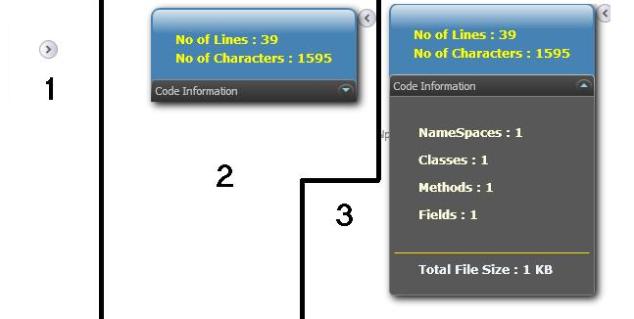
Source.extension.vsixmanifest、Adornment.cs、AdornmentFactory.cs。兩層 Expander 巢狀結構:外層 ExpandDirection=Left (基本資訊),內層 ExpandDirection=Down (詳細資訊)。StackPanel 排版 TextBlock,繫結 Foreground、FontWeight 等樣式屬性。
IWpfTextView (編輯器視圖介面)。TextView.TextSnapshot.GetText() 取得完整原始碼文字。DetectLanguage 透過 ContentType.DisplayName 判斷 CSharp / VisualBasic。CSParser 解析 AST,統計各節點類型計數。Calculators 結構體 (含所有計數欄位)。[Export(typeof(IWpfTextViewCreationListener))]
[ContentType("text")]
[TextViewRole(PredefinedTextViewRoles.Document)]
internal sealed class InfoBoxAdornmentFactory : IWpfTextViewCreationListener
{
[Export(typeof(AdornmentLayerDefinition))]
[Name("AlwaysVisibleInfoBox")]
[Order(After = PredefinedAdornmentLayers.Selection)]
public AdornmentLayerDefinition editorAdornmentLayer = null;
public void TextViewCreated(IWpfTextView textView)
{
new AlwaysVisibleInfoBox(textView); // 建立飾器實例
}
}
AdornmentLayerDefinition 屬性定義顯示層級 (在 Selection 層之上)、層名稱、適用角色。
LayoutChanged (編輯/捲動觸發)、ViewportWidthChanged/ViewportHeightChanged (視窗縮放觸發)。OnLayoutChanged:實例化 CodeInfoTracker、呼叫 PerformCalculate()、更新 WPF 控制項文字。onSizeChange:重新定位飾器至編輯器右上角 (ViewportRight - 255, ViewportTop + 10),清除舊飾器並 AddAdornment。.vsix 檔案,雙擊即可安裝至 VS2010。.vsix 至 VS Marketplace (原 Gallery)。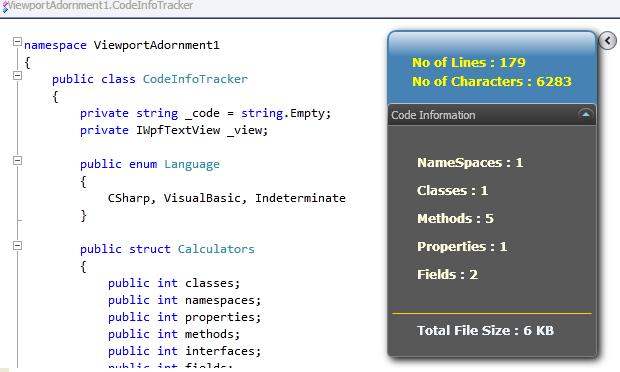
Viewport Adornment + WPF + CS Parser + MEF 元件模型,快速打造實用的編輯器增強工具。此架構可擴充為程式碼品質儀表板、重構建議、即時編譯錯誤顯示等進階功能。