程式碼重點說明
- 圖片路徑:
Main() 中指定應用程式目錄下的 Client01.jpg、Client02.jpg、Client03.jpg(偵錯模式置於 Bin\Debug)。
- 同步/非同步並存:提供
SendFile()(同步)、BeginSendFile()(非同步)、私有 SendFile() 輔助。實務上檔案傳輸幾乎必須用非同步。
- 鎖的必要性:
SendMessage() 對 streamToServer 加鎖,因 SendFile() 為多執行緒存取且會呼叫 SendMessage()。
- 職責分離:
SendStatus 獨立記錄/顯示傳送狀態(已送位元組、百分比),原本寫在 Client 內,後發現不屬於 Client 核心職責,遂獨立成類——「當方法與類別名稱不符時,該建立新類別」。
SendStatus 類別完整程式碼
// 即時計算檔案傳送狀態
public class SendStatus {
    private FileInfo info;
    private long fileBytes;

    public SendStatus(string filePath) {
        info = new FileInfo(filePath);
        fileBytes = info.Length;
    }

    public void PrintStatus(int sent) {
        string percent = GetPercent(sent);
        Console.WriteLine("Sending {0} bytes, {1}% ...", sent, percent);
    }

    // 取得傳送百分比(保留一位小數)
    public string GetPercent(int sent) {
        decimal allBytes = Convert.ToDecimal(fileBytes);
        decimal currentSent = Convert.ToDecimal(sent);
        decimal percent = (currentSent / allBytes) * 100;
        percent = Math.Round(percent, 1);
        return (percent.ToString() == "100.0") ? "100" : percent.ToString();
    }
}
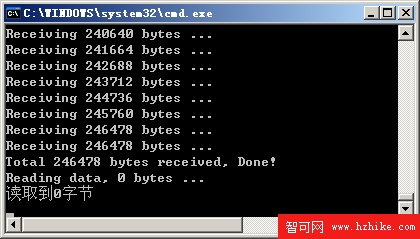
程式測試:伺服器端輸出