以下完整程式碼展示如何在空白 WinForms 控制項上實現中文輸入法支援,包含 IME 上下文關聯、組合字串擷取與繪製:
using System;
using System.Collections.Generic;
using System.ComponentModel;
using System.Drawing;
using System.Data;
using System.Text;
using System.Windows.Forms;
using System.Runtime.InteropServices;

namespace WindowsApplication2
{
    public partial class UserControl1 : UserControl
    {
        IntPtr m_hImc;
        bool isShowChina = false;
        public const int WM_IME_SETCONTEXT = 0x0281;
        private const int WM_IME_CHAR = 0x0286;
        private const int WM_CHAR = 0x0102;
        private const int WM_IME_COMPOSITION = 0x010F;
        private const int GCS_COMPSTR = 0x0008;

        [DllImport("Imm32.dll")]
        public static extern IntPtr ImmGetContext(IntPtr hWnd);

        [DllImport("Imm32.dll")]
        public static extern IntPtr ImmAssociateContext(IntPtr hWnd, IntPtr hIMC);

        [DllImport("imm32.dll")]
        static extern int ImmGetCompositionString(IntPtr hIMC, int dwIndex, StringBuilder lpBuf, int dwBufLen);

        private int GCS_RESULTSTR = 0x0800;
        private const int HC_ACTION = 0;
        private const int PM_REMOVE = 0x0001;

        StringBuilder sb = new StringBuilder();
        Font font = new Font("宋體", 14, FontStyle.Regular);

        public UserControl1() { InitializeComponent(); }

        private void UserControl1_Load(object sender, EventArgs e)
        {
            m_hImc = ImmGetContext(this.Handle);
        }

        protected override void WndProc(ref Message m)
        {
            base.WndProc(ref m);
            if (m.Msg == WM_IME_SETCONTEXT && m.WParam.ToInt32() == 1)
            {
                ImmAssociateContext(this.Handle, m_hImc);
            }

            switch (m.Msg)
            {
                case WM_CHAR:
                    KeyEventArgs e = new KeyEventArgs(((Keys)((int)((long)m.WParam))) | ModifierKeys);
                    char a = (char)e.KeyData;
                    sb.Append(a);
                    IntoText();
                    isShowChina = false;
                    break;

                case WM_IME_CHAR:
                    if (m.WParam.ToInt32() == PM_REMOVE)
                    {
                        StringBuilder str = new StringBuilder();
                        int size = ImmGetCompositionString(m_hImc, GCS_COMPSTR, null, 0);
                        size += sizeof(Char);
                        ImmGetCompositionString(m_hImc, GCS_RESULTSTR, str, size);
                        sb.Append(str.ToString());
                        MessageBox.Show(str.ToString());
                        IntoText();
                        isShowChina = true;
                    }
                    break;
            }
        }

        private void IntoText()
        {
            Graphics g = this.CreateGraphics();
            g.DrawString(sb.ToString(), font, Brushes.Black, 10, 10);
        }
    }
}
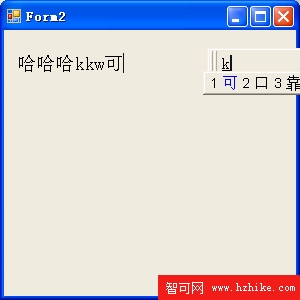
Graphics.DrawString 直接在控制項繪製文字