本系列第六篇,實作「霧化效果」:引入隨機位移打亂像素位置,產生毛玻璃/霧氣視覺感覺。
(x,y),產生隨機偏移 (dx, dy),範圍 [0, 18]。src[x+dx, y+dy],邊界裁剪。
private void btnFrost_Click(object sender, EventArgs e)
{
    try
    {
        int w = pictureBox1.Image.Width, h = pictureBox1.Image.Height;
        using (var newBmp = new Bitmap(w, h))
        using (var oldBmp = (Bitmap)pictureBox1.Image)
        {
            var rnd = new Random();
            for (int x = 1; x < w - 1; x++)
                for (int y = 1; y < h - 1; y++)
                {
                    int k = rnd.Next(123456);
                    int dx = Math.Min(w - 1, x + k % 19);
                    int dy = Math.Min(h - 1, y + k % 19);
                    newBmp.SetPixel(x, y, oldBmp.GetPixel(dx, dy));
                }
            pictureBox1.Image = newBmp;
        }
    }
    catch (Exception ex) { MessageBox.Show(ex.Message, "提示"); }
}
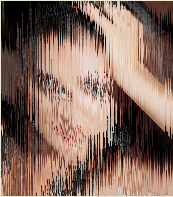
簡單隨機位移即可產生霧化視覺,但品質有限。理解噪聲函數、卷積核、高效像素存取,是進階圖像處理的必經之路。