private void btnStopService_Click(object sender, EventArgs e) {
    if (!bolServiceInstalled) return;
    using (ServiceController ctrl = new ServiceController("MyFileSystemWatcher")) {
        if (ctrl.Status == ServiceControllerStatus.Running) ctrl.Stop();
    }
}
Stop() 為非同步通知,不等待服務實際停止即返回。
每 2 秒檢查服務狀態,啟用對應按鈕:
private void myTimer_Tick(object sender, EventArgs e) {
    if (!bolServiceInstalled) return;
    using (ServiceController ctrl = new ServiceController("MyFileSystemWatcher")) {
        btnStartService.Enabled = (ctrl.Status == ServiceControllerStatus.Stopped);
        btnStopService.Enabled = (ctrl.Status == ServiceControllerStatus.Running);
    }
}
點擊工具列「系統設定」按鈕顯示:
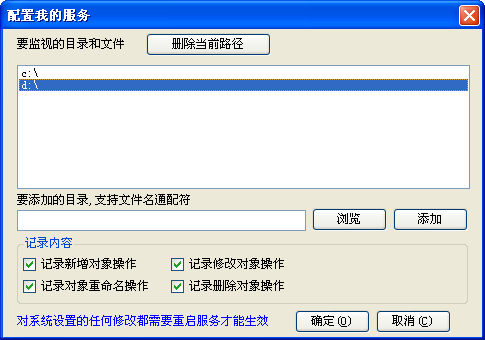
對話框繫結 MyConfig 物件屬性,修改後需重啟服務生效。