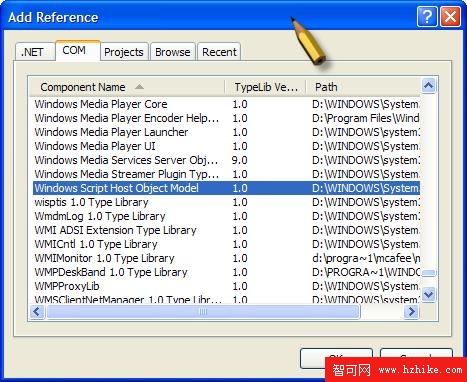
VS2005 Express:右鍵專案 → Add Reference → COM 標籤 → 選取 Windows Script Host Object Model。
using System;
using IWshRuntimeLibrary;

class Program
{
    static void Main(string[] args)
    {
        WshShell shell = new WshShell();
        IWshShortcut shortcut = (IWshShortcut)shell.CreateShortcut(
            Environment.GetFolderPath(Environment.SpecialFolder.DesktopDirectory) +
            "\\" + "Allen's Application.lnk"
        );

        shortcut.TargetPath = System.Reflection.Assembly.GetExecutingAssembly().Location;
        shortcut.WorkingDirectory = System.Environment.CurrentDirectory;
        shortcut.Windowstyle = 1;
        shortcut.Description = "Launch Allen's Application";
        shortcut.IconLocation = System.Environment.SystemDirectory + "\\" + "shell32.dll, 165";
        shortcut.Save();
    }
}
捷徑指向目標位置。範例指向本應用程式組件位置。
應用程式工作目錄。使用者未指定目錄時,作為載入/儲存檔案的預設路徑。