上一篇介紹了 Hashtable 散列表的基本原理。本文聚焦於 GetHashCode() 方法的正確實作。要實作高效能的雜湊演算法需滿足嚴格條件,但 string 類別已內建優化的雜湊演算法,可直接作為 Hashtable 的鍵。因此,自訂鍵類別(如 EmployeeID)可委派給 string.GetHashCode():
public override int GetHashCode()
{
    return Id.GetHashCode(); // 假設 Id 為 string 型別
}
雖然這會因轉換字串而有微小效能損耗,但確保正確性且程式碼簡潔。
單純的資料容器,無特殊邏輯:
public class EmployeeData
{
    public string Name { get; set; }
    public string Age { get; set; }
    public string Gender { get; set; }

    public EmployeeData(string name, string age, string gender)
    {
        Name = name; Age = age; Gender = gender;
    }
}static void Main(string[] args)
{
Hashtable ht = new Hashtable();
ht.Add(new EmployeeID("A0001"), new EmployeeData("Johnny", "24", "Man"));
ht.Add(new EmployeeID("A0002"), new EmployeeData("Vicky", "20", "female"));
ht.Add(new EmployeeID("A0003"), new EmployeeData("Allen", "30", "male"));
Console.Write("請輸入員工 ID:");
string input = Console.ReadLine();
EmployeeData emp = ht[new EmployeeID(input)] as EmployeeData;
if (emp != null)
{
Console.WriteLine($"員工 {input} 資料:");
Console.WriteLine($"姓名:{emp.Name}");
Console.WriteLine($"年齡:{emp.Age}");
Console.WriteLine($"性別:{emp.Gender}");
}
else
{
Console.WriteLine("查無此員工。");
}
Console.ReadLine();
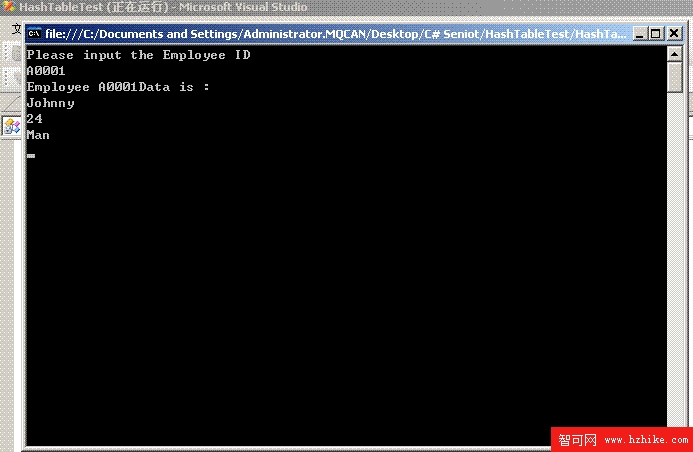
}
GetHashCode() 與 Equals()string 的雜湊演算法是安全且推薦的做法Dictionary<TKey, TValue> 取代 Hashtable,獲得型別安全與更好效能