using System;
using System.Drawing;
using System.Collections;
using System.ComponentModel;
using System.Windows.Forms;
using System.Data;
using System.Net.Sockets;
using System.Net;
private void button1_Click(object sender, EventArgs e)
{
    listBox1.Items.Clear();
    DateTime startTime = DateTime.Now;

    string ipPrefix = $"{numericUpDown1.Value}.{numericUpDown2.Value}.{numericUpDown3.Value}.";
    int min = (int)numericUpDown4.Value;
    int max = (int)numericUpDown5.Value;

    if (min > max) { MessageBox.Show("IP 區間不合法!"); return; }

    progressBar1.Minimum = min;
    progressBar1.Maximum = max;

    for (int i = min; i <= max; i++)
    {
        string ip = ipPrefix + i;
        IPAddress addr = IPAddress.Parse(ip);
        try
        {
            IPHostEntry host = Dns.GetHostEntry(addr);
            listBox1.Items.Add($"{ip} 名稱為:{host.HostName}");
        }
        catch
        {
            listBox1.Items.Add($"{ip} 主機沒有響應!");
        }
        progressBar1.Value = i;
    }

    TimeSpan elapsed = DateTime.Now - startTime;
    label4.Text = elapsed.Seconds + " 秒";
    MessageBox.Show("掃描完成!");
    progressBar1.Value = min;
}
DateTime.Now 取得本地時間TimeSpan 相減得差值:end - startelapsed.Seconds 只取秒數部分;完整格式建議 elapsed.TotalSeconds 或 elapsed.ToString()掃描 10.138.198.1 ~ 10 (10 個 IP):**43 秒**
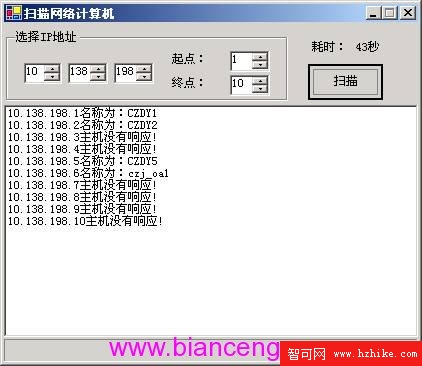
圖 02:單執行緒掃描網路電腦 - 執行介面
Dns.GetHostEntry 為同步阻塞呼叫,內含 DNS 查詢、逆向解析、網路往返下一篇將展示如何引入多執行緒將耗時壓縮至個位數秒。