private void button1_Click(object sender, EventArgs e)
{
    const long MB = 1048576; // 1024*1024
    ConnectionOptions conn = new ConnectionOptions();
    conn.Username = textBox2.Text;
    conn.Password = textBox3.Text;

    ManagementScope scope = new ManagementScope($@"\\{textBox1.Text}\root\cimv2", conn);

    try
    {
        scope.Connect();
        ObjectQuery query = new ObjectQuery("SELECT FreeSpace, Size, Name FROM Win32_LogicalDisk WHERE DriveType=3");
        ManagementObjectSearcher searcher = new ManagementObjectSearcher(scope, query);
        ManagementObjectCollection disks = searcher.Get();

        listBox1.Items.Clear();
        foreach (ManagementObject disk in disks)
        {
            listBox1.Items.Add("磁碟名稱:" + disk["Name"]);
            double free = Convert.ToInt64(disk["FreeSpace"]) / MB;
            double used = (Convert.ToInt64(disk["Size"]) - Convert.ToInt64(disk["FreeSpace"])) / MB;
            double total = Convert.ToInt64(disk["Size"]) / MB;
            listBox1.Items.Add($" 總計:{total} MB");
            listBox1.Items.Add($" 已用:{used} MB");
            listBox1.Items.Add($" 可用:{free} MB");
        }
    }
    catch (Exception ex)
    {
        MessageBox.Show($"連接 {textBox1.Text} 出錯:{ex.Message}", "錯誤!");
    }
}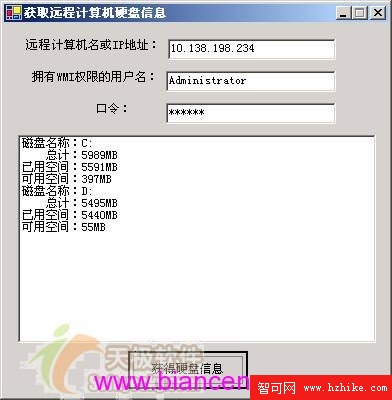
圖 08:遠端硬碟資訊查詢結果
輸入正確 IP/帳號/密碼點擊「獲得硬碟資訊」,即可列出遠端邏輯磁碟 (DriveType=3) 總計/已用/可用空間 (MB)。下篇將實現更酷的遠端重開機/關機功能。