本文提供完整的 Console 應用程式,驗證 ShowObject 類別的所有核心功能:動態載入型別、列舉屬性、設定/取得屬性值、呼叫方法。
using System;
using System.Collections.Generic;
using System.Text;
using System.Reflection;
using Model;
using ObjectLoader;

namespace ReflectionTest
{
    class Program
    {
        static void Main(string[] args)
        {
            ShowObject showObj = new ShowObject();

            // 1. 動態載入 UserInfo 型別並建立實例
            object obj = showObj.LoadObject("UserInfo");
            Console.WriteLine("實例完整型別名:" + obj.GetType().FullName);

            // 2. 列舉所有公共屬性
            Console.WriteLine("實例的所有公共屬性:");
            PropertyInfo[] pInfos = showObj.GetPropertys(obj);
            foreach (PropertyInfo info in pInfos)
            {
                Console.WriteLine(info.PropertyType + " : " + info.Name);
            }

            // 3. 設定屬性值
            showObj.SetPropertyValue(obj, "UserId", 1);
            showObj.SetPropertyValue(obj, "UserName", "admin");

            // 4. 驗證屬性值
            Console.WriteLine("設定屬性值後的結果:");
            Console.WriteLine("UserId   : " + showObj.GetPropertyValue(obj, "UserId"));
            Console.WriteLine("UserName : " + showObj.GetPropertyValue(obj, "UserName"));

            // 5. 動態呼叫方法
            Console.WriteLine("執行實例方法 Show():");
            showObj.ExecuteMethod(obj, "Show");
        }
    }
}
程式輸出如下圖所示,依序顯示:
Model.UserInfoInt32 : UserId、String : UserNameUserId: 1、UserName: adminUserId:1, UserName:admin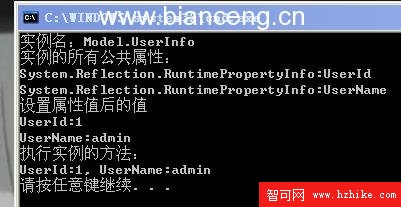
| 功能 | 對應方法 | 反射關鍵 API |
|---|---|---|
| 動態建立實例 | LoadObject | Assembly.CreateInstance |
| 列舉屬性 | GetPropertys | Type.GetProperties() |
| 設定屬性值 | SetPropertyValue | PropertyInfo.SetValue |
| 讀取屬性值 | GetPropertyValue | PropertyInfo.GetValue |
| 動態呼叫方法 | ExecuteMethod | MethodInfo.Invoke |
此測試完整驗證了反射操作物件的「建立、查詢、修改、執行」全生命週期,為後續資料庫映射、插件架構、動態代理等高階應用奠定基礎。