以主角向右施法動畫為例。先用 Photoshop 將 10 幀 150×150 圖片合併為一張 1500×150 大圖(見下圖),存放專案 bin\Debug 目錄(BitmapFrame.Create 相對路徑僅識別此資料夾)。

合併大圖清晰展現施法全過程。
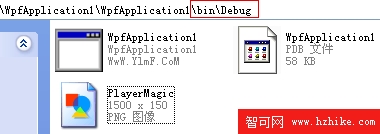
存放路徑示意。
Image Spirit; int count = 1;
public Window5() {
    InitializeComponent();
    Spirit = new Image();
    Spirit.Width = 150;
    Spirit.Height = 150;
    Carrier.Children.Add(Spirit);

    DispatcherTimer dispatcherTimer = new DispatcherTimer();
    dispatcherTimer.Tick += new EventHandler(dispatcherTimer_Tick);
    dispatcherTimer.Interval = TimeSpan.FromMilliseconds(150);
    dispatcherTimer.Start();
}

private void dispatcherTimer_Tick(object sender, EventArgs e) {
    Spirit.Source = cutImage(@"Player\PlayerMagic.png", count * 150, 0, 150, 150);
    count = count == 9 ? 0 : count + 1;
}

private BitmapSource cutImage(string imgaddress, int x, int y, int width, int height) {
    return new CroppedBitmap(
        BitmapFrame.Create(new Uri(imgaddress, UriKind.Relative)),
        new Int32Rect(x, y, width, height));
}
使用 CroppedBitmap 從大圖裁切單幀,Int32Rect 指定裁切區域。避免大量小檔案 I/O,提升效能。