using System;
using System.Windows.Forms;

namespace InputMethodDemo
{
    public class Form1 : Form
    {
        private ComboBox comboBox1 = new ComboBox();
        private RichTextBox richTextBox1 = new RichTextBox();
        private Button btnExit = new Button();

        public Form1()
        {
            InitializeComponent();
        }

        private void InitializeComponent()
        {
            // ComboBox 設定
            comboBox1.DropDownStyle = ComboBoxStyle.DropDownList;
            comboBox1.DropDownWidth = 160;
            comboBox1.Location = new System.Drawing.Point(8, 232);
            comboBox1.Name = "comboBox1";
            comboBox1.Size = new System.Drawing.Size(168, 20);
            comboBox1.TabIndex = 1;
            comboBox1.SelectedIndexChanged += ComboBox1_SelectedIndexChanged;

            // RichTextBox 設定
            richTextBox1.Dock = DockStyle.Top;
            richTextBox1.Name = "richTextBox1";
            richTextBox1.Size = new System.Drawing.Size(292, 208);
            richTextBox1.TabIndex = 0;

            // Exit 按鈕
            btnExit.Location = new System.Drawing.Point(200, 232);
            btnExit.Name = "btnExit";
            btnExit.TabIndex = 2;
            btnExit.Text = "Exit";
            btnExit.Click += BtnExit_Click;

            // Form 設定
            this.AutoScaleBaseSize = new System.Drawing.Size(6, 14);
            this.ClientSize = new System.Drawing.Size(292, 273);
            this.Controls.AddRange(new Control[] { btnExit, comboBox1, richTextBox1 });
            this.Name = "Form1";
            this.Text = "輸入法切換示範";
            this.Load += Form1_Load;
            this.InputLanguageChanged += Form1_InputLanguageChanged;
        }

        private void Form1_Load(object sender, EventArgs e)
        {
            // 1. 列舉系統安裝的所有輸入法
            InputLanguageCollection ilc = InputLanguage.InstalledInputLanguages;
            foreach (InputLanguage il in ilc)
            {
                comboBox1.Items.Add(il.LayoutName);
            }

            // 2. 設定預設選中項為目前輸入法
            comboBox1.SelectedIndex = ilc.IndexOf(InputLanguage.CurrentInputLanguage);
        }

        // 使用者切換下拉選單 -> 變更目前執行緒輸入法
        private void ComboBox1_SelectedIndexChanged(object sender, EventArgs e)
        {
            InputLanguage il = InputLanguage.InstalledInputLanguages[comboBox1.SelectedIndex];
            InputLanguage.CurrentInputLanguage = il;
        }

        // 系統輸入法變更 (如熱鍵切換) -> 同步更新下拉選單
        private void Form1_InputLanguageChanged(object sender, InputLanguageChangedEventArgs e)
        {
            InputLanguage il = e.InputLanguage;
            int index = InputLanguage.InstalledInputLanguages.IndexOf(il);
            if (index >= 0 && index < InputLanguage.InstalledInputLanguages.Count)
            {
                comboBox1.SelectedIndex = index;
            }
        }

        private void BtnExit_Click(object sender, EventArgs e)
        {
            Application.Exit();
        }

        [STAThread]
        static void Main()
        {
            Application.Run(new Form1());
        }
    }
}
| API | 用途 |
|---|---|
| InputLanguage.InstalledInputLanguages | 取得系統安裝的所有輸入法集合 (唯讀) |
| InputLanguage.CurrentInputLanguage | 取得/設定目前執行緒的輸入法 (靜態屬性) |
| InputLanguage.DefaultInputLanguage | 取得系統預設輸入法 |
| InputLanguage.LayoutName | 取得輸入法在語言列顯示的名稱 |
| Form.InputLanguageChanged 事件 | 輸入法變更時觸發 (含熱鍵/程式切換) |
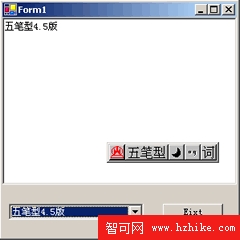
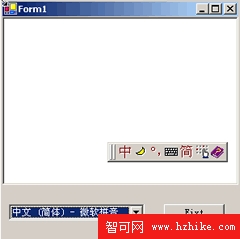
// 針對特定控制項設定輸入法 (Enter/Leave 事件)
private void txtEnglish_Enter(object sender, EventArgs e)
{
    InputLanguage.CurrentInputLanguage =
        InputLanguage.InstalledInputLanguages.Cast()
        .FirstOrDefault(il => il.LayoutName.Contains("English"))
        ?? InputLanguage.DefaultInputLanguage;
}

private void txtChinese_Enter(object sender, EventArgs e)
{
    InputLanguage.CurrentInputLanguage =
        InputLanguage.InstalledInputLanguages.Cast()
        .FirstOrDefault(il => il.LayoutName.Contains("Chinese") || il.LayoutName.Contains("微軟"))
        ?? InputLanguage.CurrentInputLanguage;
}
CurrentInputLanguage 僅影響**目前執行緒**,不影響其他執行緒或進程InputLanguageManager 與 InputMethod 類別